
A law firm's website is more than a brochure. It carries contact forms, client portals, scheduling tools and an email domain that clients trust, and each of those connects to confidential information. The firms that handle this well treat the website as one part of a managed security program, with someone watching it around the clock and someone accountable for the result. That is the approach we take with law firms in Southern California through our managed IT services and cybersecurity solutions.
This guide explains what attackers go after, what the ethics rules ask of you, which controls matter most, and what to do if something goes wrong.
TL;DR
- Your website is a gateway to client data, email and internal systems, so secure the site, the forms and the domain together.
- The ethics standard is reasonable security, not perfect security. You have to be able to show a risk-based process.
- Start with encryption, multi-factor authentication, email authentication (SPF, DKIM, DMARC), patching, backups and monitoring.
- Vet every vendor that touches the site or client data, and put security duties in writing.
- Have a breach plan before you need it: stop the damage, investigate, notify clients.
Table of Contents
- Why law firm websites are targeted
- What the ethics rules require
- Securing the website itself
- A control list that matches the standard
- Choosing and managing vendors
- If the website is compromised
- Our perspective
- How Secure Techies supports law firms
- FAQ
- Sources
Why law firm websites are targeted
Law firms hold information that other people profit from: deal terms, litigation strategy, personal and financial records. The UK's National Cyber Security Centre explains in its legal sector threat report that this material is valuable for insider trading, negotiating advantage and subverting justice. It adds that deadline pressure on transactions and large client and supplier networks make phishing and business email compromise (fraudulent emails that impersonate a trusted person to redirect money or data) especially effective. The same report notes that staff contact details published online can help attackers choose targets. Your "Our Attorneys" page is useful to clients and to criminals.
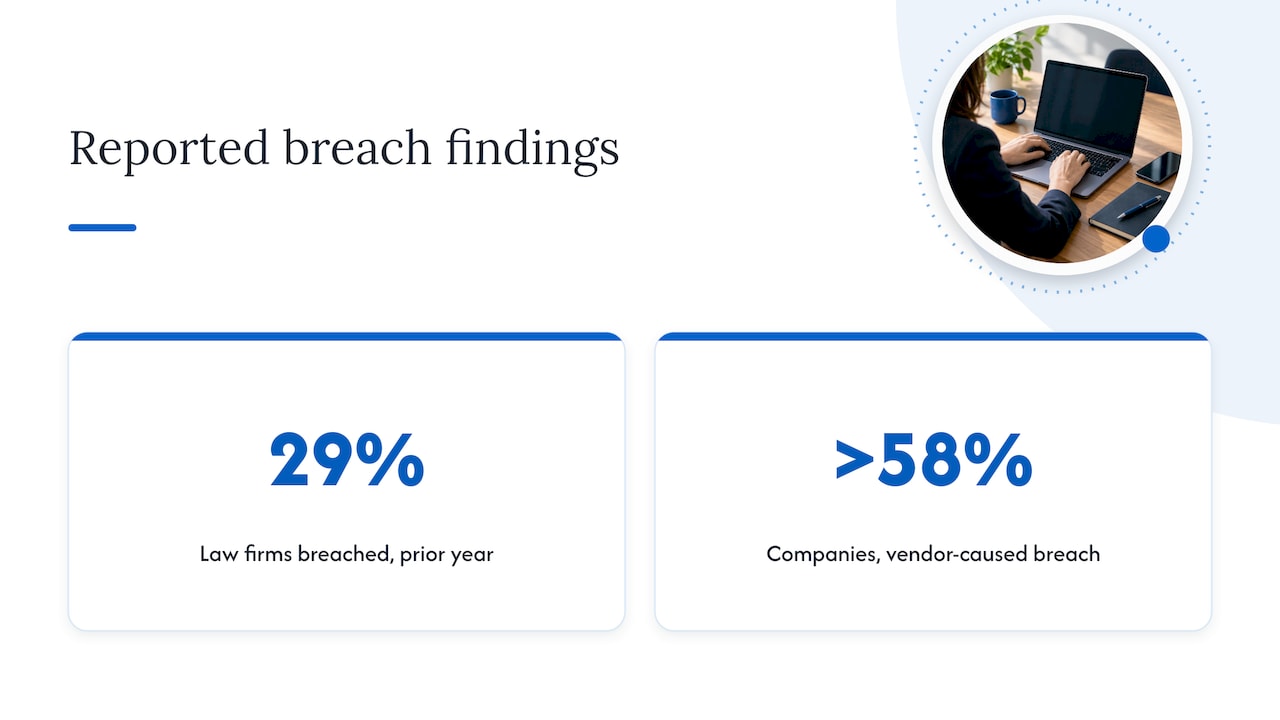
The risk is not hypothetical in the US. The ABA Cybersecurity Legal Task Force vendor checklist cites the ABA Tech Report 2020, in which 29% of law firm respondents had experienced a security breach in the prior year. The breaches included lost or stolen devices, hacker activity and website exploitation. The same checklist cites a 2018 study finding that more than 58% of companies had a breach caused by a vendor or third party, which matters for anyone who outsources hosting or web design.
What a website attack looks like
The Law Society of Scotland's cybercrime guidance describes a firm's public website as a common target. It lists three outcomes:
- Denial of service: the site is flooded with traffic and goes offline.
- Back-end intrusion: attackers get into systems behind the website, such as a client database.
- Spyware insertion: malicious code is planted to intercept what visitors type, including form submissions.
For a law firm, the second and third are the serious ones. A contact form that collects a prospective client's description of their case is collecting confidential information from the first keystroke. Broader common website security threats also affect brand reputation and customer trust, which is a real cost for a profession built on both.
What the ethics rules require
You do not need to memorize statutes to start, but you do need to know the standard you will be measured against.
The ABA's December 2023 guidance on competent and reasonable safeguards names the Model Rules in play: 1.1 (competence), 1.4 (communication), 1.6 (confidentiality), 5.1 to 5.3 (supervision of lawyers and non-lawyer staff and vendors) and 1.15 (safeguarding property). Rule 1.6(c) requires reasonable efforts to prevent inadvertent or unauthorized disclosure of, or access to, client information. The comment frames this as a risk-based analysis that weighs the sensitivity of the information, the likelihood of disclosure, the cost and difficulty of safeguards, and the effect on the representation.
Three points follow for a firm owner:
- The standard is reasonable, not absolute. ABA Formal Opinion 483 says the duty is not strict liability. Rule 1.6 is not violated if data is accessed despite reasonable efforts.
- It is a process, not a checklist. The ABA article describes assessing risks, implementing responsive measures, verifying them and updating them continually. No rule mandates a particular firewall or password policy.
- It scales with your firm. The same guidance says a program should cover the govern, identify, protect, detect, respond and recover functions, sized to the firm and the sensitivity of its data.
California specifics
If you practice in California, the State Bar's Formal Opinion 2020-203 addresses this directly. It says lawyers who keep confidential client information on electronic devices must assess the risks and take reasonable steps to secure their systems. After a breach, they must make a reasonable inquiry into its extent and consequences and notify any client whose interests could reasonably be harmed. Keep a dated record of your risk assessment and the controls you chose, because that record is how you show reasonable efforts.
Securing the website itself
The Law Society of Singapore's guide to cybersecurity gives a concrete list of web practices that apply anywhere:
- Validate user input, so a form field cannot be used to inject commands.
- Keep files containing personal or confidential data out of reach of the web server.
- Validate cookie and URL data against the session, and never allow authentication to be bypassed.
- Run web application scanning.
- Disable directory browsing, so visitors cannot list your server's folders.
Beyond that list, these are the controls that carry the most weight for a legal site.
Encrypt everything in transit
Every page should load over HTTPS, and every form should submit over it. The U.S. Court of International Trade's guidance for counsel says sensitive data such as Social Security, driver's license and financial account numbers should not be transmitted electronically without encryption. It also treats unencrypted email as acceptable for routine administrative messages when basics like firewalls and password protection are in place. In practice, that means a secure portal or encrypted channel for documents, and a form that asks only for what you need to evaluate the inquiry.
Reduce what the form collects
A contact form does not need a Social Security number, account numbers or a full account of the dispute. Add a line telling visitors not to include confidential details until an engagement is in place. Data you never collect cannot be stolen from your site.
Keep the platform patched
Most website compromises start with out-of-date content management systems, plugins or themes. Assign an owner for updates, apply them on a schedule and remove plugins you no longer use. If an outside agency built the site, confirm in writing who is responsible for patching after launch. Building security in from the start is easier than retrofitting it, which is the idea behind secure website design.
Lock down administrator access
Use unique passwords, multi-factor authentication (a second proof of identity such as an authenticator app code) and named accounts for everyone who can edit the site. Remove access the day a vendor or employee leaves. The NCSC report advises strong, unique passwords and MFA on email accounts and critical systems.
Protect the domain and email
Attackers do not need to hack your website to impersonate your firm. They can spoof your domain in emails to clients. The NCSC advises implementing SPF, DKIM and DMARC for all domains. In plain terms, these three DNS records tell receiving mail servers which senders are legitimate for your domain and what to do with messages that fail the check. They protect your clients from fraudulent invoices or wire instructions that appear to come from you. The NCSC also advises verifying unusual requests through a second channel, such as a phone call to a known number.
Back up and monitor
A site and its databases should be backed up on a schedule, with copies stored separately from the live environment and restore tests on the calendar. Monitoring matters just as much: a compromise that runs for weeks is far more damaging than one caught in hours. Our backup and disaster recovery service and 24/7 monitoring are built for this, and our uptime guarantee is 99.9%.
A control list that matches the standard
Because the ethics standard is a process, organize the work as one. This table maps the process to the practical steps.
| Function | What it means for the firm | Example actions |
|---|---|---|
| Govern | Someone owns security and reports to the partners | Written policy, named responsible person, annual review |
| Identify | Know what data you hold and where | Inventory of client data, sites, forms, vendors |
| Protect | Prevent the common attacks | Encryption, MFA, patching, email authentication, staff training |
| Detect | Notice problems fast | 24/7 monitoring, endpoint detection, alerting on admin logins |
| Respond | Act in a planned order | Written incident plan, contact list, outside counsel and IT on call |
| Recover | Restore operations | Tested backups, documented recovery steps |
The ABA's Professional Lawyer article on prevention and response says the inventory step should capture categories such as protected health information, nonpublic financial information, trade secrets, patent or M&A information and customer data. Firms with healthcare or lending clients will hold several of these at once.
A structured way to start is a risk assessment based on NIST. Our Cybersecurity Risk Assessment gives a score as a first reading, and the Compliance & Security Audits service covers formal audits against standards such as HIPAA, SOC 2 and CMMC.
Choosing and managing vendors
Your website relies on a host, a developer, a form plugin, perhaps a client portal and an email platform. Rules 5.1 to 5.3 treat supervision of non-lawyer assistance as your responsibility, so each vendor is part of your security posture.
The ABA task force checklist says to run a due-diligence risk assessment before contracting, using qualified information-security personnel. It directs firms to examine the vendor's:
- security policies
- incident response and disaster recovery plans
- compliance program
- vulnerability monitoring
- encryption practices
The Wisconsin Bar's 2018 article adds contract terms: confidentiality clauses, industry-appropriate security measures, audit rights, indemnification for losses the vendor causes, and prompt breach notification with full cooperation. It warns that without these protections the firm bears the cost of a vendor-caused breach.
When one provider manages your network, endpoints, backups and website, you have one party to hold to those terms instead of five. Our Managed IT Services are billed at a flat rate without long-term contracts, which keeps the commercial terms simple while you set the security terms.
If the website is compromised
Decide the order of operations now. ABA Formal Opinion 483 (October 17, 2018) says that when a breach involves, or is substantially likely to involve, material client information, lawyers must notify clients and take other reasonable steps. It points to a sequence of duties:
- Stop and mitigate. Take the affected site or system offline, change credentials, and isolate affected devices.
- Investigate. Make reasonable efforts to determine what happened and whose information was involved.
- Notify. The minimum disclosure to affected clients is that unauthorized access or disclosure occurred or is reasonably suspected, plus the extent of it as far as it is known or can reasonably be found out. Opinion 483 treats sharing your response plan as best practice.
- Keep clients informed. The duty to update them on material developments continues through the investigation.
The Maine Professional Ethics Commission's Opinion 220, adopting Opinion 483, recommends a breach plan that names the people to be notified to assist counsel. It also cites parallel statutory regimes such as HIPAA breach rules. For a California firm, those parallel duties can include state breach-notification statutes and, if you handle health information, HIPAA. Speak with your own ethics counsel or malpractice carrier early in any real incident, since they will weigh the rules for your specific facts.
The technical half of this plan is where speed counts. Our managed cybersecurity covers endpoint detection, incident response and risk assessment, with 24/7 monitoring, so the first step does not wait for business hours. Our law firm ransomware guidance goes deeper on that scenario.
Our perspective
Law firms often ask us about the website as if it were a separate problem. It is not. The site, the email domain, the laptops and the backups are one system, and an attacker moves between them without noticing the org chart.
Our approach is proactive: find and fix the weak points before they interrupt your practice, rather than waiting for something to break. For a law firm that means 24/7 monitoring, endpoint protection, tested backups and a documented response plan, with security and compliance as the starting point of every engagement.
The ethics standard rewards exactly this. Reasonable efforts are easier to show when someone is watching, patching and recording what was done and why. We work locally with Southern California firms, so the people who know your environment are close when you need them.
Alex
How Secure Techies supports law firms
We provide managed IT, cybersecurity, backup and disaster recovery, network security, compliance audits and web development for small and mid-size businesses in Southern California, including law firms. For a firm that wants the website, email and devices handled under one roof, start with IT services for law firms or our law firm IT services overview. You can also read our law firm IT support guide and the controls law firms need now.
If you want an assessment of where your firm stands, contact us through securetechie.com.
FAQ
Does a small law firm really need to worry about website security?
Yes. The ABA standard scales with firm size, but it applies to every firm that holds client information. Small firms often have the same sensitive data as large ones with fewer people to manage it, so a clear, documented set of basic controls matters.
Are we liable if we are hacked despite doing the right things?
The ABA says the standard is reasonable efforts, not invulnerability, and Opinion 483 states that Rule 1.6 is not violated when data is accessed despite reasonable efforts. That is why records of your risk assessment, controls and vendor reviews are valuable. Your ethics counsel can advise on your specific situation.
Can we collect client information through a website form?
Yes, with safeguards. Use HTTPS, collect only what you need, and send sensitive documents through an encrypted channel instead of plain email. Tell visitors not to include confidential details before an engagement is in place.
What is the first thing to do after a suspected breach?
Stop the damage: isolate affected systems, change credentials and preserve evidence. Then determine what client information was involved and notify affected clients as the ethics rules require. Your written incident plan should name who does each step.
How often should we review our security?
Treat it as a continuing process. The ABA describes assessing risks, implementing measures, verifying them and updating them continually, so review after any major change to your systems, vendors or practice areas, and at least once a year.
Sources
- Cyber Threat Report: UK Legal Sector, NCSC
- ABA Cybersecurity Legal Task Force vendor contracting checklist
- Law Society of Scotland cybercrime guidance
- ABA: Employing Competent and Reasonable Safeguards
- ABA Formal Opinion 483
- State Bar of California Formal Opinion 2020-203
- U.S. Court of International Trade: Professional Counsel guidance
- Law Society of Singapore: Guide to Cybersecurity
- ABA Professional Lawyer: Prevention and Response
- Wisconsin Lawyer: Cybersecurity and the Duty to Protect
- Maine Professional Ethics Commission Opinion 220