
This is an OWASP Top 10 aligned checklist for building and shipping secure websites, and the first move is a quick threat model paired with an automated pre-launch scan before anything reaches production. It's built for developers, SREs, and security engineers who need to sign off on releases with evidence, not guesswork. Every control below maps to a specific risk category and a specific artifact you can point to during a review.
TL;DR:
- Automated dependency scans should run on every CI build to catch new vulnerabilities from updated advisories immediately.
- Linking scan reports, logs, and configuration snippets to release tickets provides tangible evidence for audits and future reviews.
- Static analysis tools must be integrated into development workflows, with output attached to pull requests rather than just pass/fail badges.
- Continuous monitoring of logs and alerts post-launch is essential to detect unusual activity and respond promptly to incidents.
- Infrastructure security measures, including TLS, security headers, and secrets management, must be fully verified before deploying to production.
Table of Contents
- How Do You Actually Use a Secure Website Development Checklist?
- Secure Design and Threat Modeling: Where Do You Start?
- What Belongs on a Secure Coding Checklist for Developers?
- How Do You Harden Infrastructure Before Deployment?
- Third-Party Code: The Supply-Chain Risk Most Teams Underestimate
- Which Security Tests Should Run in CI, and When Do You Need a Pentest?
- What Should You Monitor After the Site Goes Live?
- What Goes on the Pre-Launch Checklist Before You Flip DNS?
- How Does Secure Techies Apply This Checklist in Practice?
- Get Help Running This Checklist Without Adding Headcount
- Sources
- FAQ
How Do You Actually Use a Secure Website Development Checklist?
A checklist only works if it fits inside the workflow your team already runs. Bolt it on as a one-time pre-launch ritual and it loses effectiveness quickly if used only once. Wire it into your pull request template, your CI pipeline, and your release ticket, and it becomes self-enforcing.
Different checks belong at different stages. Static analysis (SAST) runs during development, ideally on every commit. Dependency and CVE scanning runs pre-merge and again pre-deploy, since a clean scan on Monday means nothing if a new advisory drops Wednesday. Dynamic testing (DAST) runs against staging once the build is stable. Monitoring and alerting take over the moment code hits production and never really stop.
The habit that separates teams that pass audits from teams that scramble during them is evidence. A checked box that says "input validation reviewed" is worthless to an auditor or a future teammate. A checked box linked to a config snippet, a scan report, or a request/response log from a test case is proof. Tying each control to objective evidence rather than a simple yes or no flag is what makes a checklist operationally useful instead of decorative.
Not everything should be automated, though. Infrastructure checks (TLS configuration, header presence, dependency versions) are perfect for CI, where a script can fail the build in seconds. Business logic, authorization boundaries, and workflow abuse cases need a human who understands what the application is supposed to do, because automated tools can't tell the difference between a legitimate discount code and a privilege escalation bug.
- Attach SAST output to the pull request, not just a passing/failing badge.
- Link the DAST run ID to the release ticket before sign-off.
- Keep a rolling log of dependency advisories reviewed each sprint, even the ones you dismissed.
- Require a named reviewer for any change touching authentication, payments, or admin roles.
Pro Tip: Create a lightweight "evidence folder" convention per release, a naming pattern in your ticket system where scan reports, TLS check screenshots, and dependency diffs all live in one place. Auditors and new hires will thank you.
Secure Design and Threat Modeling: Where Do You Start?
Start by mapping the application broadly, including entry points (login forms, APIs, uploads, webhooks, third-party integrations), trust boundaries, and places where sensitive data moves. This sounds basic, but most teams have never drawn this diagram for their own production system, and gaps in the diagram are usually where the real vulnerabilities live.
Once the map exists, the OWASP Top 10 gives you a way to triage what matters. As of 2026, it remains the baseline awareness document for critical web application risks, and the current OWASP Top 10 2025 revision is a reasonable lens for deciding which controls to build first. Broken access control, cryptographic failures, and injection are among the highest-impact categories, so a new application without object-level authorization checks or parameterized queries should not ship, regardless of other priorities.
The Top 10 has limits worth knowing. It catalogs common vulnerability classes well, but it does not fully enumerate complex business logic flaws, the kind where every individual request looks legitimate but the sequence of requests lets someone skip a payment step or approve their own expense report. Business logic abuse requires threat modeling and manual review that no scanner will produce for you.
Threat modeling for a typical web app should cover:
- Every place user input crosses into a database query, shell command, or template.
- Every admin or privileged action, and who besides the intended admin can trigger it.
- Race conditions in anything involving money, inventory, or one-time codes.
- Session and token boundaries, especially in multi-tenant applications where one customer's data must never leak into another's view.
A secure website design approach treats this mapping exercise as part of the architecture phase, not a retrofit after the first security incident.
What Belongs on a Secure Coding Checklist for Developers?
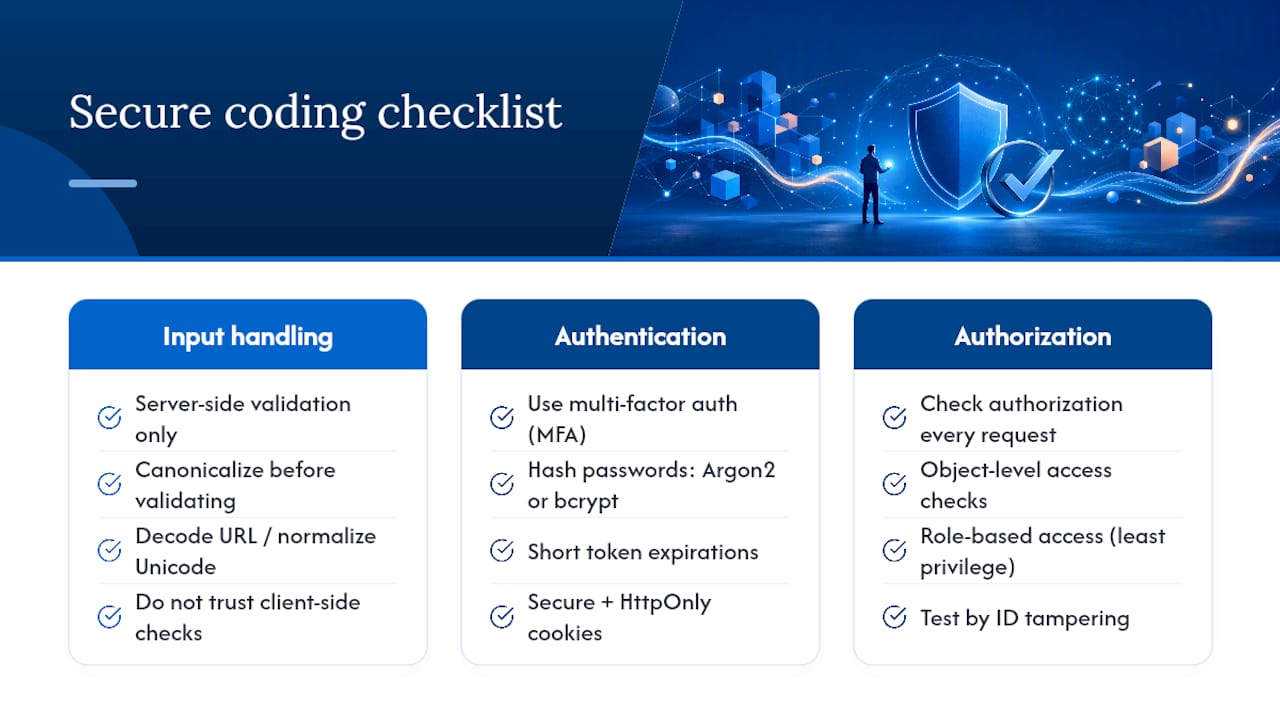
Code-level controls are where most vulnerabilities actually get introduced, and where most of them get fixed cheaply if caught early. OWASP's secure coding practices organize these into input handling, authentication, session management, and cryptography, and that grouping holds up well in practice.
1. Validate and encode everywhere it matters. Server-side validation is non-negotiable; client-side validation is a user experience nicety that an attacker will simply bypass with a direct API call. Canonicalize inputs before validating them (decode URL encoding, normalize Unicode) so an attacker can't smuggle a malicious payload past a filter that only checks the raw string. Output encoding matters just as much as input validation. A value that's safe to store might still be dangerous to render in HTML, in a SQL query, or in a shell command, and each context needs its own encoding rule.
2. Get authentication right the first time. Multi-factor authentication is recommended for accounts with elevated privileges and increasingly for standard user accounts, given the risks of credential stuffing. Password storage should use strong algorithms like Argon2 or bcrypt, not fast general-purpose hashes like plain SHA-256. Tokens need short expirations, secure and HttpOnly cookie flags, and explicit invalidation on logout, not just client-side deletion of a token the server still considers valid. If your team hasn't reviewed multi-factor authentication coverage across admin panels recently, that's a same-week fix, not a someday one.
3. Enforce authorization on every single request. Object-level authorization checks, verifying that the logged-in user actually owns or has rights to the specific record being requested, catch a huge share of real-world data breaches. It's not enough to check permissions once at login; every request needs its own check, because URL and parameter tampering is trivial. Role-based access control (RBAC) with least privilege as the default keeps the blast radius small when something does go wrong.
Pro Tip: Test authorization by logging in as a low-privilege user and manually changing IDs in API requests to try to access another user's data. If that works, you've found a broken access control bug faster than any scanner would.
How Do You Harden Infrastructure Before Deployment?
Application code can be flawless and a website still gets breached through a misconfigured server. Infrastructure hardening is mostly mechanical, which is good news: it's the category most suited to full automation in CI.
TLS is the minimum baseline. Automate certificate issuance and renewal to avoid expired certificates, and configure servers to support only current TLS versions, retiring older protocols. Verify the full certificate chain and confirm cipher suites don't include deprecated algorithms; Microsoft's guidance on restricting cryptographic algorithms is a useful reference for teams running Windows-based services that need explicit protocol restrictions.
Security headers cost almost nothing to implement and close off entire categories of attack:
- HSTS forces browsers to use HTTPS on every future visit, closing the window for downgrade attacks.
- Content-Security-Policy restricts which scripts, styles, and frames can load, which is one of the strongest practical defenses against cross-site scripting.
- X-Content-Type-Options: nosniff stops browsers from guessing content types in ways attackers can exploit.
- Referrer-Policy limits how much URL data leaks to third-party sites through referrer headers.
- Strip the Server and X-Powered-By headers so you're not advertising your stack version to anyone probing for known exploits.
Host and container hardening rounds this out. Close every port that isn't actively serving traffic. Run containers as non-root users with defined resource limits so a compromised process can't exhaust the host or pivot freely. Secrets, API keys, database credentials, signing keys, belong in a dedicated secrets manager, never committed to a repository, and CI pipelines should scan repo history for anything that slipped through before this rule existed.
Third-Party Code: The Supply-Chain Risk Most Teams Underestimate
Most modern websites run on more third-party code than first-party code once you count frameworks, libraries, analytics tags, and widgets. Every one of those is a dependency someone else maintains, and a vulnerability in any of them becomes yours the moment it ships.
Run automated dependency scanning in CI on every build, rather than on a fixed schedule. Pin exact dependency versions to prevent unexpected upgrades that could introduce vulnerabilities. Subscribe to security advisories for your core frameworks and schedule dedicated update windows, weekly or biweekly, rather than letting patches pile up until a critical CVE forces an emergency deploy.
Third-party scripts deserve their own scrutiny. Analytics tags, chat widgets, and ad scripts routinely get compromised at the source and then distribute malicious code to every site that embeds them. Load third-party scripts only from origins you explicitly trust, and enforce that trust through your Content-Security-Policy rather than through hope. Teams building on platform-based site builders should look at plugin-level hardening too; a guide like Wix security plugin options illustrates the kind of configuration checks that matter when you don't control the underlying server stack.
For any vendor supplying code you'll run in production, check for signed releases, a public vulnerability disclosure policy, and a track record of timely patching. A vendor with no disclosed CVEs in five years isn't necessarily secure; it might just mean nobody's looked.
Which Security Tests Should Run in CI, and When Do You Need a Pentest?
Automated testing catches the vulnerabilities that follow known patterns; human testers catch the ones that don't. Both belong in a mature pipeline, at different points.
- Run SAST on every pull request. Static analysis catches injection flaws, hardcoded secrets, and insecure function calls before code merges, when fixing them costs a few minutes instead of a rollback.
- Run dependency and CVE scanning in CI on every build. New advisories appear constantly, so a scan that passed last week doesn't guarantee anything today.
- Run DAST against a staging environment before every release. Dynamic testing exercises the running application the way an attacker would, catching issues static analysis can't see, like misconfigured authentication flows or exposed debug endpoints.
- Schedule external penetration tests, especially for major releases or applications handling sensitive data. The OWASP Web Security Testing Guide defines the testing workflow and technical coverage professional testers follow, and a structured penetration testing process surfaces business logic flaws automated tools consistently miss.
- Convert every finding into a ticket with reproduction steps and severity, not a line item in a PDF. A pentest report nobody triages is money spent for a document nobody reads.
Deciding what to automate versus what to send to a human tester is its own skill. A closer look at manual versus automated penetration testing helps teams draw that line based on application complexity and data sensitivity rather than budget alone. Keep every scan output and pentest report on file. It's the evidence trail compliance auditors will ask for, and it's the fastest way to prove remediation actually happened.
What Should You Monitor After the Site Goes Live?
Launch day is the beginning of the security workload, not the end of it. A site with perfect code and zero monitoring is still flying blind.
Centralize logs from your application, web server, and infrastructure into one searchable system, and redact sensitive fields (passwords, tokens, full payment numbers) before they ever hit disk. Retention needs to be long enough to investigate an incident discovered weeks after it started, which for most attacks is the norm, not the exception.
- Alert on repeated failed login attempts from a single IP or against a single account.
- Alert on unusual authentication patterns, like a login from a new country followed immediately by an admin action.
- Alert on traffic spikes against sensitive endpoints, especially checkout, password reset, and file upload routes.
- Alert immediately on any high-severity finding from an automated scan, don't wait for the weekly report.
Maintain a written incident response runbook and actually rehearse it. A tabletop drill twice a year, walking through "what do we do if the admin panel gets compromised at 2 a.m.," exposes gaps in access and communication long before a real incident does. Document remediation after every incident, even minor ones; the pattern across several small incidents often reveals the systemic fix a single postmortem would miss.
Pro Tip: Set a calendar reminder to review your alert thresholds quarterly. Alerts tuned during a quiet launch month generate either constant noise or dead silence six months later as traffic patterns shift.
What Goes on the Pre-Launch Checklist Before You Flip DNS?
This is the final gate, the point where every earlier control gets verified together, in order, with evidence attached to the release ticket.
- Confirm TLS 1.2/1.3 only, valid certificate chain, and correct cipher suites; attach the scan output.
- Confirm all required security headers are present in production-mode responses, not just in staging.
- Run a full dependency scan and resolve or formally accept any high or critical findings.
- Scan the repository history for committed secrets, keys, or credentials that predate your secrets-manager policy.
- Run DAST against the final staging build and clear or ticket every finding above low severity.
- Verify MFA is enforced on every admin and privileged account, with no fallback to password-only access.
- Verify RBAC checks on every admin-facing route, not just the ones tested during development.
- Confirm backup and recovery procedures work by restoring from a recent backup in a test environment, not just checking that the backup job ran.
- Schedule a monitoring window with tightened alert thresholds for the first 48 to 72 hours after release.
| Checklist Area | Evidence to Attach | Owner |
|---|---|---|
| TLS and headers | Scan report, cert chain screenshot | DevOps |
| Dependency scan | CVE report, remediation notes | Developer |
| Secrets scan | Repo history scan output | Security lead |
| DAST | Staging run report, ticket links | QA/Security |
| Access control (MFA/RBAC) | Test login logs, role matrix | Developer |
| Backup restore test | Restore log, timestamp | DevOps |
Attach every artifact directly to the release ticket. When something breaks three months from now, that ticket becomes the fastest way to reconstruct what was actually verified at launch.
How Does Secure Techies Apply This Checklist in Practice?
Running a checklist once is straightforward. Running it consistently across every client, every release, every quarter, is where most in-house teams lose the thread, usually because someone gets pulled onto a feature deadline and the scan gets skipped "just this once."
Secure Techies ties every checklist item to an artifact by default rather than by exception, nightly dependency and vulnerability scans, weekly patch windows for infrastructure, and continuous alerting rather than a monthly review. Compliance audits get easier when the evidence already exists in a searchable format instead of getting assembled under deadline pressure. Teams without a dedicated security engineer, or one person doing double duty as the "security person," tend to benefit most from managed execution here, since the checklist itself is only as strong as the discipline behind running it every single week.
— Alex
Get Help Running This Checklist Without Adding Headcount
Building this checklist into a workflow is one project. Running it, nightly scans, weekly patch windows, quarterly pentest coordination, incident response on call, is an ongoing job most in-house teams don't have the bandwidth to sustain past the first few months. Securetechie's Cybersecurity Solutions exist specifically to carry that weight: continuous monitoring, vulnerability management, and remediation support that keeps every item on this checklist current instead of frozen at launch-day status.

If your organization also has to satisfy HIPAA, GDPR, SOC 2, or CMMC requirements, Compliance & Security Audits can turn the evidence this checklist generates into the documentation auditors actually expect to see. Weigh managed support against in-house execution honestly: if your team already runs nightly scans and weekly patch cycles without fail, keep doing it. If gaps have crept in, or nobody owns the calendar for it, a Southern California business can reach out to a managed IT and cybersecurity provider for a review of current controls and a plan to close the gaps before the next release.
Sources
FAQ
What Is the OWASP Top 10 and Why Does It Matter Here?
The OWASP Top 10 is the industry-standard list of critical web application risk categories, currently in its 2025 revision, and it's the backbone this entire checklist is organized around.
What Are the 7 Principles of Secure by Design?
Definitions vary slightly by source, but the core ideas consistently include minimizing attack surface, secure defaults, least privilege, defense in depth, failing securely, and keeping security simple enough that developers actually follow it, rather than working around it.
Do I Need a Penetration Test if I Already Run Automated Scans?
Yes for any application handling sensitive data or a major release. Automated SAST and DAST catch known vulnerability patterns, but manual penetration testing catches business logic flaws and authorization bypasses that scanners consistently miss.
How Often Should Dependency Scans Run?
Run them on every CI build, not on a fixed schedule, since new vulnerability advisories can affect a library that passed clean scans just days earlier.
Can Secure Techies Help Implement This Checklist for an Existing Website?
Yes. Secure Techies' Cybersecurity Solutions cover continuous monitoring, vulnerability scanning, and remediation support for sites already in production, not just new builds. Current pricing is available directly on the provider's site.