
Start with Microsoft's native cross-tenant tools for mailboxes, layer in Migration Orchestrator when you need coordinated multi-workload moves, and bring third-party tooling only when Teams fidelity, complex SharePoint permissions, or metadata preservation demand it. Domain transfer, not mailbox moves, is the highest-risk event in any tenant to tenant migration, so pilot early and staff a dedicated cutover weekend. None of it works without correct identity mapping and licensing sequenced in the right order.
TL;DR:
- Proper identity mapping with target MailUser objects and correct sequence of GUIDs and proxyAddresses prevents migration failures and silent mailbox issues.
- Migration duration varies from 4 weeks for small mail-only projects to over a year for large legal or regulatory consolidations, depending on scope complexity.
- Handling domain transfer with careful verification, DNS updates, and rollback plans is critical, as it is the highest-risk event in tenant migrations.
- Native migration tools support standard workloads but fall short on complex permissions, granular audit logging, and detailed Teams chat fidelity, often requiring third-party tools.
- Conducting a thorough pilot group, staffing a dedicated cutover team, and planning for post-move cleanup are essential for a successful, compliant tenant migration.
Table of Contents
- What Are the Most Common Tenant to Tenant Migration Scenarios?
- Orchestrator, Single-Workload, or Third-Party Tooling: Which Fits Your Project?
- How Do You Set Up Identity Mapping Before a Mailbox Migration?
- Which Workloads Depend on Each Other During Migration?
- What Can Migration Orchestrator Actually Do, and Where Does It Fall Short?
- When Should You Bring In Third-Party Migration Tools?
- How Do You Plan the Domain Transfer and Cutover Weekend?
- What Licensing and Cleanup Steps Come After the Move?
- What Does a Real Pilot Playbook Look Like?
- How Long Does a Tenant to Tenant Migration Actually Take?
- What Should You Do First, and Where Can You Learn More?
- What Actually Matters in a Tenant to Tenant Migration
- Get Migration Support That Combines Microsoft Expertise With Hands-On Execution
- Sources
What Are the Most Common Tenant to Tenant Migration Scenarios?
Every Microsoft 365 tenant migration starts with a business event, and that event dictates almost everything downstream. A merger typically means absorbing one tenant into another with minimal disruption to the surviving brand. A divestiture is the opposite: carving a business unit out cleanly, often under a legal deadline, with strict rules about what data crosses the line. Consolidation after multiple acquisitions usually means merging several tenants into one standard, while a rebrand or reorg might only require a domain and identity refresh without touching underlying data ownership.
Each scenario changes your scope decision:
- Mail-only scope fits fast timelines, especially in acquisitions where Teams and SharePoint will be rebuilt anyway.
- Files-only scope applies when OneDrive and SharePoint content matter more than communication history.
- Teams-inclusive scope is required whenever chat history, channels, or meeting continuity matter to the business.
- Full-tenant scope is the default for consolidations and most divestitures.
Regulated organizations, particularly those under HIPAA or SEC oversight, need auditability baked into scope decisions from day one. That means logging every mailbox move and file transfer, not retrofitting compliance reporting after the fact.
Orchestrator, Single-Workload, or Third-Party Tooling: Which Fits Your Project?
The right approach depends on complexity, not company size. A multi-workload Migration Orchestrator run handles Exchange mailboxes, OneDrive, and Teams chats and meetings together in a single coordinated batch, which shortens risk because Microsoft sequences the dependencies for you instead of leaving that to a spreadsheet.
Single-workload native paths, like a standalone cross-tenant mailbox migration, work fine for mail-only projects but leave you manually orchestrating everything else. That's fine for a 40-person acquisition. It's a liability at 4,000 seats with complex Teams structures.
Third-party tooling or an MSP engagement earns its cost when you're dealing with deep Teams chat history, large SharePoint permission trees, or compliance-grade audit logging that native tools don't fully provide.
- Orchestrated native migration: lowest cash cost, moderate staff hours, best for straightforward mail plus Teams moves.
- Single-workload native: lowest cost, highest staff hours if workloads pile up.
- Third-party or MSP: highest cash cost, lowest staff burden, strongest for compliance and complex permissions.
Pro Tip: Run the cost math in staff hours, not just license fees. A "free" native migration that eats three weeks of a systems engineer's time isn't actually cheaper than a paid tool that finishes in three days.
How Do You Set Up Identity Mapping Before a Mailbox Migration?
Microsoft moves content. It does not move identities. That distinction trips up more migrations than any other single factor, because administrators assume the platform will somehow recognize a user across tenants. It won't, until you build the bridge yourself.
Cross-tenant mailbox migration requires a target MailUser object with a specific set of attributes matched to the source. Skip one, and the migration either fails outright or, worse, silently succeeds while creating a broken mailbox.
Follow this sequence exactly:
- Provision the target MailUser with the source mailbox's ExchangeGUID, and ArchiveGUID if an in-place archive exists.
- Add matching x500 proxyAddresses so legacy mail routing and reply-to history resolve correctly.
- Set the Primary SMTP address and targetAddress to point mail flow at the correct destination during the transition period.
- Verify every attribute against the source object before touching licensing.
- Apply the Cross Tenant User Data Migration license only after GUIDs and proxyAddresses are confirmed in place.
The most common failure is applying that license before the GUIDs exist, which provisions an empty mailbox in the target tenant instead of migrating the real one. Missing x500 addresses cause silent non-delivery reports weeks later, usually from external senders replying to old threads. Get the sequence wrong and you'll spend more time on cleanup than the migration itself took.
Which Workloads Depend on Each Other During Migration?
Workload dependencies decide your wave order, and getting them backward causes cascading failures. Exchange mailboxes are the foundation: Teams meetings and chat history depend on a working mailbox existing in the target tenant first, so migrating Teams before mail is a guaranteed dead end.
Teams files live in SharePoint, not in Teams itself, which means a Teams-inclusive migration is really a SharePoint migration wearing a different label. OneDrive is per-user storage and should be pre-provisioned in the target tenant before the transfer starts, not created on the fly during cutover.
- Mail first, or orchestrated together: Microsoft's own migration guidance recommends running Exchange, OneDrive, and Teams chats and meetings in the same batch so Orchestrator can respect the dependency chain automatically.
- Public folders and legal holds often need separate handling outside standard Orchestrator batches.
- Third-party connectors (helpdesk integrations, CRM sync tools) need their own re-authentication plan post-move.
- Power Platform artifacts (Power Automate flows, Power Apps) frequently break on tenant moves and need manual reconnection.
Permission and sharing link preservation deserves its own testing pass. Links shared externally before migration often break silently, and nobody notices until a client can't open a file three weeks later.
What Can Migration Orchestrator Actually Do, and Where Does It Fall Short?
Migration Orchestrator supports Exchange mailboxes, OneDrive, Teams chats, and Teams meetings, and it's built to sequence those workloads intelligently rather than making you script the order manually. Specify every workload you intend to move in a single batch, because leaving mailboxes out of a batch that includes Teams meetings will cause that Teams workload to fail outright.
By the numbers: Orchestrator requires a Cross Tenant User Data Migration license, assigned as a one-time per-user fee rather than a recurring subscription cost, which changes how you budget the project compared to ongoing licensing.
What it doesn't fully solve: full SharePoint site-level migration has historically lagged behind mailbox and OneDrive support, with cross-tenant SharePoint site migration sitting in more limited availability while OneDrive migration leaves a redirect link on the source location rather than a true move. Incremental sync also has limits, so plan your cutover window around a final delta pass rather than assuming continuous background sync will close every gap. Native tooling is the right call for standard mail, file, and Teams moves. It's the wrong call when you need granular permission remapping or forensic-level audit trails.
When Should You Bring In Third-Party Migration Tools?
Native tooling covers the majority of straightforward moves, but certain project profiles expose real gaps. Teams chat fidelity is the biggest one: preserving full conversation threading, reactions, and edited-message history across tenants is something third-party platforms handle more completely than native paths today. Complex SharePoint permission structures, especially inherited permissions across nested libraries, are another common breaking point, along with metadata and version history that native tools sometimes flatten during transfer.
Before signing with any vendor or MSP, require:
- Incremental or delta sync, so you're not re-running full transfers for late-changing content.
- Per-item logging detailed enough to satisfy a compliance audit, not just a summary success count.
- Documented SLAs with clearly stated support hours and escalation paths.
- A named support team you can reach during your actual cutover window, not a generic ticket queue.
Hire an MSP when your team lacks migration-specific experience, your compliance requirements (HIPAA, SOC 2, CMMC) demand documented process control, or your timeline simply doesn't allow for a learning curve. Software alone suffices when scope is narrow and your team has run a cross-tenant move before.
Pro Tip: Ask any vendor for a sample audit log from a past project before you sign anything. If they can't produce one, they can't produce one for you either.
How Do You Plan the Domain Transfer and Cutover Weekend?
A domain cannot exist in two Microsoft 365 tenants simultaneously, which is exactly why domain transfer is the single highest-risk event in the entire project. You're not just moving data anymore. You're removing a live, working domain from one tenant and re-adding it to another, and every minute of that window is a minute mail flow is at risk.
- Remove the domain from the source tenant only after every mailbox and object dependent on it has completed migration verification.
- Add and verify the domain in the target tenant, including DNS TXT verification before touching MX records.
- Update MX records to point at the target tenant's mail routing.
- Update Autodiscover so Outlook clients resolve to the new tenant automatically.
- Update SPF and DKIM records to prevent legitimate mail from failing authentication checks post cutover.
- Hold a defined DNS propagation window, typically staffed overnight, before declaring cutover complete.
Keep a rollback plan ready: if mail flow breaks and can't be resolved within your defined window, know exactly which DNS records revert and who owns that decision. Notify users and your helpdesk team ahead of the weekend, not during it. After cutover, verify mailflow in both directions, calendar free/busy lookups, key line-of-business application logins, and any federation trust between tenants before calling the migration closed.
What Licensing and Cleanup Steps Come After the Move?
License timing determines whether your migration succeeds or quietly fails behind the scenes. Assign Exchange licenses and the Cross Tenant User Data Migration license only after target MailUsers are fully provisioned with correct GUIDs, never before, since premature licensing is what creates empty mailboxes in the first place.
- Pre-create every MailUser and confirm ExchangeGUID and proxyAddresses before any license touches the account.
- Convert source mailboxes to MailUser objects once the target mailbox becomes primary, closing the loop cleanly.
- Remove obsolete objects left behind in the source tenant to avoid confusing future audits.
- Reapply conditional access and security policies in the target tenant, since these rarely carry over automatically.
- Export migration logs and license assignment reports for compliance sign-off, especially under HIPAA or SOC 2 obligations.
Skipping the cleanup step is how organizations end up with duplicate directory entries a year later, and nobody remembers why.
What Does a Real Pilot Playbook Look Like?
A pilot group of 25 to 50 representative users, spanning departments and permission levels, surfaces the attribute conflicts and permission edge cases that a single test account never will. Select pilot users who represent your messiest cases: shared mailboxes, delegated calendars, external sharing links, not just the easiest accounts on the roster.
- Command center staffing: a dedicated team monitoring mailflow, sync status, and helpdesk tickets in real time during cutover, not just business hours.
- 24/7 cutover support for at least the first 48 hours after domain transfer, since mail routing issues surface fast and unevenly.
- Wave plan checkpoints: monitor each batch for failure rate before releasing the next wave.
| Pilot element | What to check | Why it matters |
|---|---|---|
| Pilot size | 25 to 50 representative users | Surfaces edge cases before full rollout |
| Cutover staffing | 24/7 for 48 hours minimum | Mail routing issues surface unevenly |
| Wave checkpoints | Failure rate per batch | Stops problems from compounding |
Secure Techies has run these pilot structures across real Microsoft 365 migration projects, and the pattern holds: the pilot is where you find the problems cheaply, before they show up at scale.
How Long Does a Tenant to Tenant Migration Actually Take?
Duration scales with complexity more than headcount. A small migration, under 200 users with mail-only scope, typically runs 4 to 8 weeks. Mid-size projects with Teams and file migration usually take 2 to 4 months. Large, multi-tenant consolidations with regulatory oversight can run 4 to 12 months, driven mostly by legal review cycles and permission remediation, not the technical transfer itself.
- Role matrix: a migration lead, an Exchange/identity engineer, a Teams/SharePoint specialist, and dedicated helpdesk coverage for cutover weekend.
- Top risk: domain transfer — mitigate with a tested rollback plan and overnight DNS staffing.
- Top risk: licensing sequence errors — mitigate with a provisioning checklist enforced before any license assignment.
- Top risk: permission loss — mitigate with pre and post-migration permission audits on a sample of shared content.
Bring legal and compliance stakeholders into the schedule at kickoff, not at cutover. Application owners need lead time too, since third-party integrations rarely reconnect themselves.
What Should You Do First, and Where Can You Learn More?
Start with discovery: export your source directory, inventory mailboxes and shared resources, and identify your pilot group before touching any licensing.
- Run a full directory export and map every domain that needs to transfer.
- Identify your pilot group using the messiest, most representative accounts, not the simplest ones.
- Review Migration Orchestrator overview and cross-tenant mailbox migration documentation before writing your project plan.
- Check eligibility for Microsoft FastTrack if your organization has 150 or more eligible licenses, though FastTrack's own guidance notes it isn't designed for data under special regulatory requirements.
- If internal capacity is tight, Secure Techies offers direct managed migration support for end-to-end execution.
What Actually Matters in a Tenant to Tenant Migration
Most guidance on this topic treats Microsoft's documentation and third-party tooling as competing choices. That framing is wrong. Official Microsoft Learn coverage is authoritative but dense, written for engineers who already know the terrain, and it rarely tells you what a pilot should look like or how many people to staff on a cutover weekend. Third-party tools solve real gaps, but jumping to one before understanding what native tools already cover wastes money and adds vendor risk you didn't need.
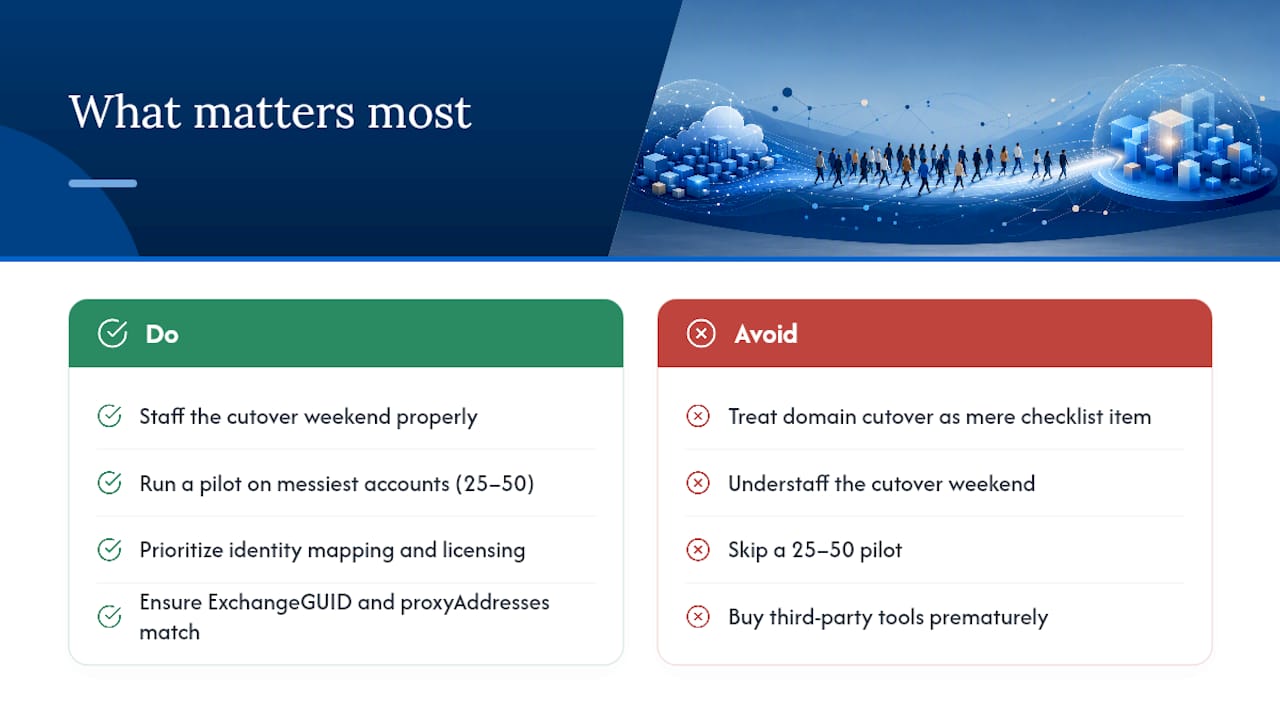
The overrated piece of conventional advice is treating domain cutover as a technical checklist item. It's a staffing and communication problem first, a DNS problem second. Every migration failure worth studying traces back to under-staffing the cutover weekend or skipping a pilot on the messiest accounts, not to a missing PowerShell command.
Prioritize identity mapping and licensing sequence before anything else. Get ExchangeGUID and proxyAddresses right, and most of Exchange's downstream problems disappear. Skip that step, and no amount of third-party tooling will save the project from itself.
— Alex
Get Migration Support That Combines Microsoft Expertise With Hands-On Execution
Reading Microsoft's documentation gets you the specs. Running a tenant to tenant migration without getting burned on cutover weekend takes something Microsoft Learn doesn't provide: a team that has actually staffed the 2 AM DNS window and fixed the empty-mailbox problem before it happened to you. Securetechie handles Microsoft 365 and Google Workspace migrations for small to mid-size organizations across Southern California, with a dedicated local team running discovery, pilot design, and cutover support so your internal staff isn't relearning identity mapping under deadline pressure.

That matters most for organizations juggling HIPAA, SOC 2, or CMMC obligations alongside the migration itself, where compliance-grade logging and correct license sequencing aren't optional extras. If your project involves a merger, divestiture, or consolidation with a hard deadline, Securetechie's managed IT services can scope your pilot group, staff your cutover weekend, and handle post-move cleanup so nothing gets left behind in the source tenant. Reach out to get a discovery assessment scheduled before you commit to a cutover date.