
The most resilient ransomware backup strategy follows the modernized 3-2-1-1-0 rule: three copies of your data, on two different media types, with one copy offsite and one copy immutable or air-gapped, with zero unverified restores. Layer that architecture with isolated backup credentials and quarterly restore testing, and you have the combination that actually determines whether your organization recovers without paying a ransom.
TL;DR:
- Immutable or air-gapped backup copies are essential to prevent attacker access during dwell time, which can last over two weeks.
- Cloud immutability modes like Compliance mode or dedicated WORM appliances are strongest, but offline media offers faster recovery at the cost of slower manual rotation.
- Isolating backup credentials from production and managing encryption keys out-of-band are critical controls frequently overlooked, but vital for resilience.
- Establishing tiered RTO and RPO targets, with recovery priority for critical systems within hours and less essential data in days, helps organize response efforts.
- Regular, automated restore verification and quarterly drills are necessary to ensure backups work correctly and are ready to restore during a real attack.
Table of Contents
- Why the Modern 3-2-1-1-0 Rule Beats the Old 3-2-1 Approach
- How Do You Configure Immutable, Isolated Backup Infrastructure?
- What RTO and RPO Should You Set for Ransomware Scenarios?
- Building Your Ransomware-Resilient Backup Checklist
- How Secure Techies Approaches Ransomware-Resilient Backup
- Backups Are One Layer, Not the Whole Defense
- Get a Ransomware-Ready Backup Architecture Built for Your Business
- Sources
- FAQ
Why the Modern 3-2-1-1-0 Rule Beats the Old 3-2-1 Approach
The original 3-2-1 rule (three copies, two media types, one offsite) was built for hardware failure and natural disasters, not for an attacker deliberately hunting your backups. Ransomware operators now search for backup infrastructure early in an intrusion, which is exactly why the rule evolved to include an extra "1" for immutable or air-gapped storage and a "0" for verified, error-free restores, according to industry analysis of backup-targeted ransomware attacks.
That extra "1" matters because standard backups sitting on the same network as production systems are just another target. If an attacker can reach your backup console with domain credentials, they can delete snapshots, shorten retention windows, or encrypt the backup repository itself before triggering the main payload. An immutable or air-gapped copy removes that option entirely, because no credential, not even an administrator account, can alter or delete it during its retention window.
Dwell time is the other piece of this puzzle. Incident timelines show attackers often sit inside a network for 5 to 21 days before triggering encryption, quietly identifying which systems matter and where the backups live. A retention window shorter than that dwell time means your "clean" backup might already be compromised by the time you need it.
Immutability and air-gapping solve overlapping but distinct problems, and picking between them comes down to speed versus assurance:
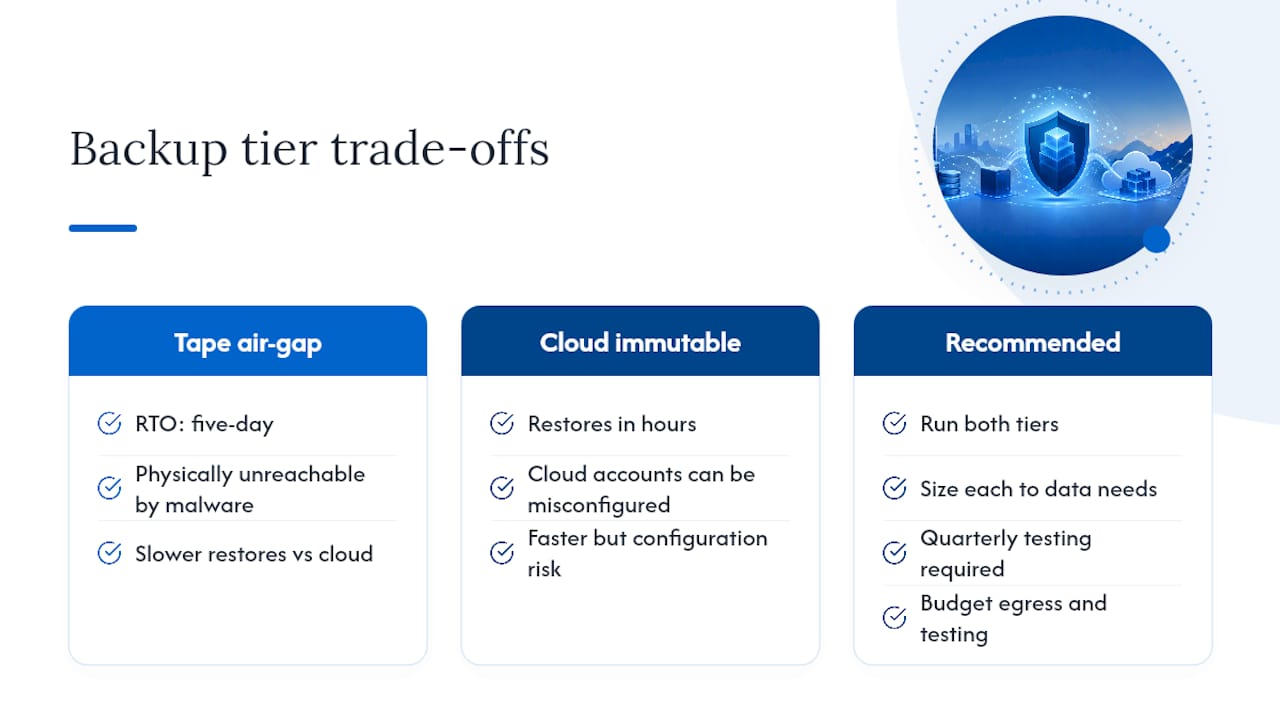
- Immutable cloud storage (like Object Lock policies) keeps a copy online and fast to restore from, but it depends on your cloud provider's infrastructure staying available and your account configuration staying correct.
- Air-gapped or offline media (tape, disconnected drives) offers the strongest isolation from network-based attacks, but restore times are slower and the rotation process is manually intensive.
- A hybrid approach, running both, gives you the recovery speed of immutable cloud storage with the belt-and-suspenders assurance of a truly offline copy for your most critical systems.
CISA frames this whole discussion correctly: prevention will fail eventually, so the real measure of resilience is whether you can restore operations without paying a ransom. Everything else in this guide builds toward that single outcome.
How Do You Configure Immutable, Isolated Backup Infrastructure?
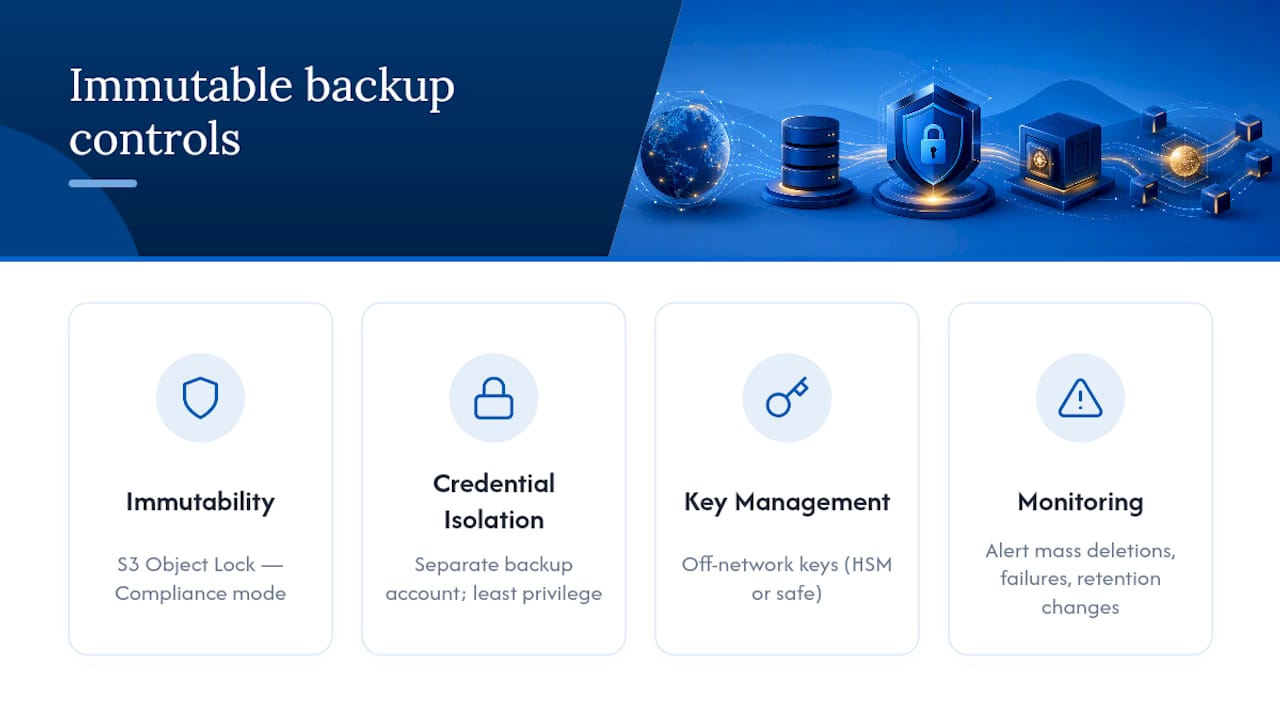
Getting the architecture right on paper means nothing if the configuration underneath it has gaps. Four technical controls do the heavy lifting: immutability, credential isolation, key management, and monitoring.
1. Enable immutability correctly. S3 Object Lock in Compliance mode is the strongest option available in mainstream cloud storage, because it prevents deletion or retention shortening even by the account root user for the duration of the lock. Azure's immutable blob storage and dedicated WORM (write once, read many) appliances offer comparable protection. When you configure any of these, check three things: which retention mode is active (Governance mode can still be overridden by privileged accounts, Compliance mode cannot), how lifecycle policies interact with the lock (a poorly timed lifecycle rule can conflict with an active retention period), and whether the immutability setting applies per object or per bucket.
2. Isolate backup credentials from production identity. This is the control most organizations skip, and it is the one attackers count on. Practical steps include running backups from a separate cloud account or tenant rather than the same Active Directory domain as production, using a backup appliance that is not domain-joined, and writing IAM policies around least privilege so that the account performing daily backups cannot also modify retention settings. A separate, more restricted role should own retention management, and that role should require a second approval for any policy change.
3. Manage encryption keys out-of-band. Every backup should be encrypted, but the key itself needs to live somewhere an attacker who compromises your network cannot reach. That means a physical safe, a hardware security module, or a separate cloud account dedicated to key management. NCSC's guidance on cloud backup resilience specifically calls out robust key management as a core principle, not an afterthought. Test key recovery on the same schedule as your restore drills. A key you cannot retrieve is functionally the same as no backup at all.
4. Monitor for the signals that precede an attack. Mass deletion events, sudden backup job failures across multiple systems, and unexpected retention-policy changes are the earliest indicators that something is wrong, sometimes days before encryption starts. Alerts for these events need to travel through a channel that is not itself dependent on the systems being attacked, an out-of-band notification path like SMS or a separate messaging platform, with a clear escalation path to someone who can act immediately.
Pro Tip: Configure soft-delete with a mandatory delay, typically 14 to 30 days, and require a second person's approval before a permanent delete executes. That single workflow change has stopped more than a few ransomware incidents from becoming total data loss events, because it buys time to catch the anomaly before it becomes permanent.
What RTO and RPO Should You Set for Ransomware Scenarios?
Recovery time objective (RTO) and recovery point objective (RPO) mean something different in a ransomware scenario than in a routine hardware failure, because you are not just restoring data, you are restoring it into a network you no longer fully trust. Tiering your systems by business priority, then assigning realistic RTO/RPO targets to each tier, keeps recovery organized instead of chaotic.
A workable three-tier model looks like this:
- Tier 1, hot and fast restore: domain controllers, core authentication, and revenue-critical applications. Target RTO under 4 hours, RPO under 1 hour, restored from immutable cloud storage for speed.
- Tier 2, immutable cloud operational tier: line-of-business applications and file shares. Target RTO of 4 to 24 hours, RPO of several hours, also served from immutable storage but with lower restoration priority than Tier 1.
- Tier 3, offline archive: long-term records, compliance archives, and rarely accessed data. Target RTO measured in days, RPO of 24 hours or more, restored from air-gapped tape or offline media.
Recovery itself follows a sequence, not a free-for-all. Contain the incident first, isolating affected systems from the network. Recover identity infrastructure next, since nothing else can authenticate without Active Directory or its equivalent back online. Then rebuild core network services (DNS, DHCP), followed by application tiers in priority order. Every stage of this process should happen inside an isolated network segment, verified clean, before it touches production again. Backup and recovery security guidance recommends treating any failed restore test during this sequence as a security incident in its own right, not just a technical hiccup to troubleshoot later.
Testing cadence is where most organizations quietly fail. Automated verification (checksums, backup job success confirmation) should run daily. Quarterly full restores of representative systems, actually bringing a server back up from backup and confirming it works, catch the failures automation misses. An annual environment-wide drill, simulating a full ransomware recovery across your entire infrastructure, is what proves the runbook works under pressure rather than just on paper. Record restore time and data integrity results from every test, and feed that data back into adjusting retention windows and RTO/RPO targets that turned out to be unrealistic.
Building Your Ransomware-Resilient Backup Checklist
Turning this architecture into reality works best as three waves of work rather than one overwhelming project.
- Initially: isolate backup credentials from your production domain, enable immutability on at least one backup copy, configure alerts for any retention-policy change, and run a smoke test restore of one critical system to confirm the pipeline actually works.
- In subsequent weeks to months: stand up a separate backup account or tenant, implement your immutable cloud tier alongside an offline rotation for Tier 3 data, and document formal RTO/RPO targets with a written recovery runbook that names who does what during an incident.
- On an ongoing quarterly and annual basis: run full restore drills every quarter, perform monthly automated verification checks, audit retention policies against actual business need, and review egress costs before you need a full restore, since pulling large volumes of data out of cloud storage during an actual emergency is the wrong time to discover what that costs.
A 3-2-1 backup retention calculator can help you model storage and egress costs across tiers before you commit to a specific cloud provider's pricing structure. Vendor playbooks that sequence architecture, credential protection, tiering, and verification in that order, as outlined by N-able, track closely with the priority order above, and following that sequence prevents teams from building an elaborate immutable tier while backup credentials remain wide open on the domain.
How Secure Techies Approaches Ransomware-Resilient Backup
Secure Techies builds ransomware backup strategy as a security control, not a storage afterthought, for small and mid-size businesses across Southern California. That means immutable cloud tiers, isolated backup credentials, and documented recovery runbooks are standard components of how backups get designed, not optional upgrades. Our team operationalizes the checklist above through 24/7 monitoring for the mass-deletion and retention-change alerts described earlier, quarterly restore testing built into ongoing service, and rapid remediation when something looks wrong. For organizations in regulated industries like healthcare, legal, and financial services, that operational discipline also supports HIPAA, GDPR, and CMMC compliance requirements that depend on demonstrable recovery capability.
Backups Are One Layer, Not the Whole Defense
A perfect backup architecture still will not stop data exfiltration, and increasingly, ransomware groups steal data before encrypting it, then threaten publication regardless of whether you restore. Backups need to sit alongside detection tooling, an incident response plan, and legal readiness for breach notification requirements like those HHS outlines for HIPAA-covered entities. Budget for both the egress costs of a real restore and the recurring cost of testing it, because an untested backup is a hypothesis, not a plan.
Where the industry gets this wrong is treating backup and detection as competing budget line items instead of dependent ones. A tape air-gap with a five-day RTO looks slow next to an immutable cloud tier that restores in hours, but the calculus changes the moment you factor in that cloud accounts can be misconfigured and tapes physically cannot be reached by malware. The right answer for most mid-size organizations is not choosing one over the other. It is running both, sized to what each tier of data actually needs, and testing the whole system quarterly rather than assuming it works because it did on installation day. Recovery time objectives written into a runbook nobody has tested are just a wish list with numbers attached.
— Alex
Get a Ransomware-Ready Backup Architecture Built for Your Business
Most businesses discover their backup gaps during an actual incident, which is the most expensive possible time to learn that a retention policy was misconfigured or that nobody had tested a restore in over a year. Secure Techies closes that gap before it becomes a crisis, mapping your current backup posture against the checklist above through a structured assessment, then designing and implementing the immutable storage, credential isolation, and monitoring your environment actually needs.

An engagement typically moves through four stages: an assessment of your current backup architecture and gaps, a design phase that sets tiering and RTO/RPO targets specific to your systems, implementation of immutability and credential isolation, and ongoing operation that includes 24/7 monitoring and quarterly restore testing. You walk away with a documented recovery runbook and a backup environment that has actually been proven to restore, not just assumed to. If your organization is ready to stop treating backup as a checkbox and start treating it as a tested security control, explore Secure Techies' Backup & Disaster Recovery services and request an assessment of your current setup.
Sources
- CISA ransomware guide
- NCSC principles for ransomware-resistant cloud backups
- Ransomware comes for your backups first: The 2026 storage defense playbook
- Backup and recovery security: Protecting your last line of defence against ransomware
- Immutable backup strategy for ransomware defense guide (2026)
FAQ
What Is the 3-2-1 Backup Rule?
The 3-2-1 rule means keeping three copies of your data, on two different media types, with one copy stored offsite. It protects against hardware failure and disasters but does not, on its own, account for an attacker specifically targeting backup infrastructure, which is why the modernized 3-2-1-1-0 version adds immutability and verified restores.
What Is the 3-2-1-1-0 Backup Rule?
The 3-2-1-1-0 rule extends the classic model with an extra "1" for one immutable or air-gapped copy that no compromised credential can alter, and a "0" meaning zero unverified restores. Both additions exist specifically to counter ransomware, which routinely targets and deletes conventional backups before triggering encryption.
What Are the Three Main Types of Backup?
The three core backup types are full backups (a complete copy of all data), incremental backups (only data changed since the last backup of any kind), and differential backups (data changed since the last full backup). Most ransomware-resilient strategies combine all three across different tiers, using full backups for critical Tier 1 systems and incremental backups for less urgent data to balance storage cost against recovery speed.
What Is the Most Secure Backup Strategy Against Ransomware?
The most secure approach combines immutable or air-gapped storage, backup credentials fully isolated from production identity, and quarterly full restore testing, following the 3-2-1-1-0 model. NCSC's guidance specifically emphasizes that resilience to destructive actions and robust key management matter as much as the backup copies themselves.
How Often Should You Test Ransomware Recovery?
Automated verification checks should run daily, quarterly full restores of representative systems should confirm backups actually work, and an annual environment-wide drill should test the entire recovery runbook under realistic conditions. Skipping the quarterly cadence is the most common reason organizations discover a broken backup only after an actual attack.