
For most small businesses without a dedicated IT staff, the right move is a managed MDM service layered on a lightweight, cross-platform cloud platform. Teams with even one in-house IT person can often run a self-serve tool directly. Either way, the immediate next step is the same: start a trial with a short device pilot, or contact a managed provider like Securetechie to scope the rollout before committing.
TL;DR:
- Small businesses benefit most from managed MDM services if they lack dedicated IT staff or cannot handle ongoing device administration internally.
- Cross-platform support including iOS, Android, Windows, and Mac devices is essential for SMBs to avoid security gaps and streamline deployment.
- Features like zero-touch enrollment, policy presets, BYOD containers, and remote wipe should be standard, not premium, for small business MDM tools.
- A phased rollout with inventory assessment, pilot testing, and monitoring is critical to prevent compliance issues and help desk overload during deployment.
- Managed services often cost less overall by including setup, support, and compliance management, reducing hidden expenses like migration or professional services.
Table of Contents
- Why MDM for Small Business Matters More Than Owners Think
- What Small Businesses Actually Need From an MDM Tool
- How to Choose an MDM: A Practical Decision Framework
- Quick Rollout Checklist: An 8-Step Small-Business Deployment
- What MDM Costs: Pricing Shapes and Realistic Ranges
- Securetechie's Perspective: When Managed MDM Is the Right Choice
- Editorial Take: Why "Just Pick a Tool" Advice Falls Short
- Getting Started With Managed MDM Through Securetechie
- Sources and Further Reading
- FAQ
Why MDM for Small Business Matters More Than Owners Think
A lost phone doesn't sound like a security incident until it happens to your business. An employee leaves a laptop in a coffee shop, or a former staffer walks out with a company iPad still logged into your shared drive. Without mobile device management, that single event can expose client records, email, and cloud files with no way to contain it remotely.
Mobile device management closes that gap by giving you remote control over every enrolled device, whether it's company-owned or an employee's personal phone used for work. That control shows up in three practical ways.
- Data protection: remote wipe, forced encryption, and conditional access that blocks a compromised device from reaching company email or files
- Operational savings: IT staff (in-house or outsourced) can push app updates, fix settings, and check device inventory without a truck roll or a desk visit
- Compliance and trust: audit logs and enforced device policies give you proof of due diligence when a client, auditor, or insurer asks how you protect data
Small businesses face this risk more often than owners assume. SuperOps notes that MDM functions as both a security control and a productivity tool, cutting the hours a small team spends chasing device issues one at a time. That dual benefit, security plus fewer help desk fires, is why MDM has moved from "nice to have" to a baseline expectation for firms handling client data, health records, or financial information.
What Small Businesses Actually Need From an MDM Tool
Enterprise MDM platforms are built for IT departments with dedicated staff. Small businesses need something different: fewer clicks, faster setup, and controls that don't require a certification to configure.
Cross-platform coverage matters more than most buyers expect going in. Your team probably runs a mix of iPhones, Androids, and Windows or Mac laptops, and a platform that only handles one operating system well will leave gaps. Vendors serving small businesses tend to emphasize zero-touch enrollment and prebuilt templates precisely because small teams can't spend a week hand-configuring policies.
Beyond platform coverage, a handful of features separate tools that work for lean teams from tools that just add another dashboard to babysit:
- Zero-touch enrollment so new devices configure themselves out of the box
- Policy presets for common scenarios (BYOD, kiosk mode, executive devices) instead of building rules from scratch
- BYOD containers that separate work apps and data from personal photos and texts, protecting employee privacy while still letting you wipe the work side
- Core security controls: remote lock and wipe, forced encryption, and support for multi-factor authentication tied to device posture
- Responsive support, since a five-person company can't afford a two-day ticket queue when a device is lost
Feature lists on SMB-focused platforms consistently point to kiosk mode, BYOD separation, and remote wipe as the baseline set, not the advanced tier. If a vendor treats those as premium add-ons, that's a signal to keep shopping.
Pro Tip: Ask any vendor to walk you through enrolling one device live during the sales call. If it takes more than five minutes or requires a manual, your admin team will feel that friction every single week.
How to Choose an MDM: A Practical Decision Framework
Skip the feature checklist for a minute and answer three questions first. They determine almost everything else about which tool fits.
- How many devices, and how mixed is the fleet? A ten-person company running all iPhones has different needs than a 30-person team split across Android, Windows, and BYOD laptops.
- Who will actually administer this day to day? If the answer is "whoever has time," you need a managed service or a tool with heavy automation, not a platform built for a full-time admin.
- What compliance obligations apply to you? HIPAA, SOC 2, or client contracts with security clauses change which controls and audit logs are non-negotiable.
Once you have those answers, map them to features instead of buying on brand recognition. A retail business with shared tablets needs kiosk mode locking devices to one app. A professional services firm with remote staff needs single sign-on and conditional access tied to device health. A healthcare practice needs encryption enforcement and detailed audit trails that satisfy an auditor, not just a dashboard that looks secure.
Before signing anything, put these questions to the vendor directly:
- What's the enrollment method for existing devices versus new ones out of the box?
- What does the support SLA actually guarantee, and during what hours?
- How long is data retained after a device is wiped or offboarded, and where is it stored?
- Does the platform integrate with endpoint detection and response tools you already use or plan to add?
If your honest answer to question two above is "nobody has bandwidth for this," a managed service is almost always the better choice over a self-serve platform. Unified platforms that bundle endpoint management with MDM tout faster deployment and lower admin overhead, but even those still need someone watching alerts and applying updates. That's the exact gap managed providers exist to fill.
Quick Rollout Checklist: An 8-Step Small-Business Deployment
A clean MDM rollout follows a sequence, not a scramble. Skipping steps, especially the pilot, is where most small-business deployments run into trouble.
- Inventory every device and decide the ownership model (company-owned, BYOD, or a mix) before you touch any settings.
- Define baseline policies: password requirements, encryption, and which apps are mandatory versus blocked.
- Choose your enrollment method and test it on two or three pilot devices before rolling out further.
- Configure apps, Wi-Fi, and VPN profiles so devices connect to company resources without manual setup by each user.
- Layer in SSO and MFA for conditional access tied to device compliance status.
- Train users and publish a support channel so people know who to contact when enrollment breaks or a device acts up.
- Set up monitoring and reporting so you catch compliance drift, not just device loss.
- Document the lost-device and offboarding process in writing, before you need it, not during the panic.
Pilot testing catches most of what goes wrong. Verifying enrollment and self-service flows on a handful of devices before a company-wide push surfaces the breakage points that would otherwise generate a flood of help desk tickets on day one.
Pro Tip: Assign a named owner to each step above, even if it's the same person for all eight. "The team will handle it" is how offboarding checklists quietly stop happening after month three.
Track a small number of metrics after launch: enrollment completion rate, average time to remote wipe a lost device, and how many devices fall out of compliance each month. Those three numbers tell you whether the rollout is actually working.
What MDM Costs: Pricing Shapes and Realistic Ranges
MDM pricing usually follows one of two shapes: per-device or per-user, a crucial factor to understand when considering AI for Small Business: Marketing Without a Team to improve budgeting and operational efficiency. Per-device pricing tends to favor small businesses where employees carry multiple devices, since you're not paying twice for one person's phone and laptop. Per-user pricing can simplify budgeting when your team is mostly one device per person.
Costs scale with the security tier you need. Basic enrollment and remote wipe sit at the low end; adding conditional access, advanced reporting, or dedicated support pushes the price up. A detailed breakdown of managed IT pricing is worth reviewing before you commit to any tier, since bundled managed services often price differently than standalone software.
Watch for costs that don't show up on the pricing page:
- Migration fees when moving from one MDM to another
- Professional services charges for initial policy setup
- Add-on modules for compliance reporting or advanced endpoint integration
SMB buyers frequently underestimate migration and professional-services costs when they switch platforms, which is one more reason to get the fit right the first time. Compare that total cost against the alternative: one unmanaged, unencrypted device with client data on it, lost in a parking lot.
Securetechie's Perspective: When Managed MDM Is the Right Choice
Self-serve MDM works fine for a company with someone dedicated to watching dashboards and applying patches. Most small businesses don't have that person. If your team is stretched across sales, operations, and everything else, a managed service closes the gap that a software subscription alone can't.
Managed MDM makes the most sense when:
- You have no dedicated IT staff and can't absorb ongoing device administration
- You carry compliance obligations like HIPAA or SOC 2 that require documented controls
- Uptime and fast response matter more than tinkering with settings yourself
Securetechie approaches enrollment and policy management the way its published Microsoft Intune rollout guide lays out: inventory first, pilot second, then staged rollout with monitoring built in from day one. That sequence, documented in a real Microsoft Intune rollout case study, gives every stage a named owner and a rollback plan instead of leaving deployment to chance. Pair that with 24/7 monitoring and compliance experience, and the result is device management that runs in the background instead of consuming your week.
Editorial Take: Why "Just Pick a Tool" Advice Falls Short
Most MDM advice online treats the decision as a feature comparison exercise: list the platforms, compare checkboxes, pick the winner. That framing misses the actual failure point for small businesses, which isn't feature gaps. It's administration capacity.
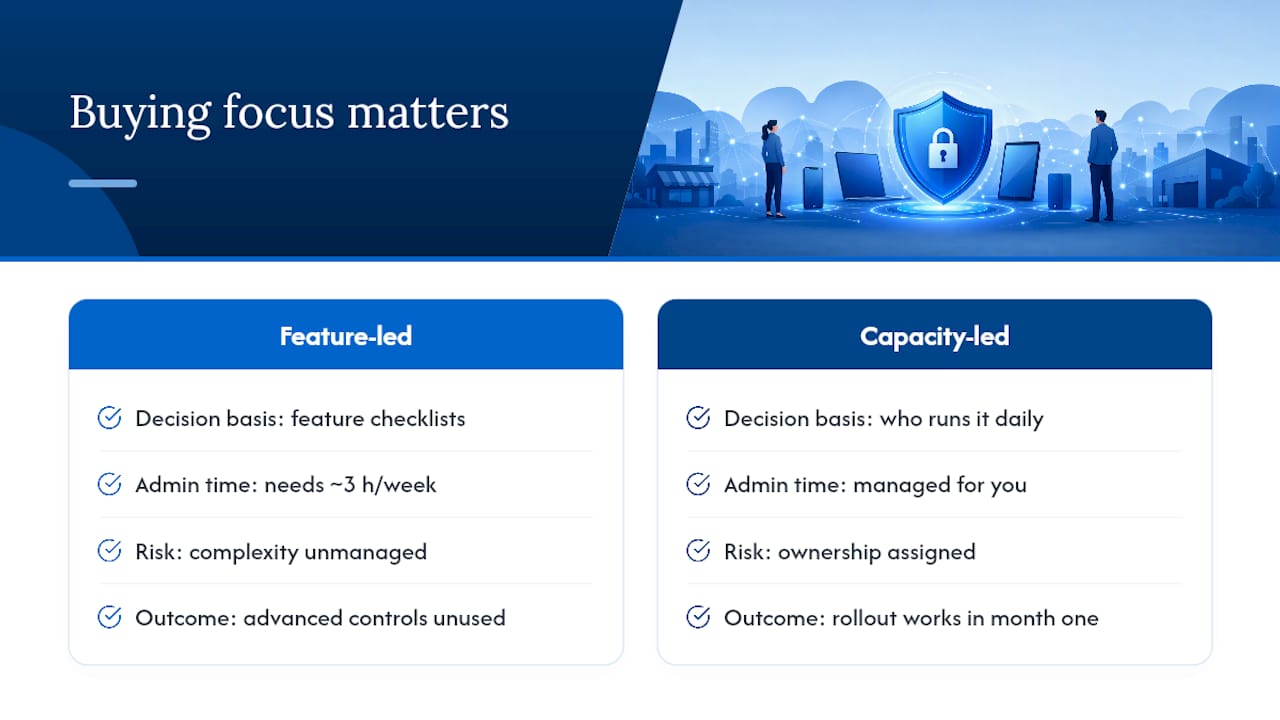
A ten-person company can buy the same enterprise-grade MDM as a 500-person one and still fail at it, not because the software lacks features, but because nobody has three hours a week to monitor compliance drift or answer enrollment tickets. The research on this is consistent: SMBs consistently trade advanced controls for reliable automation, because complexity nobody manages is worse than simplicity somebody actually runs.
That's the piece conventional buying guides underweight. Before comparing feature lists, be honest about who will own this day to day. If the answer is nobody specific, a managed service isn't a luxury upgrade. It's the difference between a rollout that works in month one and quietly decays by month four. Prioritize that answer first, and the rest of the decision gets a lot simpler.
— Alex
Getting Started With Managed MDM Through Securetechie
Managed IT services can fold mobile device management into a comprehensive monthly plan covering monitoring, help desk support, and compliance work, so you're not stitching together multiple vendors to secure one fleet of phones and laptops. Onboarding starts with the same inventory and pilot approach outlined earlier, and it comes with 24/7 monitoring already running by the time your staged rollout finishes.
That setup fits small businesses that need HIPAA, SOC 2, or client-driven compliance handled correctly without hiring a full IT department to do it. You get one predictable monthly bill instead of a stack of migration invoices and support tickets nobody owns. If your team has been putting off MDM because nobody has time to run it, get a scoped quote through Securetechie's managed IT services and find out what a hands-off rollout actually costs for your device count.
Sources and Further Reading
For deeper technical detail on rollout mechanics, Securetechie's Microsoft Intune guide and rollout case study walk through real deployment sequences. For pairing MDM with access controls, see the guide on multi-factor authentication for business. Budget context comes from SuperOps' MDM buying guide and pricing considerations from ManageEngine's cloud MDM page.
FAQ
Which MDM Software Is Best for Small Businesses?
There's no single best tool for every small business. The right choice depends on your device mix, whether anyone in-house can administer it, and your compliance needs. Businesses without dedicated IT staff generally get better outcomes from a managed MDM service like Securetechie than from a self-serve platform.
How Much Does an MDM Cost?
Pricing runs per-device or per-user, with basic remote wipe and enrollment at the low end and conditional access or compliance reporting pushing costs higher. Migration fees and professional services setup charges are common hidden costs worth asking about upfront.
Is There a Free MDM?
Some platforms offer limited free tiers for a small number of devices, usually capped on features like reporting or advanced policy controls. Most small businesses outgrow free tiers quickly once they need BYOD separation or compliance-grade audit logs.
How Do I Create My Own MDM?
Building an MDM system from scratch requires deep expertise in mobile operating system APIs, device enrollment protocols, and ongoing security maintenance, which is impractical for nearly every small business. It's far more realistic to deploy an existing platform like Microsoft Intune or work with a managed provider that handles configuration and monitoring for you.