
A HIPAA-compliant website secures every point where protected health information (PHI) is collected, transmitted, or stored, using administrative, technical, and physical safeguards as required by the HIPAA Security Rule. If your site has a contact form, appointment scheduler, patient portal, or telehealth link, it almost certainly touches PHI, and that makes compliance non-negotiable.
Your immediate priorities, executable within 24–72 hours:
- Audit your forms. Disable or replace any contact or intake form that sends PHI through an unsecured channel.
- Verify TLS. Confirm your site enforces TLS 1.2 or TLS 1.3 on every page, not just the login screen.
- List your vendors. Identify every third-party tool (scheduler, analytics, chat, CRM) that receives or processes PHI, and flag which ones have signed a Business Associate Agreement (BAA) with you.
- Start a risk assessment. Open a document, list your PHI touchpoints, and rate each by likelihood and impact of a breach. This document is your first piece of audit evidence.
Pro Tip: The fastest way to reduce exposure on a live site is to isolate all PHI collection to a single, BAA-covered endpoint, such as a dedicated forms platform or patient portal, rather than trying to harden every page of your public website at once.
Key Takeaways
A HIPAA-compliant website requires administrative controls, technical safeguards, and signed BAAs with every vendor that handles ePHI, and compliance must be maintained through ongoing monitoring, documented audits, and staff training.
| Point | Details |
|---|---|
| Map PHI touchpoints first | Audit every form, scheduler, tracker, and integration before writing a single line of remediation code. |
| BAAs are non-negotiable | Every vendor that handles ePHI must sign a BAA; a "HIPAA-ready" label without one is not compliant. |
| Isolate before you harden | Moving PHI collection to a single BAA-covered endpoint is faster and lower-risk than hardening an entire public site. |
| Document everything | Policies, training records, BAAs, and scan reports are the evidence that protects you during an HHS investigation. |
| Securetechie for managed compliance | Securetechie provides compliance audits, managed HIPAA-ready infrastructure, and ongoing monitoring for healthcare practices in Southern California. |
Table of Contents
- What HIPAA rules actually apply to your website
- How to find where PHI is collected on your site
- Policies, BAAs, and access controls your site compliance requires
- Technical safeguards your website must have in place
- When to use HIPAA-compliant hosting vs. isolating PHI components
- Step-by-step implementation plan and realistic timeline
- How to monitor for breaches, respond to incidents, and pass audits
- How Securetechie approaches HIPAA website compliance
- What working with small practices actually teaches you about website compliance
- Securetechie's HIPAA compliance services for healthcare websites
- Sources
What HIPAA rules actually apply to your website
The HIPAA Security Rule requires covered entities and their business associates to implement administrative, physical, and technical safeguards to protect electronic PHI (ePHI). A covered entity is any healthcare provider, health plan, or clearinghouse that transmits health information electronically. A business associate is any vendor or contractor that creates, receives, maintains, or transmits ePHI on your behalf, including your hosting provider, forms platform, and analytics tool.
Your website falls under HIPAA the moment it collects, displays, or transmits information that could identify a patient and relates to their health condition, care, or payment. That includes a form asking for a name and reason for visit, a scheduling tool that stores appointment details, or a chat widget that logs symptom descriptions.
The Security Rule organizes safeguards into three categories: administrative (policies, training, access management), physical (server and workstation security), and technical (encryption, authentication, audit controls). All three apply to web-based systems that handle ePHI.
— HHS Security Rule Summary
The Privacy Rule governs how PHI may be used and disclosed. For websites, this means your privacy notice must accurately describe how patient data collected through the site is used, and you cannot share that data with third-party trackers without a valid authorization or a BAA. HHS has published specific guidance on online tracking technologies that clarifies how pixel-based trackers and analytics tools can create HIPAA risk when they receive identifiable information. The HHS FAQ library is a practical resource for clarifying edge cases as you map your site.
How to find where PHI is collected on your site
Mapping PHI touchpoints is a concrete exercise, not a theoretical one. Work through your site systematically before writing a single line of remediation code.
Step-by-step mapping process:
- Open your site in a browser and click through every page, including hidden or linked subpages.
- List every form: contact, intake, appointment request, prescription refill, insurance verification, and feedback.
- Identify file upload points: patient document uploads, lab result submissions, and image uploads.
- Note every embedded third-party tool: scheduling widgets (Calendly, Acuity, or similar), live chat, telehealth links, and patient portal iframes.
- Check your analytics setup. Google Analytics 4, Meta Pixel, and similar tools can receive URL parameters, form field data, or IP addresses that, combined with health context, constitute PHI. HHS guidance on online tracking addresses this directly.
- Review your CRM and email integrations. If a form submission routes to HubSpot, Mailchimp, or a similar platform, that platform receives the data and needs a BAA.
- Audit cookies. Session cookies on authenticated patient portals can carry session tokens tied to PHI.
For each touchpoint, label it against four questions:
- Does it collect PHI?
- Does it transmit PHI to a third party?
- Does it store PHI (in a database, log, or third-party system)?
- Does a vendor have access to the data?
Any "yes" answer means that touchpoint requires a technical safeguard and, if a vendor is involved, a signed BAA. Vendor-managed HIPAA-compliant forms platforms can securely capture PHI, integrate with EHRs, and typically provide a BAA, but you must verify the integration scope and BAA terms before going live. The NIH Privacy Rule reference provides useful clarifications on PHI definitions for edge cases like research intake forms or clinical screening tools embedded on a practice website.
Policies, BAAs, and access controls your site compliance requires
Technical controls alone do not satisfy HIPAA. The administrative layer, policies, agreements, and training, is what gives those controls legal and operational weight.
Business Associate Agreements. A BAA is required whenever a vendor handles ePHI on your behalf. This covers your hosting provider, forms platform, EHR integration partner, telehealth vendor, and any analytics or CRM tool that receives patient data. HHS publishes sample BAA provisions that describe the elements a valid agreement must include: permitted uses of PHI, safeguard obligations, subcontractor requirements, breach notification timelines, and termination provisions. Request the BAA before you connect any vendor to a PHI-handling system, not after.
Required policies for web compliance include:
- Data classification policy: defines what counts as PHI on your site and how it must be handled.
- Retention and disposal policy: specifies how long web-collected PHI is kept and how it is securely deleted.
- Acceptable use policy for web administrators: governs who can modify site code, access databases, or change hosting configurations.
- Vendor management policy: documents how you evaluate, onboard, and monitor third-party vendors with PHI access.
Role-based access control (RBAC) limits who can reach PHI-related systems. Your web developer does not need database access to patient records. Your front-desk coordinator does not need hosting panel credentials. Apply least-privilege: grant only the access each role genuinely requires, review it quarterly, and revoke it immediately when someone leaves. Mandate multi-factor authentication (MFA) for every privileged account, including hosting control panels, CMS admin logins, and database interfaces.
Pro Tip: Keep a simple access log spreadsheet: who has admin access to what system, when it was granted, and when it was last reviewed. This one document answers a significant portion of an auditor's access-control questions.
Staff training should occur at onboarding and at least annually thereafter. Document every session with a sign-off record. Training does not need to be elaborate; a 30-minute walkthrough of your policies, PHI handling procedures, and breach reporting steps satisfies the requirement when it is documented. For practical guidance on password management and privileged account controls, a structured approach to credential hygiene reduces the risk of unauthorized access significantly.
Technical safeguards your website must have in place
The Security Rule's technical safeguard requirements translate into a concrete set of controls for any site that handles ePHI. The ONC/HealthIT privacy and security guide provides practical implementation checklists that map directly to these requirements.

Encryption. HHS guidance on encryption classifies it as an addressable implementation specification, meaning you must implement it or document a compensating control. In practice, there is no defensible alternative for a public-facing website. Enforce TLS 1.2 at minimum; TLS 1.3 is preferred. Disable SSL 3.0, TLS 1.0, and TLS 1.1. Encrypt PHI at rest in every database, backup, and file store that holds patient data.
Authentication controls:
- Require strong passwords (minimum 12 characters, complexity enforced) for all accounts with PHI access.
- Enforce MFA on all admin, clinician, and database accounts.
- Use single sign-on (SSO) where your infrastructure supports it to reduce credential sprawl.
- Set session timeouts on authenticated portals: 15 minutes of inactivity is a reasonable default.
Logging and audit trails. Capture login attempts (successful and failed), data access events, configuration changes, and file downloads. Retain logs for a minimum of six years to align with HIPAA's documentation retention requirement. Logs must be tamper-evident; store them in a write-once or append-only system where possible.
Backups. Run encrypted, automated backups at least daily. Store at least one copy offsite or in an immutable cloud storage tier. Test restoration quarterly. Document the backup schedule and retention period in your policies.
Additional controls to implement:
- Deploy a web application firewall (WAF) to filter malicious traffic before it reaches your application layer.
- Run automated vulnerability scans at least monthly and after every significant code deployment.
- Set secure HTTP headers:
Strict-Transport-Security,Content-Security-Policy,X-Frame-Options, andX-Content-Type-Options. - Mark all session cookies as
SecureandHttpOnly. - Review your secure website design practices to confirm headers and cookie flags are correctly configured at the server level.
Pro Tip: Run your site through Mozilla Observatory (observatory.mozilla.org) before and after implementing security headers. It scores your configuration and flags missing controls in under a minute, giving your developer a clear remediation list.
For secure file transfer between your site and backend systems, use SFTP or HTTPS-based APIs with certificate pinning rather than plain FTP or unencrypted email attachments.
When to use HIPAA-compliant hosting vs. isolating PHI components
Not every healthcare website needs to run on a fully HIPAA-dedicated hosting environment. The right strategy depends on where PHI actually lives on your site.
What HIPAA-compliant hosting must provide:
- A signed BAA from the hosting provider
- Encrypted storage for all data at rest
- Hardened server configurations with regular patching
- Access logging and audit trail capabilities
- Encrypted, tested backups with documented retention
Full-site HIPAA hosting makes sense when your entire site is a patient-facing application, such as a telehealth platform or a patient portal, where PHI flows through most pages and components. It is also the right choice when your development team lacks the capacity to isolate and harden individual components.
The isolation approach works well for practices whose public website is primarily informational, with PHI collected only through specific, bounded touchpoints. A vendor-managed HIPAA-compliant forms platform embedded via iframe or redirect keeps PHI off your primary server entirely, provided the vendor signs a BAA and you verify the integration scope.
When evaluating any hosting vendor or forms provider, request:
- A current SOC 2 Type II audit report
- Their BAA template before signing anything
- Documentation of encryption at rest (algorithm and key management)
- Vulnerability scanning cadence and patch SLA
- Log retention period and access controls on logs
For EHR integrations and API connections, use segmented subdomains or separate infrastructure for PHI-handling endpoints. This limits the blast radius of a breach and simplifies your audit scope. Security engineering guidance from partners like Akika Labs covers API-level controls and segmentation patterns worth reviewing before building any EHR-connected feature.
Step-by-step implementation plan and realistic timeline
A phased approach prevents the paralysis that comes from trying to fix everything at once. The phases below apply whether you are building a new site or remediating an existing one.
Implementation phases:
- Risk assessment (Days 1–5): Document all PHI touchpoints, rate each by likelihood and impact, and produce a written risk assessment. This is the foundation of your compliance program.
- Inventory and mapping (Days 3–7): Complete the touchpoint mapping exercise from Section 3. Label every component by PHI status.
- BAAs and vendor locks (Days 5–14): Contact every vendor with PHI access. Collect signed BAAs or replace non-compliant vendors. Reference HHS sample BAA provisions when reviewing vendor templates.
- Technical controls (Days 10–28): Enforce TLS, implement MFA, configure security headers, deploy WAF, enable logging, and encrypt databases and backups.
- Testing (Days 25–35): Run vulnerability scans, verify TLS configuration, test backup restoration, and review log capture for completeness.
- Documentation and training (Days 30–42): Finalize policies, conduct staff training, and document completion with sign-off records.
- Audit readiness review (Days 40–50): Compile your risk assessment, BAAs, training records, and scan reports into a compliance evidence folder.
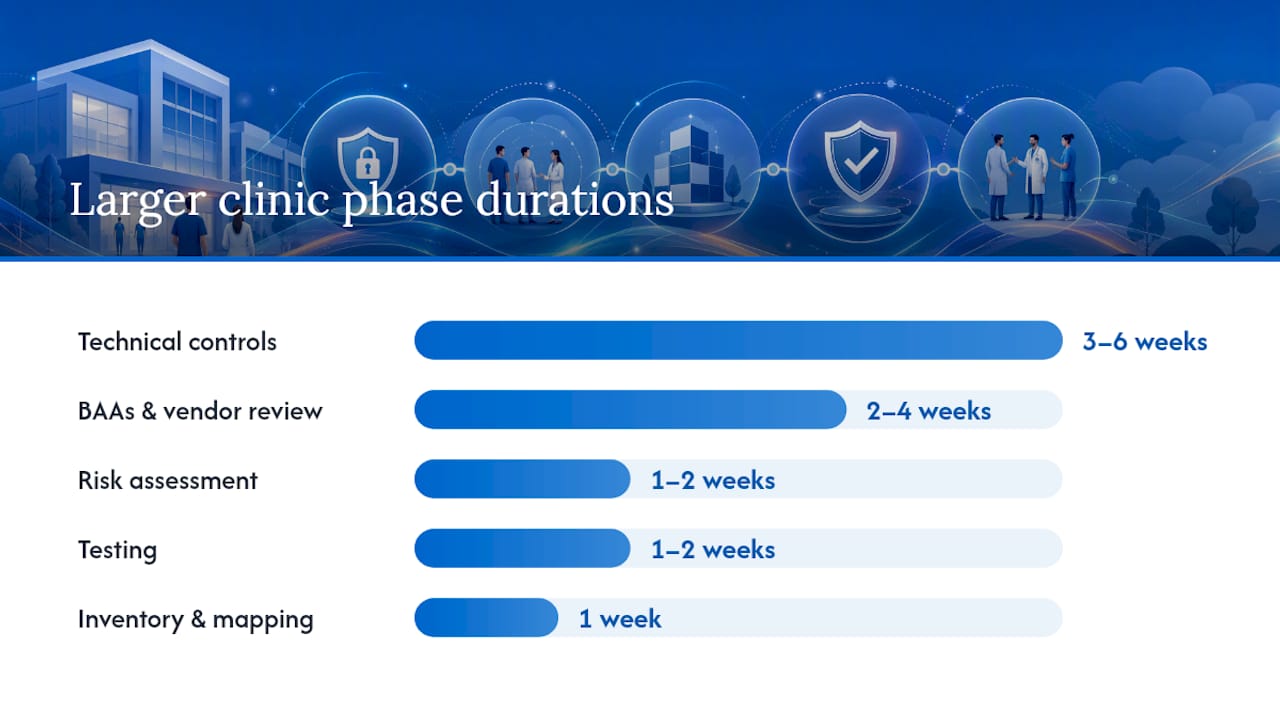
| Phase | Small Practice (1–5 staff) | Larger Clinic (10+ staff) |
|---|---|---|
| Risk assessment | 2–3 days | 1–2 weeks |
| Inventory and mapping | 1–2 days | 1 week |
| BAAs and vendor review | 1–2 weeks | 2–4 weeks |
| Technical controls | 1–2 weeks | 3–6 weeks |
| Testing | 3–5 days | 1–2 weeks |
| Documentation and training | 3–5 days | 1–2 weeks |
| Total | 4 weeks | 10 weeks |
Primary cost drivers to budget for:
- HIPAA-compliant hosting or forms platform subscription
- Developer time to isolate PHI components, configure headers, and enable logging
- Annual compliance audit (internal or third-party)
- Staff training program (one-time build, annual refresh)
- Ongoing vulnerability scanning and monitoring tools
The HIPAA compliance checklist from Securetechie maps these phases to specific organizational controls and is a useful companion document during the implementation sprint.
How to monitor for breaches, respond to incidents, and pass audits
Compliance is not a one-time project. Ongoing monitoring, documented incident response, and periodic audits are what keep a compliant site compliant.
Monitoring essentials:
- Review access logs weekly for anomalous login patterns, unusual data exports, or access from unexpected IP ranges.
- Set automated alerts for failed login thresholds (e.g., five failed attempts in ten minutes), large data downloads, and configuration changes.
- Run vulnerability scans monthly and after every significant deployment.
- Conduct a penetration test at least annually, or after any major infrastructure change.
Incident response for web-originated breaches:
When a potential breach is detected, isolate the affected component immediately, preserve forensic logs without modification, and begin the HHS breach assessment. Under the HIPAA Breach Notification Rule, you must notify affected individuals within 60 days of discovering a breach, and notify HHS. Breaches affecting 500 or more individuals in a state require media notification as well. HHS enforcement examples document the types of website-related incidents that have led to corrective action plans and civil monetary penalties, and they are worth reviewing before an incident occurs.
The HHS enforcement process begins with a complaint or self-report, moves to investigation, and can result in corrective action plans, resolution agreements, and civil monetary penalties. Documented controls and a written incident response plan are the two factors that most consistently reduce penalty exposure during an investigation.
— HHS Enforcement Process
Audit documentation to maintain:
- Current, signed BAAs for every vendor with PHI access
- Written risk assessment, updated at least annually
- Staff training records with dates and sign-offs
- Vulnerability scan and penetration test reports
- Access review records (who has what access, last reviewed when)
- Incident log, even for near-misses and false positives
The Securetechie cybersecurity services team provides 24/7 monitoring and incident response support for practices that cannot staff these functions internally.
How Securetechie approaches HIPAA website compliance
Securetechie's process for getting a healthcare site compliant follows the same phased structure described above, with a managed layer that reduces the internal overhead for practices and clinics.
Services included in a HIPAA website compliance engagement:
- Full compliance audit covering PHI touchpoints, existing controls, and gap analysis
- Managed hosting and infrastructure configured for HIPAA requirements, with a signed BAA
- Secure web development to isolate PHI components, implement security headers, and configure WAF and logging
- BAA provisioning and vendor review support
- Ongoing 24/7 monitoring with automated alerting and log management
- Annual audit support with compiled evidence packages
The Securetechie process:
- Assessment: Map all PHI touchpoints, review existing vendor agreements, and produce a prioritized gap report.
- Remediation: Execute technical controls in order of risk priority, starting with form isolation, TLS enforcement, and MFA.
- Vendor BAAs: Coordinate BAA execution with hosting, forms, and integration vendors.
- Controlled deployment: Deploy changes in a staging environment, run vulnerability scans, and validate logging before production release.
- Ongoing monitoring and audits: Provide continuous monitoring, quarterly access reviews, and annual audit evidence packages.
Clients working with Securetechie on compliance and security audits receive documented evidence of controls that satisfies HHS audit requirements, reduces internal overhead, and supports the 99.9% uptime guarantee Securetechie maintains across managed infrastructure.
Pro Tip: Ask any compliance vendor for their BAA template and a sample audit evidence package before signing a contract. A provider that cannot produce both quickly is unlikely to have the documentation discipline HIPAA requires.
What working with small practices actually teaches you about website compliance
The most consistent pattern across small practice engagements is not a lack of intention. It is a lack of inventory. Practices often believe their site is low-risk because it does not have a patient portal, then discover during a mapping exercise that their contact form routes to a Gmail account, their scheduling widget sends appointment confirmations through an unreviewed third-party, and their site has a Meta Pixel firing on every page, including the appointment confirmation page.
The second most common gap is unsigned BAAs. A vendor's "HIPAA-ready" badge means nothing without a signed agreement. Practices frequently assume that because a vendor markets to healthcare, the BAA is automatic. It is not.
The high-leverage fixes are almost always the same: isolate the PHI-collecting form to a BAA-covered platform, remove or gate tracking pixels from PHI-adjacent pages, enforce MFA on every admin account, and get BAAs signed. A focused remediation sprint of a few weeks covering those four areas can materially reduce exposure for most small practices before any deeper infrastructure work begins.
Where teams consistently underestimate effort is in documentation. The technical fixes are often faster than expected. Writing the policies, training staff, and assembling audit evidence takes longer. Build that time into your project plan from day one, not as an afterthought after the technical work is done.
Speed matters, but a fix with no documentation is a fix that cannot be proven. Move quickly on the highest-risk controls, and document as you go.
Securetechie's HIPAA compliance services for healthcare websites
Healthcare providers in Southern California dealing with PHI on their websites face a specific challenge: the technical and administrative requirements are well-defined, but executing them correctly while running a practice is a different matter entirely.

Securetechie delivers managed infrastructure configured for HIPAA requirements, including BAA-covered hosting, encrypted storage, 24/7 monitoring, and audit-ready logging. The compliance audit service identifies every PHI touchpoint on your site, produces a prioritized remediation plan, and handles BAA coordination with your vendors. Web development engagements cover form isolation, security header configuration, WAF deployment, and secure portal integration. For practices that need ongoing support, the managed cybersecurity service provides continuous monitoring and incident response without requiring internal IT staff.
To start, request a compliance and security audit from Securetechie. The engagement begins with a scoped assessment of your website and infrastructure, followed by a written gap report and a prioritized remediation plan you can act on immediately.
Sources
The sources below are the primary references for U.S. HIPAA website compliance. Each serves a different purpose in your compliance work.
This article is general information, not a substitute for advice from a qualified doctor. Consult a qualified healthcare professional about your own circumstances before acting on anything here.