Yes, your business needs an independent Google Workspace backup. Google's native retention tools were built for short-term cleanup, not disaster recovery, and their restore windows close fast. The standard for business continuity is a dedicated backup service with point-in-time restore, immutable storage, and self-service recovery. Start by piloting a backup for 5 to 10 users, or request an assessment from Secure Techies to see how big the gap really is.
TL;DR:
- Backups should include all Google Workspace data, including shared drives, contacts, calendars, chat, and Sites, with metadata like permissions and ownership preserved.
- Choose backup solutions that offer automated, incremental backups with true point-in-time restore, immutable storage, and self-service recovery options for full operational safety.
- Regularly test restores, starting with a pilot group, to ensure backup integrity and validation before broad domain deployment, while defining clear RPO and RTO targets.
- Ensure backup vendors provide secure, encrypted storage with role-based access control, audit logs, and compliance support for standards like HIPAA or SOC 2.
- Relying solely on Google's native retention tools risks data loss due to short recovery windows; an independent backup service with scheduled testing is essential for business continuity.
Table of Contents
- What Does Google Workspace's Native Recovery Actually Cover?
- Which Google Workspace Apps and Data Need Backup?
- What Features Should You Require From a Backup Vendor?
- How Do You Set Up and Test a Google Workspace Backup?
- How Long Do Google's Export and Restore Options Really Take?
- What Security and Compliance Checks Belong in Your Backup Plan?
- What Do IT Teams Get Wrong About Google Workspace Backup?
- How Secure Techies Handles Google Workspace Backup and Recovery
- Where Can You Find Official Google Workspace Backup Guidance?
- Sources
- FAQ
What Does Google Workspace's Native Recovery Actually Cover?
Google gives you a safety net, but it's a short one. Once a file lands in a user's trash, it stays recoverable for 30 days before the system deletes it permanently. Admins get a slightly wider window for certain Drive restores, up to 25 days after the trash empties, but that's still a hard deadline, not an ongoing safety margin.
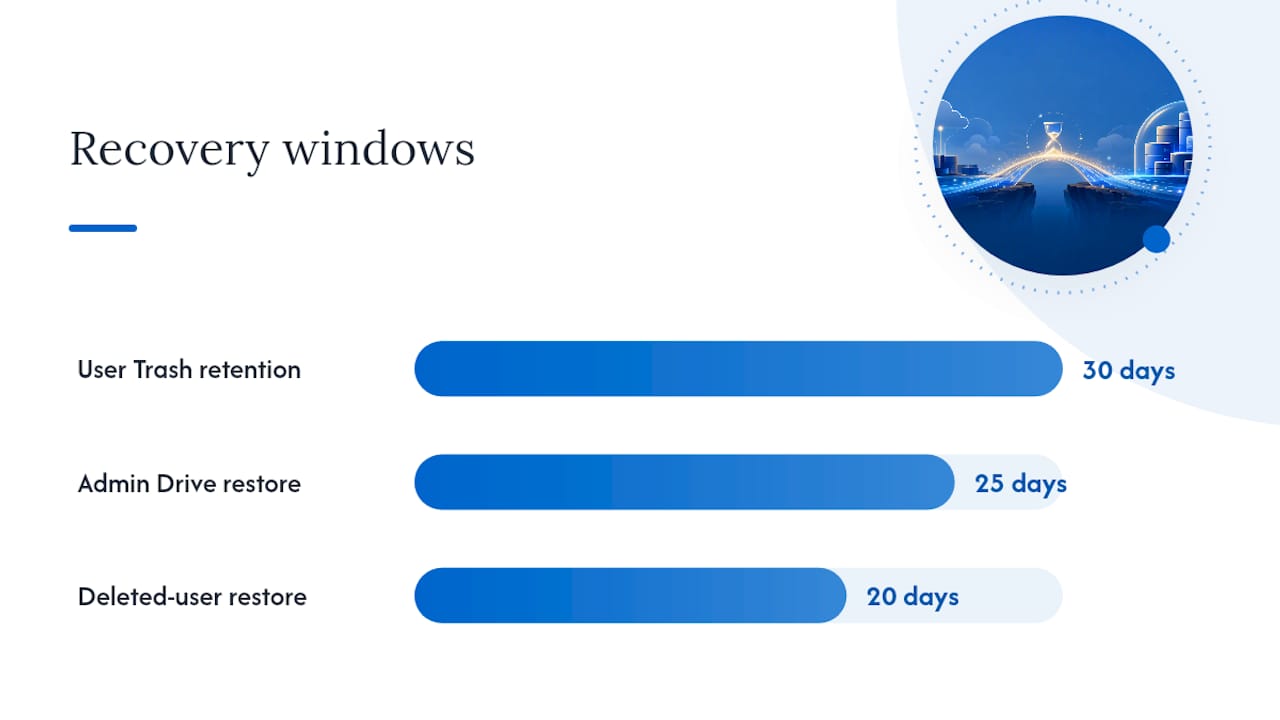
Delete a user account and the clock is even tighter. Admins can only restore a deleted user and their data within 20 days of deletion. After that, the account and everything in it is gone for good through standard tools.
Google Vault adds another layer, but it solves a different problem entirely. Vault handles eDiscovery, legal holds, and long-term retention. It was never designed to restore a mailbox or a Drive folder back into a live account. And Data Export, Google's built-in portability tool, produces bulky zip archives rather than quick, targeted restores.
- Trash retention for end users is limited to a short, fixed period before permanent deletion
- Admin Drive restore window of up to 25 days
- Deleted-user restore limited to 20 days
- Vault for compliance, not operational recovery
- Data Export archives are slow and unwieldy for daily use
Which Google Workspace Apps and Data Need Backup?
A comprehensive Google Workspace backup strategy has to cover more than email. Ransomware, accidental deletion, and insider mistakes touch every corner of the platform, and a backup plan with blind spots is really just a partial plan.
Scope your backup to include:
- Gmail, including custom labels and filters
- Drive files, folders, and version history
- Shared Drives, which often hold your most critical team data
- Calendar events and shared calendars
- Contacts, both personal and shared
- Chat and Spaces conversations
- Sites pages and Forms responses
- Classroom data, if your organization uses it
Metadata matters just as much as the content itself. Permissions, ownership records, sharing links, and timestamps all need to survive a restore intact, or you'll spend hours rebuilding access after the fact. Don't overlook archived and deleted users, either, along with files owned by service accounts. Those often sit outside standard licensing and get missed entirely during a rushed backup rollout.
What Features Should You Require From a Backup Vendor?
Not every product marketed as "Google Workspace backup" delivers real operational recovery. Some are closer to glorified export tools. Before signing a contract, hold every vendor or managed service to the same checklist.
- Automated, incremental backups running on a configurable schedule, with true point-in-time restore, not just a single daily snapshot.
- Immutable, ransomware-safe storage with built-in verification so a compromised admin account can't also compromise your backup copies.
- Granular restore options, from a single email to a full domain-wide rollback to a specific date and time.
- Self-service restore for end users, paired with admin-level search and eDiscovery for legal or HR requests.
- Audit logging and role-based access control (RBAC) so you know exactly who touched what, and when.
- Flexible storage location choices, including bring-your-own-storage (BYOS) or Google Cloud Storage, plus retention policies you control rather than ones fixed by the vendor.
- A written SLA covering recovery time objective (RTO) and recovery point objective (RPO), not vague promises.
- Encryption at rest and in transit, along with a stated commitment to regular restore testing.
Pro Tip: Ask any vendor to run a live test restore during your evaluation, not just a demo video. If they hesitate or can't show you a real point-in-time recovery, that's your answer.
How Do You Set Up and Test a Google Workspace Backup?
Rolling out backup coverage across an entire domain on day one is how projects stall. A phased approach gets you real answers faster and with far less risk.
- Define scope and targets. Decide which apps and users matter most, then set realistic RPO and RTO numbers based on how much data loss and downtime your business can tolerate.
- Run a pilot. Start with 5 to 10 users across a mix of roles, including at least one shared drive owner.
- Authorize the service account. Connect your backup tool to Workspace and choose your storage destination, whether that's a vendor-managed environment or your own cloud storage bucket.
- Set your retention policy. Match retention length to your compliance obligations and internal data governance rules, not just the vendor's default setting.
- Validate the backups. Confirm incremental jobs are actually capturing changes, then run test restores at both the individual file level and in bulk.
- Roll out domain-wide. Expand from the pilot group once test restores succeed, enforcing multi-factor authentication and RBAC specifically for anyone with restore permissions.
- Document the runbook. Write down who initiates a restore, who approves it, and how long each step should take, so a crisis doesn't become a scramble to figure out ownership.
Skipping the pilot is the single most common mistake IT teams make here. A backup that's never been test-restored isn't a backup. It's an unverified assumption.
How Long Do Google's Export and Restore Options Really Take?
Google's Data Export tool writes archives to a Google Cloud Storage bucket, and depending on how much data you're moving, the process can take roughly 48 hours up to many days. Incremental export options exist to cut down on repeat work by exporting only new or changed files, but they still require authorizing a dedicated service account and remain built for portability, not fast recovery.
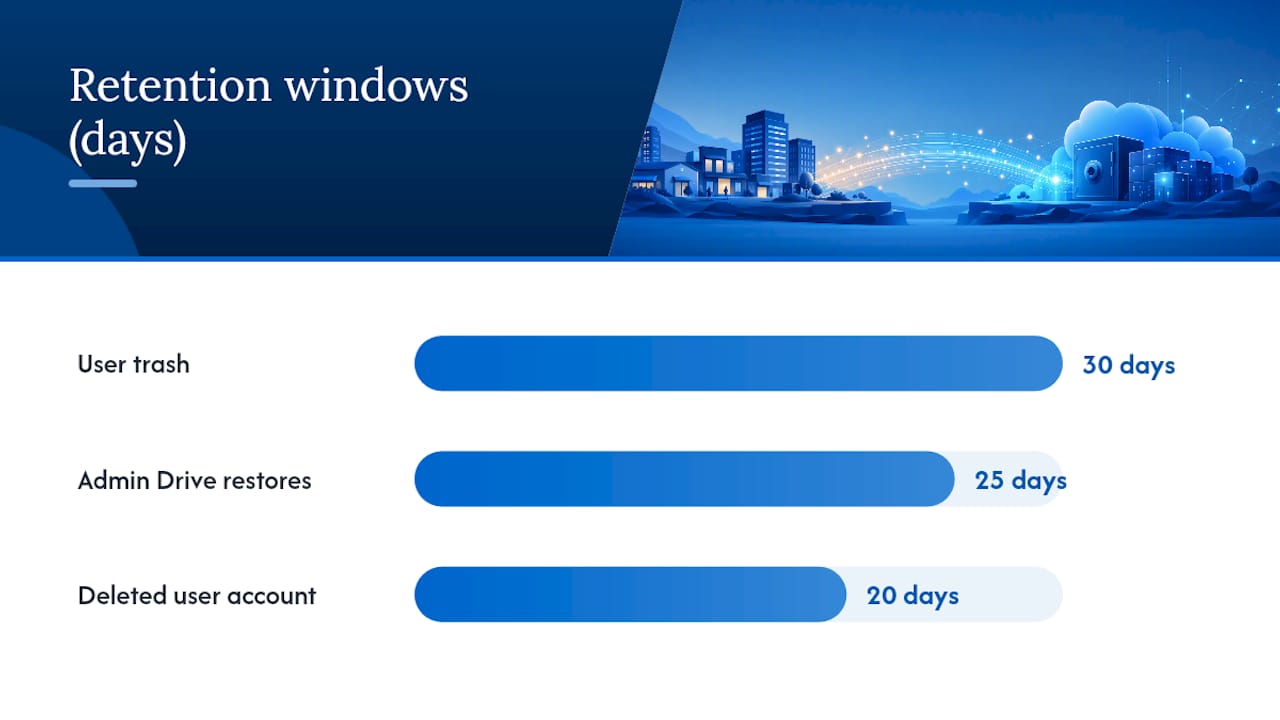
The retention math is unforgiving: 30 days for user trash, 25 days for admin Drive restores, and just 20 days to bring back a deleted user account. Miss any of those windows and standard tools can't help you.
- Data Export is primarily designed for compliance and archiving rather than fast recovery
- Incremental export saves storage space but remains slower for restore operations
- Default exported archives are deleted after a short retention period unless stored in a customer-owned bucket
Exports have a real place in your compliance toolkit. They're just the wrong tool when a partner needs their inbox back in the next hour.
What Security and Compliance Checks Belong in Your Backup Plan?
A backup that isn't secure is a second attack surface, not a safety net. Before you deploy any solution, confirm it meets the same bar you'd hold your production environment to.
- Encryption at rest and in transit, with clear answers on who controls the keys
- BYOS options if your industry or contracts require specific data residency
- Immutable backups and a clean-room restore process, so a ransomware infection can't ride back in through the recovery itself
- Audit logs and RBAC that integrate with legal hold and eDiscovery workflows alongside Vault
- Written confirmation the vendor supports frameworks like HIPAA or SOC 2, backed by an actual contract or policy document, not just a sales claim
If a vendor can't answer these plainly, treat that as a red flag rather than a detail to follow up on later.
What Do IT Teams Get Wrong About Google Workspace Backup?
The mistake Secure Techies sees most often isn't a missing backup tool. It's an incomplete one. Teams back up Gmail and personal Drive files, then forget Shared Drives entirely, or overlook files owned by service accounts that never show up in a standard user audit. Archived and deleted users get missed the same way, quietly falling outside the backup's scope until someone needs a file that no longer exists anywhere.
A staged pilot fixes most of this before it becomes a problem. Test restores, both single-file and bulk, before trusting any backup with production data. Daily or continuous incremental backups tend to fit most SMB workloads, since Google Workspace changes constantly throughout a business day and a once-daily snapshot can leave hours of work exposed. The organizations that handle this well treat backup validation as a recurring calendar item, not a one-time setup task.
— Alex
How Secure Techies Handles Google Workspace Backup and Recovery
You can consider managed Google Workspace backup services that offer scheduled test restores, compliance alignment for standards like HIPAA, and recovery times backed by an actual SLA rather than a best guess.

Self-serve SaaS backup tools work fine if you have the internal staff to configure, monitor, and test them consistently. Many SMBs don't have that bandwidth to spare, and that's exactly where a managed service can provide significant support by handling configuration, running restore tests on schedule, and keeping documentation current.
If you want a clear picture of where your current setup falls short, request an audit through Secure Techies' Backup & Disaster Recovery page and get a specific plan instead of a generic checklist.
Where Can You Find Official Google Workspace Backup Guidance?
For hands-on admin tasks, start with Google's own documentation on restoring deleted files and setting up incremental data export. For planning a broader migration or backup rollout, Secure Techies' migration roadmap walks through scope and permissions in more detail.
Sources
- Recover deleted files and folders for Drive users | Drive & Docs | Google Workspace Help
- Export your Workspace data using local data storage | Google Workspace Admin
FAQ
What's the Difference Between Google Drive and Google Workspace?
Google Drive is a single storage and file-sharing app. Google Workspace is the full suite: Gmail, Drive, Calendar, Contacts, Chat, Sites, and more, all under one admin console. Backup planning has to cover the whole suite, not just Drive.
Where Can You Access Your Google Backup?
If you're relying on Google's native tools, exports live in the Google Cloud Storage bucket you specify during setup. Managed backup services typically store your data in separate vendor-managed or BYOS locations, accessible through a dedicated restore console.
Will You Lose Your Emails if You Cancel Google Workspace?
Yes, in most cases. Once a subscription ends and the retention period lapses, Google does not guarantee ongoing access to your data. An independent backup taken before cancellation is the only reliable way to preserve your email history.
Can Veeam Backup Be Used to Back Up Google Workspace?
Veeam and similar third-party platforms do offer Google Workspace backup modules with incremental backups and point-in-time restore. When evaluating any provider, including Veeam, hold it to the same checklist: immutable storage, granular restore, and a documented SLA for recovery time.
How Much Does Google Workspace Backup Cost With Secure Techies?
Pricing depends on user count, storage needs, and retention requirements, so current rates are available directly through Secure Techies. Requesting an assessment gets you a specific quote based on your actual environment rather than a generic estimate.