
A compliant email archive must capture every message and attachment with full metadata, keep records tamper-evident or immutable, support immediate legal holds, and make records searchable and auditable for the required retention period. That's the whole job description. If your current system can't do all four, it's a mailbox with a search bar, not a compliance tool.
These requirements aren't arbitrary. SEC Rule 17a-4 demands WORM storage for broker-dealer records. HIPAA's Security Rule requires access controls and audit trails for anything touching protected health information. SOX holds public companies to a multi-year retention period on audit communications. FRCP Rule 37(e) triggers preservation duties the moment litigation becomes reasonably foreseeable, regardless of your industry.
Here's what to verify before you do anything else:
- Does your legal hold actually override automated deletion, right now, for a real custodian?
- Are your audit logs immutable and exportable on demand?
- Can you retrieve a message from three years ago with its original headers and attachment intact?
Pro Tip: Test the legal hold before you touch the retention schedule. Organizations that configure auto-purge first and plan to "add holds later" are the ones that show up in spoliation sanctions cases.
Key Takeaways
Defensible email archiving requires immutable storage, complete metadata capture, tested legal holds, and documented retention policies mapped to the specific regulations governing your industry.
| Point | Details |
|---|---|
| Archiving is not backup | Backups restore data after loss; archives preserve tamper-evident records for the retention period regulators require. |
| Know your retention windows | SEC demands six years with WORM storage; HIPAA requires six years with encryption and audit trails; SOX requires five years for audit records. |
| Test legal holds before automation | Confirm a hold stops deletion for a real custodian before enabling any purge schedule. |
| Migrate PSTs first | Consolidate legacy PST files into the archive before configuring retention enforcement, since gaps here surface during discovery. |
| Work with a partner who verifies, not just configures | Securetechie combines Microsoft 365 migration, compliance audits, and legal-hold testing into one engagement backed by a 99.9% uptime guarantee. |
Primary Sources for Compliance Teams
- FRCP Rule 37(e) guidance for ESI preservation duties
- NARA GRS 6.1 for federal email records and Capstone guidance
- Sarbanes-Oxley Act for audit-record retention requirements
When these frameworks conflict, particularly across multiple jurisdictions, involve legal counsel before finalizing your retention schedule rather than resolving the conflict through configuration alone.
Table of Contents
- What Is Email Archiving Compliance, Exactly?
- Regulatory Retention Rules That Shape Your Archive
- The Technical Controls an Archive Must Actually Have
- Building a Retention Policy and Governance Structure That Holds Up
- A Step-by-Step Path to a Defensible Archive
- Lessons From a Real Microsoft 365 Compliance Migration
- How Cross-Border Data Rules Complicate Email Archiving
- What to Look for When Evaluating an Archiving Vendor
- Budgeting for a Compliant Archive Without Surprises
- Getting Staff to Actually Follow the Retention Policy
- The Two Failure Points That Matter Most
- Getting Your Archive Compliance-Ready With Securetechie
- Frequently Asked Questions
- Sources
What Is Email Archiving Compliance, Exactly?
Email archiving and email backup solve different problems, and confusing them is the most common mistake regulated organizations make. A backup exists to restore data after a disaster. It's a point-in-time snapshot designed for recovery speed, not evidentiary integrity, and older versions typically get overwritten or cycled out. An archive exists to preserve records exactly as they were created, indexed for search, and protected from alteration for as long as regulation requires.
Native platform retention settings, like a mailbox retention policy in Microsoft 365, sit somewhere in between. They can delay deletion, but they usually don't provide the tamper-evident audit trail or purpose-built eDiscovery search that regulators expect from a true archive.
A record preserved for compliance needs to retain:
- Full message headers (sender, recipient, routing path, message ID).
- Attachments in native format, not flattened into PDFs that strip metadata.
- Accurate timestamps reflecting transit time, not just storage time.
- Thread context, so a reply makes sense without the original being separately archived and disconnected.
Strip any of these and you've got a record that looks complete but won't hold up under electronic mail records requirements or a discovery challenge.
Regulatory Retention Rules That Shape Your Archive
Every technical decision in your archive, from storage format to access controls, should trace back to a specific regulatory requirement. Here's how the major frameworks break down.
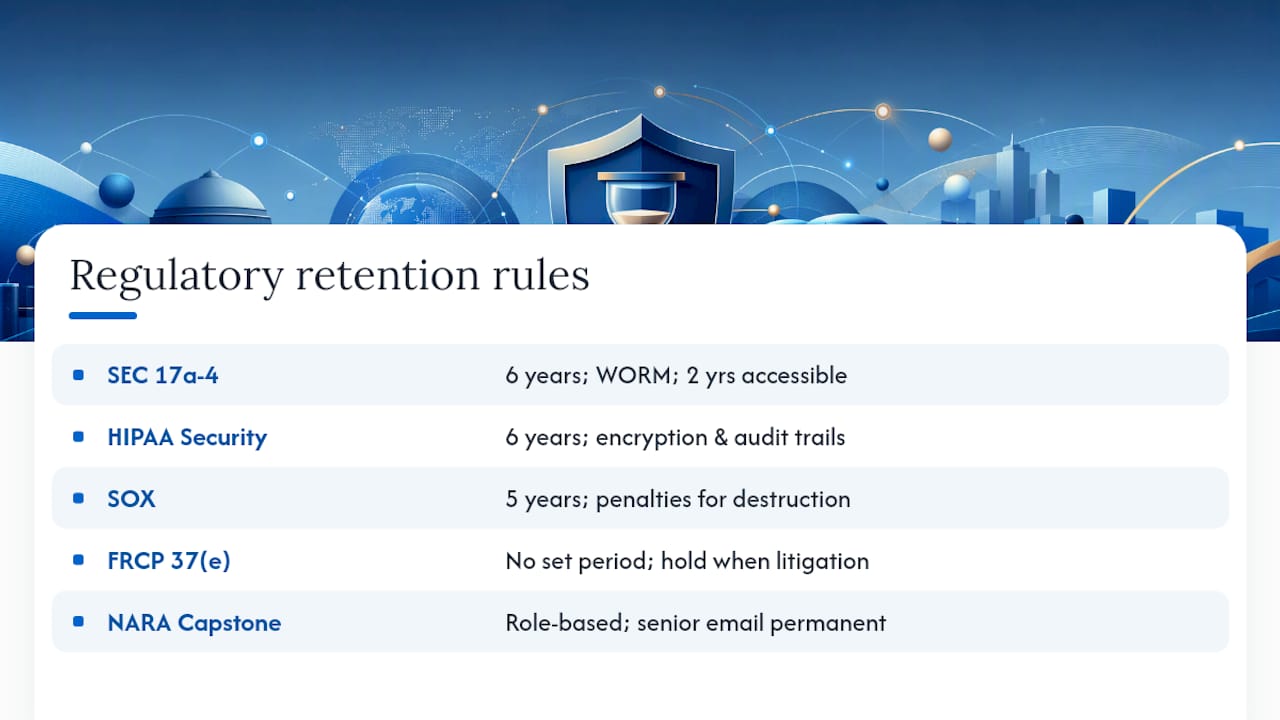
SEC Rule 17a-4 governs broker-dealers and requires six years of retention on covered records, with the first two years kept in an immediately accessible format. The rule specifically requires non-rewriteable, non-erasable (WORM) storage or a technology that achieves equivalent protection. Auditors will ask you to prove this, not just claim it.
HIPAA's Security Rule requires covered entities and business associates to retain documentation involving protected health information for a minimum of six years, backed by encryption, access controls, and detailed audit trails. If your practice or health system emails patient information without an archive that meets these controls, you're carrying risk regardless of how careful your staff is about phrasing. Securetechie's HIPAA compliance checklist breaks down the technical and administrative safeguards this rule actually demands.
SOX requires five years of retention on audit records and related communications for publicly traded companies. Willful destruction of these records, even after the fact, can trigger severe penalties independent of the underlying financial issue.
FRCP Rule 37(e) is different in kind from the others. It doesn't set a retention period. It creates a duty to preserve electronically stored information the moment litigation becomes reasonably anticipated, and it authorizes courts to sanction organizations, sometimes with adverse jury instructions, when relevant ESI isn't preserved. "We didn't think we needed to keep it" is not a defense once anticipation is established.
Federal agencies operate under NARA's GRS 6.1 and Capstone guidance, which uses role-based capture. Senior officials' email gets permanent retention, while lower-risk roles follow shorter, documented disposition schedules. It's a useful model even outside government: not every mailbox needs the same retention treatment, but every exception needs a documented reason.
The Technical Controls an Archive Must Actually Have
Policy documents don't survive an audit on their own. Auditors and opposing counsel want to see the underlying technology enforce what the policy claims.
Immutability or a tamper-evident audit trail is the baseline. WORM storage satisfies SEC and FINRA expectations directly; a cryptographically verifiable audit log can serve a similar function for regulations that don't mandate WORM specifically, but you need to be able to prove the record hasn't been altered since capture.
Encryption matters at both ends: AES-256 at rest, TLS 1.3 in transit. If your archive vendor operates a multi-tenant environment, ask directly how customer data is logically separated and how encryption keys are managed. A vague answer here is a red flag.
Full-text and attachment indexing turns a legal hold from a manual scavenger hunt into a defensible search. eDiscovery requests routinely require Boolean search across headers, body text, and attachment content within tight deadlines. An archive that can't search inside a PDF attachment isn't ready for a real request.

Audit logs and role-based access control need to show who accessed what, when, and why. Segregation of duties matters here: the person who can approve a legal hold shouldn't be the same person who can quietly export or delete records. Multi-person approval on exports and restores closes an obvious insider-risk gap.
Capture typically happens through journaling (a copy made at the moment of transit), API connectors into platforms, or lightweight agents. Journaling at the point of transit, rather than relying on periodic mailbox exports, avoids gaps caused by a user deleting a message before it's ever captured. Native tools like Microsoft Purview offer retention and hold capabilities that plug into a broader compliance program, but they typically need configuration and testing before they satisfy the controls above on their own.
Pro Tip: Ask any archive vendor to demonstrate a legal hold in a live environment during the sales process. If they can only show you a slide describing the feature, that's your answer.
Building a Retention Policy and Governance Structure That Holds Up
A retention policy that exists only on paper is worse than no policy at all, because it gives auditors a document to compare against what actually happened. The policy needs to map specific email categories, financial communications, PHI-containing threads, HR records, to the statute or standard that governs each one, along with disposition workflows and any documented exceptions.
Assign roles explicitly:
- Who issues a legal hold when litigation or a regulatory inquiry becomes reasonably foreseeable.
- Who implements the hold in the archive platform, and how fast that happens after issuance.
- Who monitors ongoing compliance, checking that holds remain active and retention schedules run as configured.
- Who documents the decisions, including the legal rationale when multiple regulations overlap.
That last point deserves emphasis. When retention requirements conflict, say SOX's five years against a state law requiring seven, the safer approach is adopting the strictest applicable period and documenting why.
The hold lifecycle itself runs through predictable stages: a trigger event, custodian notification, suspension of automated deletion for affected mailboxes, verification that the suspension actually worked, and eventual release once the matter closes. Skipping verification is where most programs fail. Regulators and courts don't accept "we sent the notice" as proof; they want evidence the deletion workflow was actually overridden. Build a testing and audit cadence, quarterly spot checks at minimum, that samples retention enforcement and documents any remediation.
A Step-by-Step Path to a Defensible Archive
Most remediation projects fail not because the technology is wrong, but because the sequencing is wrong. Here's the order that actually works.
-
Inventory every email data source. That includes primary mailboxes, shared mailboxes, legacy PST files scattered across desktops and file shares, and any third-party messaging channels (Teams, Slack, SMS) that touch regulated communications. Map each source to a retention category before you configure anything.
-
Migrate PSTs before you enable automation. This is consistently the slowest, most tedious part of remediation, and it's also the step organizations most want to skip. Treat PST discovery and ingestion as its own project milestone with its own deadline, not a background task that happens eventually.
-
Configure capture mode, retention schedules, legal holds, encryption, and access controls, then validate that audit logs are actually generating and WORM behavior is actually enforced. Configuration without validation is just an assumption.
-
Run test holds and mock eDiscovery exports. Pick a real custodian, issue a test hold, confirm deletion stops, then run a search across their mailbox to confirm indexing and export functions work as expected. Document every result.
-
Train custodians and schedule annual reviews. A policy nobody on the compliance team has read in eighteen months is a policy that's already drifted from practice.
Pro Tip: Before enabling any automated deletion schedule, confirm in your production environment, not a test tenant, that a held custodian's messages survive the purge cycle. This single check catches the majority of configuration failures we see.
Lessons From a Real Microsoft 365 Compliance Migration
Securetechie's own Microsoft 365 migration work illustrates why sequencing matters more than most IT teams assume going in. A recent engagement involved consolidating scattered PST files across dozens of desktops, enforcing retention schedules aligned to the client's regulatory obligations, and running legal-hold tests before any automated deletion went live.
A few patterns held up across that project and others documented in Securetechie's broader case study library:
- PST consolidation took longer than the platform migration itself, and skipping it would have left gaps in coverage that nobody would have noticed until a hold or audit request hit.
- Legal-hold testing surfaced configuration issues that weren't visible in the admin console until a real custodian's mailbox was put under hold and checked.
- Documented outcomes, backed by a 99.9% uptime guarantee on the resulting managed environment, gave the compliance team something concrete to show auditors instead of a policy binder.
The replicable takeaway: verify holds before deletion, and treat PST inventory as a prerequisite, not an afterthought.
How Cross-Border Data Rules Complicate Email Archiving
Regulated organizations with international operations, or even a handful of overseas employees, face a second layer of complexity on top of US retention law. Cross-border data transfer rules can restrict where archived email physically resides, how long it can be held, and who's permitted to access it.
The practical friction shows up in a few predictable places. An archive that replicates data across multiple regions for redundancy may inadvertently create a data residency violation if one of those regions falls outside an approved transfer mechanism. A US-based holding company with a European subsidiary may find that a routine legal hold covering all custodians globally triggers separate notice or consent requirements abroad that don't exist domestically.
The safest posture is architectural: know exactly where your archive vendor stores data, get that in writing, and confirm whether your retention and legal-hold workflows can be scoped by region without breaking the single-pane search and audit capability you need for domestic eDiscovery. Organizations that treat this as a contract-negotiation afterthought tend to discover the conflict during an actual cross-border litigation matter, which is the worst possible time to learn your archive can't segment data by jurisdiction. When these issues arise, involve counsel early rather than trying to resolve a conflict-of-law question through IT configuration alone.
What to Look for When Evaluating an Archiving Vendor
Vendor marketing pages tend to converge on the same claims, so the evaluation has to go deeper than a feature checklist. Ask for evidence, not assertions.
Start with certifications and attestations: SOC 2 Type II and ISO 27001 are the two that matter most for regulated buyers, because both require ongoing evidence collection rather than a one-time assessment. Securetechie's guide to SOC 2 evidence collection walks through what auditors actually expect to see documented, and it's a useful benchmark when you're reviewing a vendor's own audit reports. For technical asset controls specifically, the ISO 27001 software asset management framework offers a concrete checklist worth comparing against a vendor's stated practices.
Beyond certifications, ask a vendor to demonstrate, live, not in a demo script: a legal hold that survives a deletion attempt, an export with a verifiable chain of custody, and search performance across a mailbox with real attachment volume. Ask how they handle a business associate agreement if PHI is involved; Securetechie's overview of HIPAA business associate agreements is a good primer on what that document needs to cover before you sign anything.
Finally, get specific about exit terms. If you switch vendors in three years, can you export every record in native format with metadata intact, or are you locked into a proprietary format that makes migration its own compliance project?
Budgeting for a Compliant Archive Without Surprises
Archive costs typically break into three buckets, and organizations that budget for only one of them tend to get blindsided later. There's the licensing or subscription cost, usually scaled by mailbox count or data volume. There's the migration and remediation cost, PST consolidation, legacy data ingestion, and initial configuration, which is frequently underestimated because it's treated as a one-time technical task rather than a project with its own timeline and labor cost. And there's the ongoing governance cost: staff time for policy review, hold testing, and annual audits.
The migration bucket is where budgets most often go sideways. An organization with years of accumulated PST files spread across departing employees' old laptops can find that discovery and ingestion alone consumes more hours than the platform deployment itself. Building in a realistic estimate for this phase, rather than assuming it's a quick cleanup task, avoids the mid-project budget conversation nobody wants to have.
It's also worth weighing the cost of doing this in-house against a managed compliance engagement. A compliance and security audit that includes archive remediation as part of a broader HIPAA, SOC 2, or CMMC readiness project often costs less than treating each piece as a separate procurement, because the assessment work overlaps.
Getting Staff to Actually Follow the Retention Policy
The best-designed archive still fails if the people generating records don't understand what's expected of them. Training needs to go beyond a once-a-year slide deck that nobody retains past the following Tuesday.
Effective programs tend to focus on a few specific behaviors: what counts as a record subject to retention (most employees underestimate this), how to respond when notified of a legal hold, and who to contact if they suspect a record was deleted in error. Custodians under an active hold need direct, plain-language instructions, not a forwarded legal memo, about what they can and can't delete and for how long.

New-hire onboarding should include a session on email retention obligations specific to the employee's role, since a salesperson's obligations differ meaningfully from a compliance officer's. Annual refreshers matter more for this topic than most security training, because retention rules and legal-hold status change as litigation and regulatory exposure evolve. Pair the refresher with a short, real-world scenario, "you receive a hold notice, what do you do in the next hour", rather than an abstract policy summary. Organizations that skip this step often discover the gap only when an employee under an active hold deletes something they didn't realize was covered.
The Two Failure Points That Matter Most
Most guidance on this topic treats every compliance control as equally urgent, and that's the wrong lens. In practice, two failure points cause the overwhelming majority of real problems: legal holds that don't actually work when tested, and PST files that never made it into the archive in the first place.
The conventional advice, get certified, buy a platform, write a policy, treats archiving as a procurement decision. It isn't. It's an operational discipline that has to be tested, not just configured. A vendor's SOC 2 report tells you they have controls; it doesn't tell you your specific implementation enforces a hold correctly. That gap between "the platform can do this" and "we verified it does this in our environment" is where most audit findings and litigation sanctions originate.
If you do only two things after reading this, test a legal hold against a real custodian this quarter, and find out where your organization's PST files actually live before someone else does during discovery. Everything else, the policy language, the vendor certifications, the retention schedules, matters, but it's downstream of those two checks. Prioritize accordingly.
*— Alex
Getting Your Archive Compliance-Ready With Securetechie
Most organizations discover their archiving gaps during an audit or a discovery request, which is the most expensive possible time to find out a legal hold doesn't work or a decade of PST files never made it into the system. Securetechie approaches this differently: as a Southern California managed IT provider that runs Microsoft 365 and Google Workspace migrations, compliance audits, and cybersecurity engagements as one connected practice, not three separate vendor relationships you have to coordinate yourself.

That matters because the failure points covered here, PST discovery, legal-hold testing, retention configuration, rarely live cleanly inside one department. Securetechie's team handles the migration and the compliance verification together, so the archive that comes out the other end has already been tested against the exact scenarios an auditor or opposing counsel would ask about, backed by a 99.9% uptime guarantee on the environment it runs in.
If your organization needs HIPAA, SOC 2, or CMMC-aligned email retention in place before your next audit cycle, start with a compliance and security audit to find out exactly where your current setup stands.
Frequently Asked Questions
What is the difference between email archiving and email backup?
Backup creates point-in-time snapshots for disaster recovery and typically cycles out older versions. An archive preserves records in an unalterable or tamper-evident form for the full regulatory retention period, indexed for legal search and eDiscovery rather than restoration speed.
How long do regulated organizations need to retain email records?
It depends on the governing regulation. SEC Rule 17a-4 requires six years for covered broker-dealer records, HIPAA requires six years for documentation involving protected health information, and SOX requires five years for audit-related communications. When multiple rules apply, the safer practice is adopting the longest applicable period and documenting the rationale.
Does Microsoft 365 or Google Workspace handle email archiving compliance on its own?
Native retention tools like Microsoft Purview offer retention policies and hold capabilities, but they generally need deliberate configuration, testing, and documentation to meet the audit-trail and immutability standards regulators expect. Treat native platform tools as a foundation, not a finished compliance program.
What happens if a legal hold fails during litigation?
Under FRCP Rule 37(e), failing to preserve electronically stored information once litigation is reasonably anticipated can lead to court-ordered sanctions, including adverse jury instructions. This is why testing a hold against a real custodian before relying on it matters more than most compliance checklists suggest.
What's the biggest mistake organizations make with email archiving compliance?
Treating it as a one-time IT setup task instead of an ongoing governance program. The two most common real-world failures are legal holds that were never tested against actual deletion workflows and legacy PST files that never made it into the archive before automated retention rules went live.
This article is general information, not a substitute for advice from a qualified lawyer. Consult a qualified legal professional about your own circumstances before acting on anything here.