
The 3-2-1 backup rule means keeping three copies of your data, on two different media, with one copy off-site. That much has held true for over a decade. What changed is ransomware: it now hunts down and deletes backups before encrypting your files, which is why CISA and NIST both push a modernized version. Your off-site copy now needs to be immutable or air-gapped, and testing restores regularly is strongly recommended, not optional.
TL;DR:
- Modern backup strategies require immutable or air-gapped copies, along with regular restore testing, to effectively prevent ransomware that targets connected backups.
- Using a dedicated backup admin account with MFA and least privilege access helps protect backup systems from attacker compromise.
- The extended 3-2-1-1-0 rule emphasizes verifying backups through actual restores and maintaining at least one copy immune to modification or deletion.
- Small businesses should implement a local fast copy, a scheduled cloud backup, and one off-site immutable or offline copy, adjusting for industry-specific compliance needs.
- Common mistakes include treating cloud sync as a backup and reusing admin credentials, which can be fixed by layered, tested backup architectures with proper access controls.
Table of Contents
- What the 3-2-1 Backup Strategy Actually Requires
- Why Classic 3-2-1 Isn't Enough Against Modern Ransomware
- 3-2-1-1 vs. 3-2-1-1-0: Choosing the Right Variant
- Setting Up Your 3-2-1 Backup: A Step-by-Step Checklist
- Testing and Verification: The Step Everyone Skips
- Common 3-2-1 Backup Mistakes and How to Fix Them Today
- How Secure Techies Applies 3-2-1 for Southern California Businesses
- What Actually Matters in a 3-2-1 Strategy
- Get a 3-2-1 Backup Plan Built for Ransomware, Not Just Hardware Failure
- Sources
- FAQ
What the 3-2-1 Backup Strategy Actually Requires
The three numbers in the 3-2-1 backup strategy aren't arbitrary. Each one closes a specific failure path that has taken down real businesses.
Three copies means your production data plus two backups, never just one backup sitting next to the original. A single backup is a coin flip: if it corrupts or gets encrypted at the same time as your live files, you have nothing.
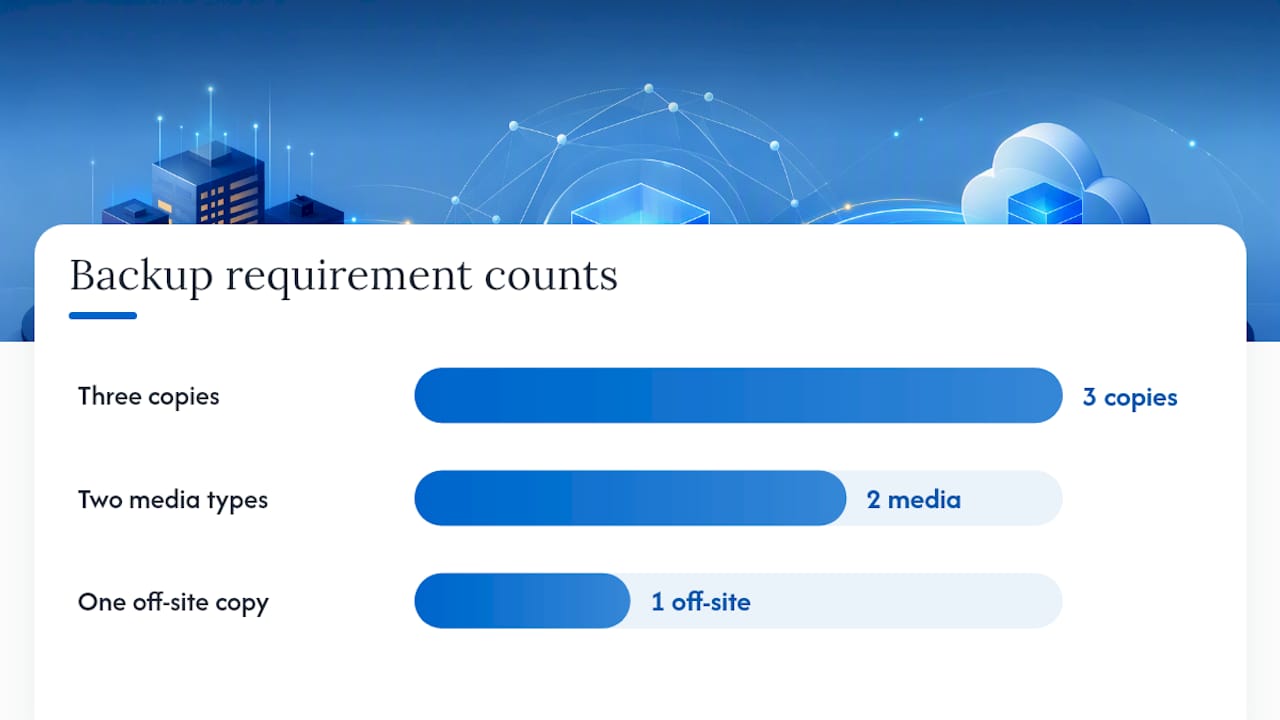
Two different media means your backups can't both live on the same type of storage. A common small-business setup pairs a local Network Attached Storage (NAS) device or external drive with cloud object storage. Larger operations sometimes still use tape, which is slow but nearly impossible for malware to reach remotely.
One off-site copy means a copy physically or logically separated from your main location. This is where a lot of small businesses get it wrong.
- A backup on a second drive in the same office doesn't count as off-site if a fire, flood, or theft hits the building.
- A separate cloud account or region, or a drive stored at another location, satisfies the requirement.
- Microsoft 365 and Google Workspace data is not backed up by Microsoft or Google in the way most people assume. Their retention policies protect against accidental deletion for a limited window, not against ransomware or long-term loss, so that data needs its own third-party backup.
Why Classic 3-2-1 Isn't Enough Against Modern Ransomware
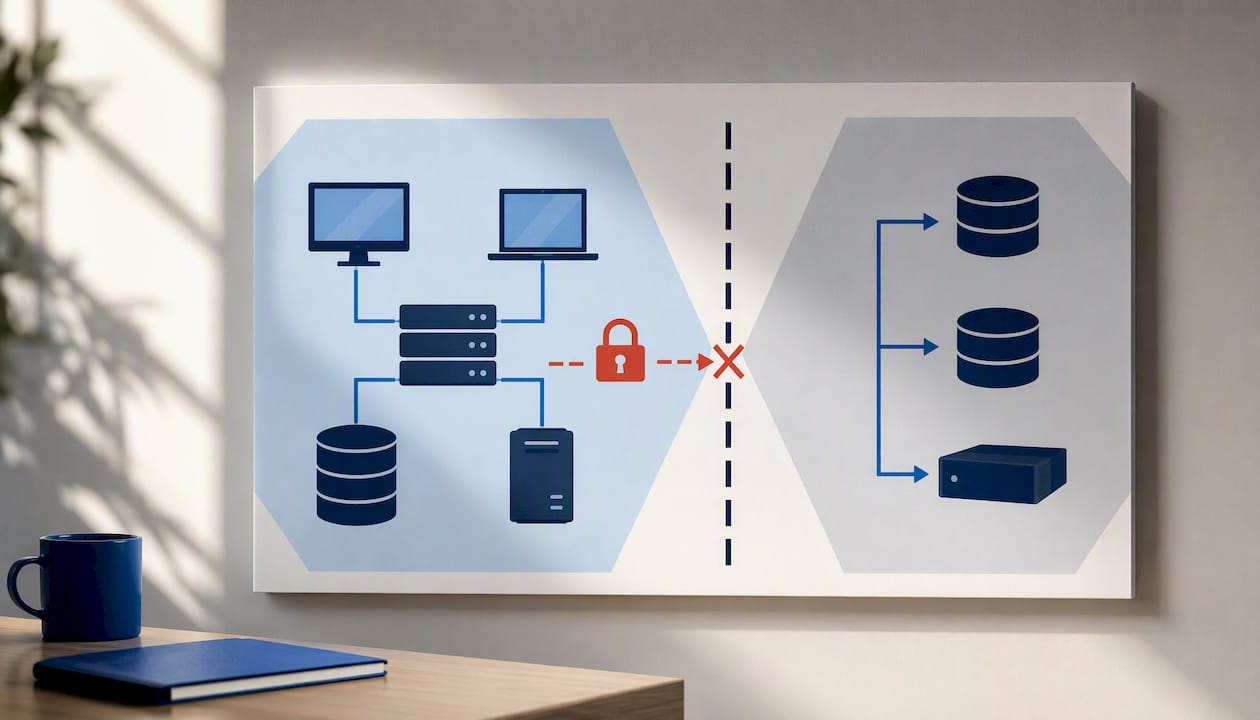
Ransomware groups don't just encrypt your live files anymore. They actively search for connected backup systems, delete snapshots, and exploit shared administrator credentials to wipe recovery options before triggering encryption. A 3-2-1 setup with no isolation between the backup and the production network can be destroyed in the same attack it was supposed to protect against.
That's the gap CISA's StopRansomware guide addresses directly. It recommends layering in immutable or air-gapped copies and locking backup systems behind separate credentials and multi-factor authentication (MFA), rather than reusing the same admin login across your entire network.
This is where the 3-2-1-1-0 extension comes from: the classic rule plus one immutable or offline copy, plus zero errors on verified restores.
- Use a distinct backup admin account, never your everyday IT login.
- Require MFA on every backup and recovery console.
- Grant least-privilege access so only the people who need backup control have it.
- Keep at least one copy that ransomware literally cannot reach or modify, whether that's offline media or storage with immutability locks.
Pro Tip: Ask your backup vendor directly whether "immutable" means write-once storage with a locked retention period, or just a soft delete flag an attacker with admin access could reverse. The difference matters more than the marketing language.
3-2-1-1 vs. 3-2-1-1-0: Choosing the Right Variant
3-2-1-1 adds one immutable or air-gapped copy to the standard rule, closing the gap where an attacker with network access could otherwise delete every backup they can reach.
3-2-1-1-0 goes further: it adds zero errors on recovery verification. In practice, that means every backup gets tested through an actual restore, not just checked for a "completed successfully" status message.
Your choice between architectures comes down to cost, recovery speed, and how much downtime your business can tolerate.
- Immutable cloud storage offers fast recovery time objectives (RTO), moderate ongoing cost, and strong durability, since data is locked against deletion for a set retention period.
- Air-gapped tape or offline drives cost less to maintain long-term but take longer to restore from, making them better suited as a last-resort copy than a daily recovery source.
- Multi-cloud or multi-region backups add resilience against a provider-wide outage or account compromise, at a higher monthly cost that only makes sense once downtime itself gets expensive.
A solo consultant running one laptop and a handful of cloud accounts probably needs one immutable cloud copy and nothing more elaborate. A healthcare practice or law firm handling regulated client data usually needs multi-region redundancy and documented recovery testing to satisfy compliance obligations.
Setting Up Your 3-2-1 Backup: A Step-by-Step Checklist
Before touching any backup software, define two numbers: your Recovery Time Objective (RTO), how fast you need systems back online, and your Recovery Point Objective (RPO), how much data loss you can tolerate. A retail shop that can survive four hours offline has very different needs than a medical office where even thirty minutes of lost appointment data creates real problems.
- Scope your data. List what actually needs backup: client files, accounting records, email, configuration files, and license keys. Skip temporary files and anything easily re-downloaded.
- Build the minimal architecture. A solid baseline is a local fast copy for quick restores, a scheduled cloud backup for off-site redundancy, and one immutable or offline copy for ransomware resilience.
- Configure endpoint and server backups. For PCs and file servers, schedule automated backups using reliable backup plugins for Wix rather than relying on anyone to remember manual copies. For NAS devices, confirm snapshot and versioning features are active, not just raw file storage.
- Back up Microsoft 365 and Google Workspace separately. Native sync and retention tools are not backups. Configure a dedicated backup product that captures mail, files, and Teams or Shared Drive data on its own schedule.
- Set encryption and retention. Encrypt backups both in transit and at rest, and set retention long enough to recover from an attack discovered weeks after it happened, not just yesterday's version.
- Schedule the cadence. Daily incremental backups plus weekly full backups cover most small businesses; adjust upward if your RPO is tighter.
Pro Tip: A common and expensive mistake is calculating storage needs based on today's data volume and never revisiting it. A backup retention calculator helps you plan for growth before you run out of space mid-quarter.
Testing and Verification: The Step Everyone Skips
Backups that have never been restored are a theory, not a plan. NIST's guidance on recovery testing recommends a measured cadence with logged results, and Ready adds that documenting the recovery plan itself is what makes it usable when someone unfamiliar with the system has to execute it under pressure.
A workable testing schedule looks like this:
- Monthly: Restore a handful of individual files to confirm backups are intact and accessible.
- Quarterly: Restore an entire application or database to a test environment and confirm it runs correctly.
- Annually: Run a full failover test simulating a real outage, measuring how long recovery actually takes against your target RTO.
Every test should be logged: the date, what was restored, how long it took, and whether the result matched your RPO target. Businesses that skip this step routinely discover during an actual crisis that their "backups" have been silently failing for months. Document credentials, encryption keys, and step-by-step runbooks somewhere separate from the systems they're meant to recover, since a well-encrypted backup you can't unlock is functionally no backup at all.
Common 3-2-1 Backup Mistakes and How to Fix Them Today
- Treating cloud sync as a backup. Dropbox, OneDrive, and Google Drive sync changes instantly, including ransomware encryption and accidental deletions. Fix it by adding a scheduled, versioned backup with independent retention on top of any sync tool, as industry guidance on 3-2-1 architecture consistently points out.
- Sharing one admin login across backup and production systems. If an attacker compromises your network credentials, they can compromise your backups in the same breach. Fix it by creating a dedicated backup administrator account with MFA enabled today.
- Skipping the immutable or offline copy entirely. Relying on connected backups alone leaves you exposed to exactly the attack pattern ransomware groups now specialize in. Fix it by enabling immutability settings on your cloud backup provider or rotating an offline drive weekly.
- Forgetting the auxiliary items. Encryption keys, software licenses, and network configuration files rarely make it into backup scopes, yet they're often required to rebuild a system from scratch. Add them to your backup scope this week, not after the next audit.
How Secure Techies Applies 3-2-1 for Southern California Businesses
Running 3-2-1 correctly at scale looks different from running it on one laptop. Secure Techies manages backup and disaster recovery for small and mid-size businesses across Southern California by building in the controls the standards above call for, rather than treating them as optional add-ons.
- Immutable storage configured as the default
- Separate administrative roles for backup systems, isolated from other network credentials
- Automated verification checks paired with scheduled restore tests
- Documented runbooks covering credentials, retention windows, and recovery procedures
Clients use the Backup Retention Calculator to size their own retention windows before committing to a plan, which tends to surface storage gaps early rather than during an actual recovery.
What Actually Matters in a 3-2-1 Strategy
Most advice on this topic stops at "three copies, two media, one off-site" and calls it done. The hard part, the part that actually determines whether you recover from an attack, is whether your backups are isolated from the credentials an attacker will inevitably steal.
I'd argue the conventional framing of 3-2-1 has aged badly not because the math is wrong, but because it was written for hardware failure and human error, not for an adversary actively trying to delete your safety net. A business with three perfect copies and zero restore tests is worse off than it thinks. Untested backups create false confidence, and false confidence is what turns a bad week into a closed business.
If you take one thing from this guide, prioritize the restore test over the extra copy. A verified single off-site backup you can actually recover from beats three unverified copies you've never tried to restore. Test first. Add redundancy second.
— Alex
Get a 3-2-1 Backup Plan Built for Ransomware, Not Just Hardware Failure
There are managed Backup & Disaster Recovery services that build immutability, tested restores, and documented recovery times into the plan from day one, instead of leaving you to discover gaps during an actual attack.

Such services may cover managed backup configuration across PCs, servers, NAS, and Microsoft 365 or Google Workspace, immutable or air-gapped copies as a standard part of the architecture, and scheduled recovery testing with logged results you can hand to an auditor or insurer without scrambling. If you're not sure how much storage or retention your business actually needs, start with the Backup Retention Calculator to get a real number before you talk to anyone. When you're ready for a plan that's monitored and tested rather than set up once and forgotten, request a consultation through the Backup & Disaster Recovery page.
Sources
FAQ
Is the 3-2-1 backup rule outdated?
No, but the unmodified version is incomplete. The core structure, three copies on two media with one off-site, still works, but CISA and NIST both recommend adding an immutable or air-gapped copy and regular restore testing to defend against ransomware specifically.
What is the 3-2-1-1-0 rule for backing up data?
It's the classic 3-2-1 rule plus one immutable or offline copy that ransomware can't reach or delete, plus zero errors confirmed through verified restore testing. The extension exists because attackers now target connected backups directly.
Which backup strategy is best for a small business?
For most small businesses, a minimal architecture of a local fast copy, a scheduled cloud backup, and one immutable off-site copy covers the majority of failure scenarios at a manageable cost. Businesses handling regulated data often need multi-region redundancy on top of that baseline, which a managed Backup & Disaster Recovery service can help scope correctly.
What is the difference between backup and disaster recovery?
Backup is the copy of your data; disaster recovery is the full plan and infrastructure for getting systems running again after an outage or attack. A business can have solid backups and still lack disaster recovery if there's no tested plan, RTO target, or runbook to execute during an actual incident.
Does a cloud sync tool count as my off-site backup?
Not on its own. Sync tools like OneDrive or Google Drive mirror changes instantly, including ransomware encryption, so they need a separate scheduled, versioned backup with independent retention layered on top, as noted in industry guidance on the 3-2-1 rule.