
Dynamic Data Masking (DDM) is a presentation-layer security feature built into SQL Server 2016 and later that masks column values in query results for non-privileged users while leaving the underlying stored data completely unchanged. The one-line production rule every team should follow: use DDM to reduce accidental exposure in reporting, support access, and non-production environments, but never treat it as a substitute for encryption. For high-sensitivity PII or any column that must be hidden from DBAs, Always Encrypted is the right control. SQL Server 2022 added granular UNMASK permissions at the database, schema, table, and column level, which materially changes how safely you can deploy DDM in production.
Table of Contents
- How SQL Server data masking works at the query layer
- Masking functions, syntax, and column type restrictions
- Step-by-step T-SQL examples with before-and-after output
- UNMASK permissions and SQL Server 2022 granular controls
- Recommended production patterns and use cases for DDM
- Known limitations, bypass risks, and security boundaries
- How DDM fits with TDE, Always Encrypted, and Row-Level Security
- What to test before deploying masks in production
- Logging, auditing, and retention for masked columns
- When to use DDM versus encryption: an evidence-backed decision flow
- Key Takeaways
- DDM in practice: what managed deployments actually look like
- Securetechie helps you implement and audit SQL Server security controls
How SQL Server data masking works at the query layer
DDM intercepts query results at the output stage. The data on disk stays plaintext; the masking engine rewrites column values in the result set before they reach the client. A user without the UNMASK permission sees XXXX where a credit card number would be. A user with UNMASK, or any member of db_owner or sysadmin, sees the real value. That distinction is the entire security model, and it is also DDM's most important limitation.

The feature is available across SQL Server 2016+, Azure SQL Database, Azure SQL Managed Instance, and Microsoft Fabric. The flow looks like this: the client sends a query, the SQL Engine processes it against real data, the masking layer rewrites designated column values in the result set, and the masked result set is returned to the client. Critically, joins, aggregations, and GROUP BY operations all run against the actual column values. Masking only affects what the client receives.
SQL Server provides five built-in masking functions:
- default() — fully masks the value based on data type (strings become
XXXX, numbers become0, dates become1900-01-01) - partial(prefix, padding, suffix) — exposes a specified number of leading and trailing characters with custom padding in between
- email() — exposes the first character of the email address and the domain suffix in the format
aXXX@XXXX.com - random(low, high) — replaces a numeric value with a random number within a defined range
- datetime — masks individual date/time parts (year, month, day, hour, minute, second, nanosecond) independently
Masking functions, syntax, and column type restrictions
Each masking function targets a different data exposure scenario. The table below maps each function to its primary use case and a sample output.
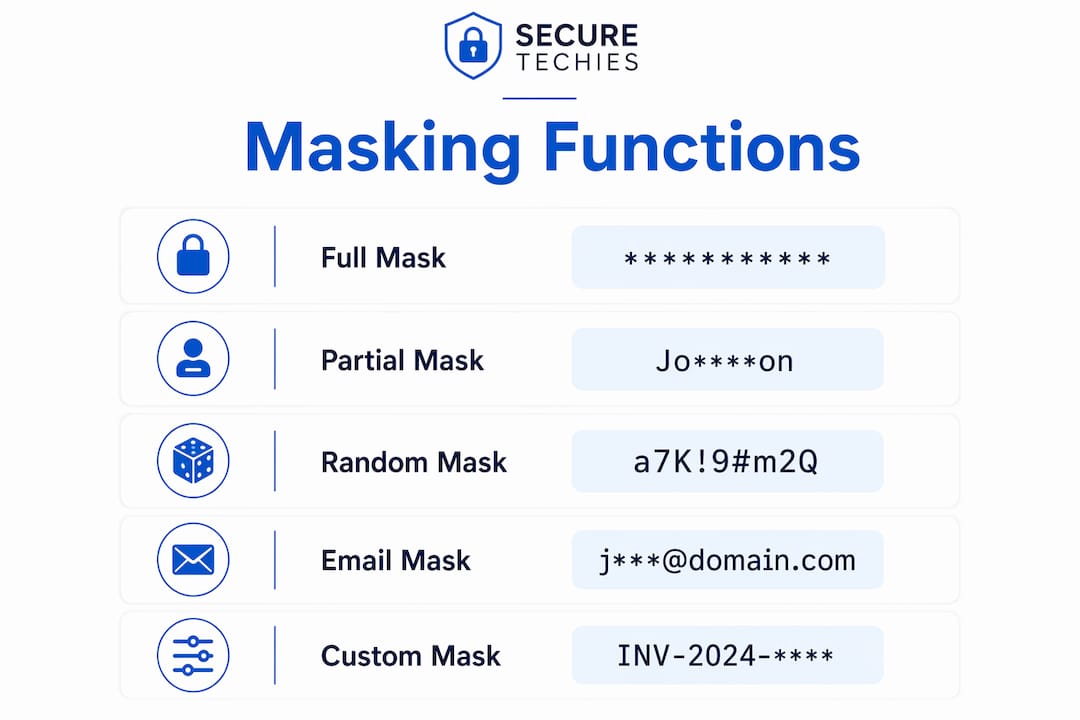
| Mask Function | Best Use Case | Example Output |
|---|---|---|
default() | General-purpose full masking for strings, numbers, dates | XXXX, 0, 1900-01-01 |
partial(2,"XXXX",2) | Partial credit card or ID number exposure | XXXXXX...XX |
email() | Email address obfuscation | jXXX@XXXX.com |
random(low, high) | Numeric ranges (salaries, scores) | Random number within a specified range |
datetime | Date/time fields where partial exposure is acceptable | 1900-01-01 |
Defining a mask at table creation:
CREATE TABLE dbo.Customers (
    CustomerID   INT           NOT NULL,
    FullName     NVARCHAR(100) MASKED WITH (FUNCTION = 'partial(1,"XXXXXXXX",1)') NOT NULL,
    Email        NVARCHAR(200) MASKED WITH (FUNCTION = 'email()') NOT NULL,
    Phone        NVARCHAR(20)  MASKED WITH (FUNCTION = 'default()') NULL,
    CreditScore  INT           MASKED WITH (FUNCTION = 'random(300,850)') NULL
);
Adding a mask to an existing column:
ALTER TABLE dbo.Customers
ALTER COLUMN SSN NVARCHAR(11)
    MASKED WITH (FUNCTION = 'partial(0,"XXX-XX-",4)');
Mask definitions are stored as column metadata, so adding or changing a mask is a schema change with dependency implications. If the column participates in an index, that index may need to be dropped and recreated.
Column types that cannot be masked include Always Encrypted columns, FILESTREAM columns, computed columns, full-text index key columns, and PolyBase external table columns. Attempting to add a mask to any of these returns an error. One useful side effect: a computed column that references a masked base column will automatically return the masked value to non-privileged users.
Step-by-step T-SQL examples with before-and-after output
The examples below are runnable in any SQL Server 2016+ environment. Work through them in a test schema before touching production.
- Create a masked table and insert test data.
CREATE SCHEMA demo;
GO

CREATE TABLE demo.Employees (
    EmpID    INT           PRIMARY KEY,
    Name     NVARCHAR(100) MASKED WITH (FUNCTION = 'partial(1,"XXXXXXXX",1)') NOT NULL,
    Email    NVARCHAR(200) MASKED WITH (FUNCTION = 'email()') NOT NULL,
    Salary   DECIMAL(10,2) MASKED WITH (FUNCTION = 'default()') NOT NULL
);

INSERT INTO demo.Employees VALUES
(1, 'Jane Doe', 'jane.doe@contoso.com', 95000.00),
(2, 'John Smith', 'john.smith@contoso.com', 82000.00);
- Query as a non-privileged user to confirm masking.
-- Create a test user with no UNMASK permission
CREATE USER TestUser WITHOUT LOGIN;
GRANT SELECT ON demo.Employees TO TestUser;

EXECUTE AS USER = 'TestUser';
SELECT * FROM demo.Employees;
REVERT;
Expected output for TestUser:
| EmpID | Name | Salary | |
|---|---|---|---|
| 1 | JXXXXXXXX e | jXXX@XXXX.com | 0 |
| 2 | JXXXXXXXX h | jXXX@XXXX.com | 0 |
- Alter an existing mask.
ALTER TABLE demo.Employees
ALTER COLUMN Salary DECIMAL(10,2)
    MASKED WITH (FUNCTION = 'random(50000,150000)');
Note: if Salary had a dependent index, drop it first, run the ALTER, then recreate the index.
- Drop a mask from a column.
ALTER TABLE demo.Employees
ALTER COLUMN Email NVARCHAR(200) DROP MASKED;
- Validate masking in staging before production. Always run the
EXECUTE AS USERpattern above against a staging copy of the schema. Confirm that joins, aggregations, and any stored procedures that reference masked columns return the expected masked values to non-privileged users. Treat mask changes as you would any other schema change: include them in a release plan, test in staging, and schedule during a low-traffic window.
UNMASK permissions and SQL Server 2022 granular controls
Who sees unmasked data? Any user holding the UNMASK permission, CONTROL on the database, ALTER ANY MASK, or membership in db_owner or sysadmin will always see plaintext. Prior to SQL Server 2022, UNMASK was an all-or-nothing database-level grant. That changed significantly with SQL Server 2022's granular UNMASK, which allows grants at the database, schema, table, or individual column level.

Granting UNMASK at different scopes (SQL Server 2022+):
-- Database-level (legacy behavior, avoid for support roles)
GRANT UNMASK TO SupportUser;

-- Table-level
GRANT UNMASK ON OBJECT::dbo.Customers TO SupportUser;

-- Column-level (preferred for least-privilege)
GRANT UNMASK ON OBJECT::dbo.Customers(Phone) TO SupportUser;

-- Revoking
REVOKE UNMASK ON OBJECT::dbo.Customers(Phone) FROM SupportUser;
Inventory all masked columns:
SELECT
    t.name        AS TableName,
    c.name        AS ColumnName,
    c.masking_function
FROM sys.masked_columns c
JOIN sys.tables t ON c.object_id = t.object_id;
Audit users with UNMASK-equivalent privileges:
SELECT
    dp.name       AS PrincipalName,
    dp.type_desc  AS PrincipalType,
    perm.permission_name,
    perm.state_desc
FROM sys.database_permissions perm
JOIN sys.database_principals dp ON perm.grantee_principal_id = dp.principal_id
WHERE perm.permission_name IN ('UNMASK','CONTROL','ALTER ANY MASK');
Pro Tip: Prefer column-level UNMASK grants for support and QA roles that only need access to a small set of fields. A support agent who needs to verify a phone number does not need database-wide UNMASK. Review this permission list quarterly and flag any unexpected grants immediately.
Recommended production patterns and use cases for DDM
DDM works best as a friction-reduction layer for accidental exposure, not as a hard security boundary. The following guidance reflects practical deployment patterns.
- Use DDM for reporting databases and data warehouses. Analysts running ad-hoc queries against a reporting replica should see masked PII by default. Grant UNMASK only to roles that have a documented business need.
- Apply DDM to non-production environments. Refreshing a staging or QA database from production is common. DDM on the source means non-privileged developers never see live customer data, even in a dev copy.
- Use DDM for support portal access. A help-desk agent who needs to verify a customer's last four digits of a phone number can receive a column-level UNMASK grant rather than full access.
- Document your masking policy. Maintain a data classification register that maps each masked column to its sensitivity level, the mask function applied, and which roles hold UNMASK at what scope. This document becomes evidence during HIPAA or SOC 2 audits.
- Treat mask changes as schema changes in release management. Include
ALTER TABLE ... MASKED WITHstatements in your database migration scripts alongside index changes and constraint updates. - Do not use DDM as the sole control for high-sensitivity PII. Social Security numbers, payment card data, and protected health information require encryption (Always Encrypted) or tokenization, not just masking. DDM is a complement, not a replacement, for those controls.
- Pair DDM with Row-Level Security (RLS) where appropriate. DDM controls which column values are visible; RLS controls which rows a user can access. Together they provide a tighter least-privilege posture for multi-tenant or role-segmented databases.
Known limitations, bypass risks, and security boundaries
DDM's most important limitation is also its most misunderstood one. Because masking happens at the output layer, any user with sufficient privileges, including all DBAs and sysadmin members, always sees plaintext. There is no configuration that hides data from server administrators using DDM alone.
Security boundary warning: DDM does not protect data in backups, exports, or server-level file copies. A backup of a DDM-enabled database contains the full plaintext values. Restoring that backup to another server gives any DBA on that server unrestricted access to the data. TDE is the correct control for backup and at-rest protection.
Inference and brute-force bypass. A non-privileged user cannot see a masked value directly, but they can use WHERE clause filtering to deduce it. For example, WHERE SSN = '123-45-6789' returns a row even though the SSN column is masked in the result. A patient attacker can enumerate values systematically. This is a known DDM limitation that Microsoft documents explicitly. DDM reduces casual exposure; it does not prevent a determined insider.
Joins and aggregations use real values. Because masked columns still use actual values for internal operations, a non-privileged user can join on a masked column and get accurate join results, which can itself leak information about the underlying data.
Exports and ETL pipelines. When a non-privileged user copies data from a masked column into a temp table or a new table, the data lands in masked format. That is protective for accidental exposure but can cause data corruption in ETL pipelines that expect real values. Ensure ETL service accounts hold the appropriate UNMASK grants.
Schema restrictions. Always Encrypted columns, FILESTREAM columns, computed columns, full-text index keys, and PolyBase external tables cannot be masked. Plan your schema around these constraints before adding DDM to an existing database.
How DDM fits with TDE, Always Encrypted, and Row-Level Security
Each SQL Server security feature solves a different problem. Treating them as interchangeable is the most common mistake security architects see in production environments.
| Protection Goal | DDM | TDE | Always Encrypted |
|---|---|---|---|
| Data changed on disk | No | Yes (entire DB) | Yes (column-level) |
| Protects data at rest / backups | No | Yes | Yes |
| Protects data from DBAs | No | No | Yes |
| App changes required | No | No | Partial |
| Protects data in use (memory) | No | No | Yes |
| Granularity | Column (presentation) | Database | Column (encrypted) |
The recommended stacking pattern for defense-in-depth is:
- TDE as the baseline for all databases: encrypts data at rest and protects backups and disk files from physical theft or unsecured disposal.
- Always Encrypted for columns containing truly sensitive data (SSNs, PHI, payment card numbers) where even DBAs must be prevented from seeing plaintext. The encryption and decryption happen on the client side, so the SQL Engine never sees the plaintext value.
- DDM layered on top for accidental exposure reduction in reporting, support access, and non-production use.
For backup and disaster recovery, TDE is non-negotiable: a DDM-only database backup is a plaintext backup.
Compliance implications. HIPAA requires encryption of protected health information at rest and in transit. DDM alone does not satisfy that requirement. GDPR's pseudonymization standard may accept DDM as a supplementary control, but not as the primary one for high-risk personal data. For HIPAA compliance, Always Encrypted plus TDE is the defensible architecture; DDM adds operational convenience on top.
What to test before deploying masks in production
A mask that works in isolation can break downstream processes. Run through this checklist in staging before any production deployment.
- Validate masked output for non-UNMASK users. Use
EXECUTE AS USERto impersonate a non-privileged user and confirm each masked column returns the expected masked value. - Verify UNMASK grants at each scope. Test database-level, table-level, and column-level grants separately to confirm the correct users see the correct data.
- Test joins and aggregations. Run representative queries that join on or aggregate masked columns. Confirm that join results are correct and that no unintended data leakage occurs through join output.
- Test exports and ETL pipelines. Run your ETL jobs under the service account credentials used in production. Confirm that masked values do not corrupt downstream data stores and that UNMASK grants are applied where the pipeline requires real values.
- Check computed columns and dependencies. Identify any computed columns that reference the column being masked. Confirm they return masked values as expected and that no index rebuild is required.
- Test full-text indexes. If the table has a full-text index, verify that adding a mask to a non-key column does not affect index behavior.
- Simulate a schema-change rollback. Confirm you can drop and re-add a mask without data loss and that your rollback script is tested and ready.
- Document the test results. Record the
EXECUTE AS USERoutput for each masked column as evidence for compliance audits.
Logging, auditing, and retention for masked columns
Auditing DDM is not optional in regulated environments. You need to know when masks are added or changed, who holds UNMASK grants, and whether those grants have changed since the last review.
Detect schema changes to masking definitions using SQL Server Audit or Extended Events. Configure an audit action group for SCHEMA_OBJECT_CHANGE_GROUP to capture ALTER TABLE events that modify masking metadata. Pair this with DATABASE_PERMISSION_CHANGE_GROUP to log every GRANT and REVOKE of UNMASK.
Alert on unexpected UNMASK grants. Schedule a weekly SQL Agent job that runs the permission audit query from the permissions section above and emails the security team if any new principal appears with UNMASK, CONTROL, or ALTER ANY MASK. This is one of the operational controls that turns DDM from a passive feature into an actively managed control.
Retention. Audit logs for permission changes should be retained for a minimum of 12 months for SOC 2 and HIPAA environments. Store audit output in a location that database administrators cannot modify, such as a write-protected Azure Blob Storage container or an immutable log archive. For teams pursuing SOC 2 compliance, the audit trail for masking changes is direct evidence for the Logical and Physical Access Controls criterion.
Include masking checks in routine security reviews. Add a quarterly task to your security calendar: run sys.masked_columns to verify the inventory matches your data classification register, and run the UNMASK permission query to confirm no privilege creep has occurred.
When to use DDM versus encryption: an evidence-backed decision flow
The decision between DDM, TDE, and Always Encrypted should follow data sensitivity, not convenience. Security architects consistently caution that the most common mistake is treating these three features as interchangeable when they solve fundamentally different problems.
Decision flow:
- Classify the data. Is it regulated PII (SSN, PHI, payment card data)? If yes, encryption is required. DDM is a supplementary control only.
- Can DBAs see plaintext? If the answer must be "no" for compliance or contractual reasons, Always Encrypted is the only SQL Server-native option. DDM and TDE both allow DBA access to plaintext.
- Is the risk accidental exposure by application users or analysts? DDM is the right tool. It requires zero application changes and centralizes masking logic in the database.
- Is backup and at-rest protection required? Enable TDE. It protects the entire database file, log, and backup set with AES encryption and requires no application changes.
SQL Server 2022's column-level UNMASK grants change the operational calculus for DDM. Before 2022, granting UNMASK to a support role meant granting it across every masked column in the database. Now you can scope it to a single column, which makes DDM a more defensible control for support and QA access patterns. Pair that with RBAC, quarterly permission reviews, and SQL Server Audit, and DDM becomes a meaningful part of a layered security posture rather than a checkbox feature.
The practical guidance from security practitioners is consistent: use DDM for accidental exposure reduction, TDE for at-rest protection, and Always Encrypted when the threat model includes privileged insiders or compromised server environments.
Key Takeaways
Dynamic Data Masking reduces accidental exposure at the query layer but requires TDE and Always Encrypted to form a complete, compliance-ready data protection architecture.
| Point | Details |
|---|---|
| DDM is presentation-layer only | Underlying data stays plaintext; DBAs and sysadmin members always see real values. |
| Prefer column-level UNMASK | SQL Server 2022 granular UNMASK grants reduce privilege creep; scope grants to the minimum columns needed. |
| Test joins, exports, and ETL | Masked columns use real values for joins and aggregations; ETL pipelines need UNMASK grants or they receive masked data. |
| Stack DDM with TDE and Always Encrypted | TDE protects backups and at-rest data; Always Encrypted protects from DBAs; DDM handles accidental application-layer exposure. |
| Securetechie for implementation and audits | Securetechie helps Southern California businesses implement DDM, configure TDE and Always Encrypted, and maintain audit-ready compliance documentation. |
DDM in practice: what managed deployments actually look like
The gap between how DDM is documented and how it gets deployed in production is wider than most guides acknowledge. The feature is genuinely easy to configure, and that ease is exactly what creates risk. Teams add masks to a handful of columns, grant UNMASK to a service account, and consider the work done. Six months later, that service account has been added to three additional roles, two of which carry db_owner, and the masking policy exists only in someone's memory.
The more defensible pattern is to treat DDM as a managed control, not a one-time configuration. That means a written masking policy tied to a data classification register, UNMASK grants documented in a permission matrix, and a scheduled audit job that flags drift. SQL Server 2022's column-level UNMASK makes this significantly more tractable: a support role that needs one phone number field gets exactly that, nothing more. The permission matrix stays narrow and auditable.
One practical tip for staged rollouts: add masks to new columns first, validate with EXECUTE AS USER in staging, then migrate to production during a scheduled change window. For columns with existing indexes, script the index drop and recreate as part of the same release. Rushing that step is the most common source of schema-change failures in DDM deployments.
DDM works best when it is one layer in a stack, not the whole stack. For any environment handling regulated data, pair it with TDE from day one and evaluate Always Encrypted for your highest-sensitivity columns. The combination is not complex to operate, and it is the architecture that holds up under a compliance audit.
Securetechie helps you implement and audit SQL Server security controls
For small to mid-size businesses in Southern California, getting DDM, TDE, and Always Encrypted configured correctly, and keeping them that way, is a real operational challenge. Securetechie's managed IT and cybersecurity team handles the full implementation: schema analysis, mask configuration, UNMASK permission matrices, TDE enablement, and the audit logging setup that compliance frameworks require.

Beyond the initial deployment, Securetechie provides ongoing compliance and security audits that cover HIPAA, SOC 2, GDPR, and CMMC requirements, including verification that your masking and encryption controls are correctly scoped and documented. The team also manages infrastructure and SQL Server environments directly, so permission reviews, audit log retention, and schema change management are handled as part of your monthly service agreement rather than left to a quarterly scramble. If your organization needs a clear picture of where your current SQL Server security posture stands, contact Securetechie for a security assessment.