
SOC 2 does not mandate a fixed retention period or a specific list of fields. Auditors require documented logging policies and demonstrable evidence that critical events, authentication, authorization, admin activity, and data access, were captured, protected from tampering, retained on schedule, and actively reviewed throughout the Type II observation period. If you can't produce that evidence on demand, the control fails regardless of how much data you're logging.
TL;DR:
- Most organizations should establish a retention period of around 15 months to cover the typical 12-month observation window plus a buffer for sampling, but longer periods are needed if regulations demand it.
- Log evidence must include both successful and failed authentication events, role changes, data access, and configuration changes, all linked with consistent fields such as actor ID, timestamp, and resource.
- Auditors focus more on actual, continuous log review and real-time monitoring than on policies or large data volumes, emphasizing a well-documented "narrative of control."
- Centralized, immutable storage with cryptographic hash chaining and regular restore tests are critical to prove logs haven't been tampered with throughout the retention period.
- Building audit-ready logging infrastructure requires comprehensive planning, including policy creation, instrumentation, centralization, automation, and testing, ideally supported by professional services.
Table of Contents
- Understanding SOC 2 Logging Requirements Through the Trust Services Criteria
- What Log Categories and Fields Do Auditors Expect?
- How Long Should You Retain Logs for SOC 2 Compliance?
- How Do You Prove Logs Haven't Been Tampered With?
- What Do Auditors Expect for Monitoring and Alerting?
- What Evidence Will Auditors Actually Request?
- Building a SOC 2 Logging Program: A Practitioner's Playbook
- What Engineering Teams Get Wrong on the First Audit
- Get Your Logging Infrastructure Audit-Ready
- Where to Go for Authoritative SOC 2 Logging Guidance
- Sources
- FAQ
Understanding SOC 2 Logging Requirements Through the Trust Services Criteria
SOC 2 audits don't hand you a checklist that says "retain logs for 90 days" or "capture these 12 fields." Instead, the AICPA Trust Services Criteria define outcomes, and your logging architecture has to prove you meet them. Four controls carry most of the weight, and each one implies a specific kind of log evidence.
CC6.1 governs logical access. Auditors expect authentication and authorization logs that show who accessed what, when, and under what credentials. This is the control most people think of first, but it's only one piece of a larger set of controls most dependent on logging, which also includes monitoring, evaluation, and change management.
CC7.2 requires continuous monitoring for security events. It's not enough to log an event. You need proof that something was watching for it in something close to real time.
CC7.3 goes a step further and asks whether your organization evaluates security events once detected. This is where an alert has to turn into an investigation, and the investigation has to leave a paper trail.
CC8.1 covers change management. Every deployment, schema change, and configuration edit needs a corresponding log entry tying the change to an approved request.
Here's the distinction that trips up a lot of engineering teams: some of this evidence is procedural (a signed policy document, a diagram of your logging architecture) and some of it is continuous observational evidence (actual log entries generated day after day across the audit window). A Type II audit weighs the second kind far more heavily than the first, because policies prove intent while logs prove practice.
Auditors typically request specific artifacts for each control area:
- For CC6.1: a sample of authentication logs showing both successful and failed login attempts, plus evidence of multifactor enforcement.
- For CC7.2: monitoring tool configuration and a timestamped feed showing continuous coverage, not spot checks.
- For CC7.3: tickets or case records linking a detected alert to an investigation and its outcome.
- For CC8.1: a change log correlated with approval records in a ticketing or CI/CD system.
What auditors are really testing is what one industry review calls a "narrative of control," meaning your logs have to tell a coherent story. A security-relevant event happened, it got noticed, someone looked at it, and something was done. Auditors care far more about that narrative of control than about the sheer volume of data you're collecting. A team logging everything but reviewing nothing will struggle more in fieldwork than a team with a tighter, well-monitored log set.
What Log Categories and Fields Do Auditors Expect?
Once you know which controls depend on logs, the next question is what to actually capture. Four categories cover almost every control an auditor will test, and each has its own instrumentation quirks.
Authentication events need to capture both success and failure, not just successful logins. Session start and end times matter for proving idle timeout enforcement, and MFA challenge results need their own entry since auditors frequently sample these separately from basic login logs.
Authorization events track role changes, permission grants and revokes, and any privilege escalation, including temporary elevated access. If your organization uses just-in-time access elevation, log both the grant and the automatic revocation. An escalation with no corresponding de-escalation event is one of the most common gaps auditors flag.
Data access and export events cover reads, downloads, and exports of sensitive resources, tied to a specific resource identifier. This is the category most often under-instrumented, because application teams log writes far more diligently than reads.
Configuration and change events include deployments, schema changes, and feature toggle flips. These need to connect to an approval trail, whether that's a pull request, a change ticket, or a signed change request form.
Every entry, regardless of category, needs a consistent set of fields to be usable as audit evidence:
| Field | Why auditors need it |
|---|---|
| Unique actor ID | Ties every action to a specific person or service account, not a shared login |
| Action verb | Precisely what happened (login, export, role_grant, deploy) |
| Resource identifier | Which system, file, database, or record was affected |
| Timestamp (UTC) | Establishes exact sequence and supports cross-system correlation |
| Outcome and context | Success/failure, source IP, request ID for tracing |
| Source system | Confirms where the event originated, especially across microservices |
The operational checklist that experienced audit teams follow adds one more requirement worth flagging: every admin role should be enumerable, and every privileged action should map cleanly to a defined log entry type. If you can't list your admin roles and match each one to its logging behavior, an auditor will find that gap before you do.
How Long Should You Retain Logs for SOC 2 Compliance?
SOC 2 sets no numeric retention floor. What it does require is that you write a retention policy, follow it consistently, and prove that you followed it across the entire audit window. Auditors don't check your logs against an external standard, they check your practice against your own documented policy, and that's a distinction with real consequences: an inconsistently followed 12-month policy is a bigger problem than a well-followed 6-month one.
Pro Tip: Write your retention policy before you build your logging pipeline, not after. Retroactively justifying whatever your tooling happens to keep is an easy way to fail a documentation review.
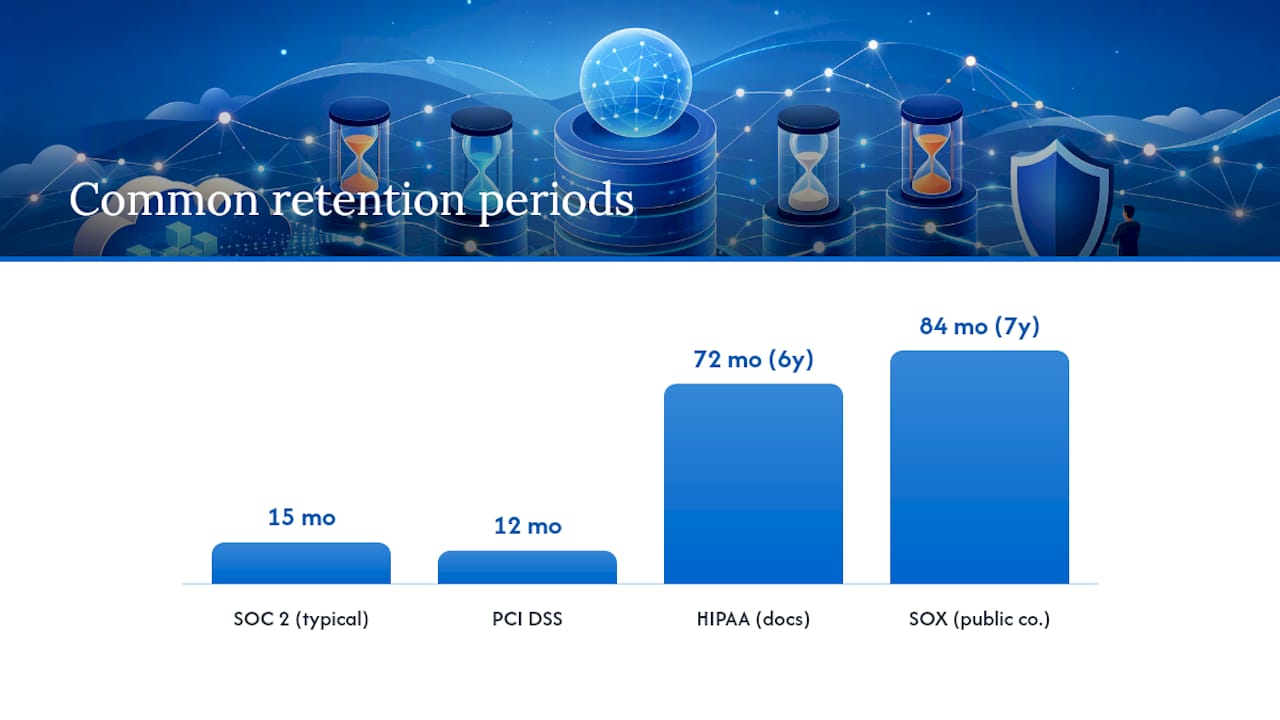
For a Type II audit, the practical anchor is your observation window. Most organizations run a 12-month observation period, and the common practice is to retain logs for that window plus a buffer, landing around 15 months of coverage. That buffer matters because fieldwork often starts after the observation period closes, and auditors need to sample data from the earliest weeks of that window.
SOC 2 retention is often influenced by overlapping regulations that may require longer retention periods.
- PCI DSS requires 12 months of retention with the most recent three months immediately accessible online.
- HIPAA documentation rules under 45 CFR 164.530(j) require six years of retention for compliance documentation.
- SOX Section 802 requires seven years for audit-related records at public companies.
- Contractual clauses with enterprise customers sometimes specify retention periods longer than any regulation requires.
The rule of thumb: inventory every framework and contract that applies to your organization, then adopt the longest period among them. A healthcare SaaS company under both SOC 2 and HIPAA doesn't get to retain logs for 15 months just because that satisfies the audit window. HIPAA's six-year requirement for compliance documentation overrides the shorter SOC 2 heuristic.
Tiered storage keeps this affordable. A workable pattern keeps the most recent three months hot for fast queries, with everything older moved to warm or cold archive that's still restorable within a defined window. The catch is that archived logs are worthless as evidence if nobody has tested whether they actually restore. Auditors increasingly ask for proof of a restore test, not just a retention configuration screenshot.
How Do You Prove Logs Haven't Been Tampered With?
Auditors need confidence that a log entry from six months ago reads exactly as it did the day it was written. Two approaches satisfy this in practice, and most mature logging architectures use both.
Immutable storage locks data against modification or deletion for a defined period. AWS S3 Object Lock enforces write-once-read-many behavior at the storage layer, and Azure's immutable blob storage does the same for organizations on that platform. Once a log object is written under a retention lock, not even an account administrator can alter or delete it before the lock expires.
Cryptographic hash chaining works differently: each log entry (or batch) gets hashed, and that hash is included in the next entry, creating a verifiable chain. Any retroactive edit breaks the chain and is immediately detectable. Either approach, or a combination of the two, is generally accepted by auditors as proof of integrity.
Storage mechanics only solve part of the problem. Where you centralize logs matters just as much:
- Route logs from every source system into a hardened, dedicated logging account or tenant, separate from production infrastructure.
- Restrict who can read, export, or configure retention on that logging environment, ideally a much smaller group than who has production access.
- Log every administrative action taken on the logging system itself. Auditors call this "logging the loggers," and it's one of the highest-impact controls in the entire framework because it closes the obvious loophole: an attacker (or a rogue insider) who compromises production and then edits the logs to cover their tracks.
- Synchronize clocks across every system feeding your central log store. Timestamp drift between servers makes correlation unreliable and undermines your evidence during an incident review.
- Run periodic restore tests on archived logs and document the results.
Centralizing ingestion into a separate hardened environment is one of the clearest signals to an auditor that your evidence would survive a real compromise, not just a routine review.
What Do Auditors Expect for Monitoring and Alerting?
Logs that sit unread satisfy neither CC7.2 nor CC7.3. Auditors want to see that security-relevant events trigger alerts, that alerts get acknowledged, and that acknowledgment leads to a documented resolution. Here's how mature teams structure that pipeline:
- Classify alerts by risk tier. A failed login attempt and a privilege escalation on a production database shouldn't trigger the same response clock. Map each alert class to a specific service level, such as "critical alerts acknowledged within 30 minutes."
- Automate detection wherever possible. Manual log review, someone scrolling through a dashboard once a week, is one of the weakest forms of evidence you can present. Automated detection paired with a recorded investigation trail is both more defensible and less labor intensive.
- Route every alert into a ticketing system. An alert with no corresponding ticket looks, to an auditor, exactly like an alert nobody saw.
- Document the full lifecycle. Each sampled incident needs a timeline: when the event occurred, when it was detected, when someone acknowledged it, and when it was resolved.
- Retain the alert configuration itself as evidence. Auditors don't just want to see that alerts fired, they want to see the rule logic that would have caught the event in the first place.
When auditors sample this control, they typically pull the alert configuration, a handful of triggered alerts with their linked tickets, and the resolution timeline for each. A well-tuned SIEM setup with alert rules mapped to your actual risk assessment produces this evidence almost automatically, since every alert already has a ticket and a timestamp trail by design. Teams that skip this integration usually end up reconstructing timelines by hand during fieldwork, which is a slower and less convincing exercise for everyone involved.
What Evidence Will Auditors Actually Request?
Type II auditors sample across the full observation period, not just a single point in time. That means you need to be ready to produce evidence from month two of a twelve-month window just as easily as from month eleven.
Common evidence requests follow a predictable pattern:
- A full export of admin activity logs for a randomly chosen week, complete with actor IDs, timestamps, and resource identifiers.
- A sample of triggered alerts with their linked tickets, showing acknowledgment and remediation timing.
- Proof of retention configuration, ideally an exportable settings screen or policy document rather than a verbal description.
- Evidence that the retention policy has actually been enforced, not just configured, across the sampled period.
Auditors increasingly pull raw exports rather than relying on screenshots, and they source most of this evidence from a predictable set of systems: your identity provider, cloud console, CI/CD pipeline, SIEM, and ticketing platform. If those five systems are clean and queryable, most evidence requests become a export-and-send exercise rather than a scramble.
When a gap does surface, whether it's a missing week of logs or an alert with no linked ticket, the better move is to flag it to the auditor proactively rather than hope it goes unnoticed. Auditors distinguish between an isolated documented gap with a remediation plan and a pattern of gaps that suggests the control never operated consistently. The first is a manageable finding. The second threatens the whole opinion.
Building a SOC 2 Logging Program: A Practitioner's Playbook
Turning these requirements into a working system follows a consistent sequence: policy first, then instrumentation, then centralization, then automated evidence collection. Skipping the policy step is the most common mistake, since teams that start with tooling often end up with logs that don't map cleanly to any control.
A practical operating checklist looks like this:
- Build a retention matrix that cross-references SOC 2's observation window against every other applicable regulation (HIPAA, PCI, SOX, contractual terms) and locks in the longest required period.
- Standardize mandatory fields (actor ID, action, resource, timestamp, outcome, source system) across every logging system before instrumentation begins, not after.
- Route all logs into a SIEM for correlation and alerting, rather than leaving them scattered across individual application dashboards.
- Enforce immutable archival using object lock or hash chaining so integrity isn't a manual claim.
- Connect alerting to a ticketing workflow so every triggered alert has a documented investigation trail.
- Schedule quarterly restore tests on archived logs and keep the results as standing evidence.
This is the kind of gap between "we have logs" and "we have audit-ready evidence" that shows up repeatedly in Type II fieldwork. Secure Techies works with Southern California organizations on exactly this transition: running gap assessments against the Trust Services Criteria, configuring SIEM ingestion and retention rules, and building the evidence automation that turns raw logs into export-ready proof before fieldwork starts. A structured evidence playbook built ahead of the audit window saves weeks of reconstruction work when the auditor's request list finally lands.
What Engineering Teams Get Wrong on the First Audit
Most Type II findings trace back to a handful of repeat offenders. Missing failure logs top the list. Teams instrument successful logins diligently and forget that auditors specifically want to see failed attempts too, since that's where brute-force and credential-stuffing evidence lives.
Writable production logs are the second most common gap. If an engineer with database access can technically alter a log table, the integrity argument collapses no matter how good your monitoring looks on paper. Unlogged break-glass access, emergency admin access that bypasses normal controls, is a close third. It's precisely the kind of access an auditor expects to be logged most carefully, and it's often the access nobody thought to instrument.
Untested archives round out the list. A retention policy that's never been verified by an actual restore is a policy on paper only.
The fix for most of these is procedural rather than technical: run a pre-assessment before fieldwork actually starts. Inviting an auditor, or an internal reviewer using the same criteria, for a dry run surfaces these gaps while there's still time to remediate. Pair that with a short, written runbook for exporting evidence, so day one of fieldwork isn't the first time anyone has tried to pull a real export. Teams that hand auditors a tested runbook on day one consistently move through fieldwork faster than teams improvising exports in real time.
— Alex
Get Your Logging Infrastructure Audit-Ready
Building SOC 2 logging infrastructure from scratch, correctly, on the first attempt, is harder than most engineering teams expect, especially alongside a full production workload. Managed projects that cover the entire scope include centralizing log ingestion, configuring immutable storage, tuning SIEM rules to your actual risk profile, and automating the evidence exports auditors will ask for during fieldwork.

An engagement typically moves through discovery, where Secure Techies maps your current logging gaps against the Trust Services Criteria, followed by implementation, validation against a pre-audit checklist, and a full handoff with documented runbooks your team can operate independently. Deliverables include a retention matrix mapped to your regulatory overlap, a configured centralized logging environment, and an evidence export process ready before your auditor ever asks for one.
If you're heading into a Type II audit and want your logging architecture reviewed before fieldwork starts, Secure Techies' compliance and security audit services cover exactly this gap assessment and buildout process for Southern California businesses. Reach out to schedule a readiness review and find out where your current setup stands against the controls an auditor will actually test.
Where to Go for Authoritative SOC 2 Logging Guidance
The AICPA Trust Services Criteria remain the governing document for what SOC 2 actually requires, since every control your auditor tests traces back to this framework's language rather than to any third-party interpretation.
For the technical side of incident handling and monitoring design, NIST SP 800-61r3 offers detailed guidance on building detection and response workflows that hold up under audit scrutiny. It's a US government reference, not a compliance vendor's interpretation, which makes it useful for technical teams designing monitoring architecture from the ground up.
Beyond those two, a solid log retention policy and a working understanding of your own audit's evidence request patterns will cover most of what a Type II auditor expects to see.
Sources
- SOC 2 Log Retention Requirements: What Auditors Check - LegalClarity
- SOC 2 Logging And Monitoring: Best Practices and Key Steps for 2026 - Konfirmity
- SOC 2 Audit Log Requirements: Complete Checklist for SaaS | AuditKit
- NIST SP 800-61r3: Computer Security Incident Handling Guide
FAQ
What Is SOC 2 Compliance in the US?
SOC 2 is an auditing standard built on the AICPA Trust Services Criteria that evaluates how a US service organization protects customer data across security, availability, processing integrity, confidentiality, and privacy.
What Are the 5 Criteria for SOC 2?
The five Trust Services Criteria are security, availability, processing integrity, confidentiality, and privacy, though every SOC 2 report is required to include security while the other four are added based on what services the organization provides.
Who Needs SOC 2 Type II Compliance?
SaaS providers, healthcare technology vendors, financial services platforms, and any organization handling sensitive customer data for enterprise clients typically need SOC 2 Type II compliance because customers increasingly require it in vendor contracts.
How Often Are SOC 2 Reports Required?
Most enterprise customers expect an annual SOC 2 Type II report, since each report only covers a defined observation period, commonly 12 months, and needs to be renewed to demonstrate continuous control operation.
Does SOC 2 Require a Specific Log Retention Period?
No. SOC 2 requires organizations to define and follow their own documented retention policy, and auditors test whether that policy was consistently applied across the audit's observation window rather than checking against a fixed numeric standard.