
Passwordless authentication, built on FIDO2/WebAuthn standards and reinforced by NIST identity guidance, is the right direction for most organizations to move toward now. It replaces shared secrets with device-bound cryptographic keys, cutting off the phishing and credential-reuse attacks that break traditional logins.
That said, the switch is not a flip of a switch. A staged rollout with a real recovery plan matters as much as the technology itself, especially where legacy applications cannot yet speak WebAuthn. Securetechie has guided regulated clients across Southern California through exactly this kind of transition.
- Passkeys and FIDO2 security keys are the strongest starting point for privileged accounts.
- Recovery workflows need as much design attention as enrollment.
- Legacy application compatibility should be mapped before the pilot begins.
Key Takeaways
Passwordless authentication built on FIDO2/WebAuthn reduces phishing risk and long-term support costs when deployed through a staged pilot with a secure recovery design.
| Point | Details |
|---|---|
| Standard to adopt | Prioritize FIDO2/WebAuthn and passkeys over SMS or app-based one-time codes for phishing resistance. |
| Pilot before scaling | Start with IT and privileged accounts using hardware keys before expanding org-wide. |
| Recovery is the weak point | Design auditable recovery workflows that avoid falling back to weak legacy methods. |
| Budget for the long game | Expect upfront integration costs offset by lower password reset and helpdesk volume over time. |
| Managed support available | Securetechie offers assessment, pilot management, and compliance audit services for passwordless rollouts. |
Table of Contents
- What Is Passwordless Authentication and How Does It Work?
- Which Passwordless Methods Should You Pilot First?
- What Security Gains and Risks Come With Going Passwordless?
- How Does Passwordless Fit With MFA, SSO, and Zero Trust?
- How Do You Roll Out Passwordless Authentication Successfully?
- What Does Passwordless Authentication Cost to Deploy?
- What Timeline Should You Expect for Full Adoption?
- How Does Passwordless Affect User Experience and Accessibility?
- What's Next for Passwordless Authentication Technology?
- Lessons From the Field: What Deployments Actually Teach You
- How Securetechie Manages Your Passwordless Rollout
- Sources
What Is Passwordless Authentication and How Does It Work?
Passwordless authentication replaces the password with a cryptographic key pair generated on the user's device. The private key never leaves that device; the public key sits with the service provider. Nothing secret travels across the network during login, which is what makes the whole model harder to phish.
The registration and login sequence follows a predictable pattern:
- The user registers a device (phone, laptop, or hardware key), which generates a public/private key pair locally.
- The public key is sent to the server and tied to the user's account; the private key stays on the device.
- At login, the server sends a random challenge to the device.
- The device signs that challenge with the private key, often after a biometric or PIN unlock, and returns the signature.
- The server verifies the signature against the stored public key and grants access.
Private keys live in hardware, whether that's a TPM chip on a laptop, a phone's secure enclave, or a dedicated USB security key. That storage location is the whole point: even a fully compromised operating system cannot extract a key that never leaves a sealed hardware boundary. This is different from classical multifactor authentication, which often layers a password with a second factor like an SMS code. "Passwordless MFA" combines a device-bound key with a biometric or PIN as a second local factor, satisfying multifactor requirements without ever transmitting a shared secret. As of 2026, security researchers classify phishing-resistant methods like FIDO2/WebAuthn and passkeys as measurably stronger than SMS or email one-time codes, which remain interceptable in transit.
Which Passwordless Methods Should You Pilot First?
Not every passwordless method delivers the same security or the same user experience, and picking the wrong one for the wrong group creates friction fast.
FIDO2 and passkeys represent the current industry standard. Platform authenticators, such as Windows Hello for Business or a phone's built in passkey manager, bind the key to a specific device and unlock it with a fingerprint, face scan, or PIN. Microsoft names these among its recommended enterprise passwordless options, alongside its own Authenticator app. External authenticators, like a portable security key, let a credential travel between machines, which matters for shared workstations or contractors.
Hardware security keys deserve priority for admin and finance accounts. These are the users attackers target first, and a physical key that must be plugged in or tapped removes remote phishing as a viable attack path entirely. Enrollment does require a documented backup key process, since a lost token without a spare locks a user out cold.
Mobile push approval and magic links are easier to deploy and require no new hardware, which makes them attractive for lower-risk applications or customer-facing logins. They are also less phishing-resistant than FIDO2, since a push notification can be approved by mistake or a magic link email can land in a compromised inbox.
BYOD environments complicate all of this. A workforce running a mix of five-year-old laptops and current-generation phones will have uneven support for platform authenticators, which is exactly why a pilot cohort matters.
- Start with IT and security teams, who can troubleshoot their own enrollment issues.
- Add finance and executive accounts next, paired with hardware keys.
- Expand to general staff last, once helpdesk scripts are proven.
Pro Tip: Run your first pilot with a cohort that already owns modern devices. Testing method reliability separately from device-compatibility problems saves weeks of confused troubleshooting.
What Security Gains and Risks Come With Going Passwordless?
Phishing resistance is the headline benefit, and it's a structural one rather than a policy-driven one. A FIDO2 credential is cryptographically bound to the origin domain it was registered against, so even a pixel-perfect fake login page cannot trick the browser into releasing a valid signature. The private key never leaves the device, so there's no credential to steal from a server breach, no password to reuse across accounts, and no one-time code to intercept over SMS.
Experts increasingly classify phishing-resistant passwordless methods as providing measurably higher security than legacy MFA relying on SMS or email codes, a distinction that is now shaping cyber-insurance underwriting decisions as much as security architecture.
Residual risk doesn't disappear, though. Recovery workflows become the new weak point: if account recovery falls back to an SMS code or a security question, the phishing resistance of the primary method is undermined by a soft backup path. Session hijacking after a valid login also remains possible, which is why session monitoring still belongs in the stack.
Biometric methods raise a separate question worth addressing directly with stakeholders. A fingerprint or face scan never gets transmitted anywhere. It unlocks a locally stored cryptographic key, with the biometric template itself sealed inside the device's secure enclave rather than sent to any server. That distinction, template versus raw data, is the one compliance and privacy teams usually ask about first.

How Does Passwordless Fit With MFA, SSO, and Zero Trust?
The old framing of "passwordless versus MFA" is a false choice. Modern identity architecture uses a passwordless credential as the primary factor and reserves adaptive multifactor authentication for step-up verification when risk signals spike, like a login from an unfamiliar country or an unmanaged device.
Single sign-on paired with passwordless authentication centralizes policy enforcement and cuts down on repeated prompts, which is often the difference between a smooth rollout and a wave of helpdesk complaints. Once a user authenticates once with a passkey, SSO propagates that trust across connected applications.
Microsoft frames passwordless as a core building block of Zero Trust, not a replacement for it. Zero Trust assumes no login event, however strong, grants permanent trust. Practical policy examples look like this:
- Low-risk internal tools: passkey login, no additional prompt.
- Financial systems or admin consoles: passkey login plus a step-up biometric check.
- Anomalous location or device: automatic session challenge regardless of initial method.
How Do You Roll Out Passwordless Authentication Successfully?
A staged rollout beats a big-bang deployment every time, and the sequencing matters more than the technology choice itself.
- Scope the pilot narrowly. Start with IT staff and privileged accounts, the group most capable of self-diagnosing enrollment problems and most valuable to protect first. Analysts consistently recommend securing privileged accounts with hardware keys before expanding to passkeys for the general workforce, precisely to manage support friction.
- Expand role by role. Move to finance, then executives, then general staff, setting a completion target for each wave, typically two to four weeks apart, with login success rate as the gating metric before advancing.
- Design recovery before you launch. A recovery path that falls back to a weak method, like a security question, quietly reintroduces the exact vulnerability passwordless is meant to close. Build an auditable recovery process instead: identity verification through a manager, a secondary hardware key held in reserve, or a supervised helpdesk reset with logging.
- Build the operational playbook. Document helpdesk scripts for device pairing failures, set enrollment windows so users aren't scrambling on day one, and maintain a device inventory covering BYOD hardware. Enrollment problems concentrate at device pairing and recovery steps more than anywhere else in the process, so dedicated tooling there pays off immediately.
- Track the right metrics. Password reset ticket volume, average login success rate, and helpdesk call volume tied to authentication should all trend downward within the first two rollout waves. If they don't, the enrollment process needs revisiting before expanding further.
A vague goal like "improve security" gives you nothing to hold the pilot accountable to.*
What Does Passwordless Authentication Cost to Deploy?
Budgeting for passwordless requires separating one-time investment from ongoing operational impact. Hardware keys, platform authenticator licensing, and identity provider integration work all carry upfront cost. That cost tends to offset itself over time: passwordless adoption reduces password reset volume and can lower long-term IT support costs even after accounting for the initial integration spend, a shift worth modeling against your current password management overhead.
Compliance carries its own financial logic. Phishing-resistant methods are increasingly treated as a differentiator in cyber-insurance underwriting and regulatory posture, meaning early adopters may see better terms than organizations still relying on password-plus-SMS setups.
Support models also shift. Expect to build:
- Enrollment assistance during each rollout wave, not just at launch.
- A documented lost-device workflow separate from standard password resets.
- Vendor SLAs covering authenticator app or hardware key support.
- A procurement checklist covering platform compatibility and legacy app gaps before purchase.
What Timeline Should You Expect for Full Adoption?
Most organizations underestimate how long a proper passwordless rollout takes, largely because they benchmark against how fast a password reset policy can change. Passwordless adoption is closer to an infrastructure project than a policy update.
A realistic phased timeline looks like this. Weeks one through four cover discovery: inventorying applications for WebAuthn support, mapping privileged accounts, and selecting the pilot cohort. Weeks five through eight run the initial pilot with IT and security staff, refining enrollment scripts and recovery workflows based on what actually breaks. From there, expect eight to twelve weeks of role-by-role expansion, moving through finance, executives, and department by department across general staff, with each wave gated by login success rate and helpdesk ticket trends before the next group starts.
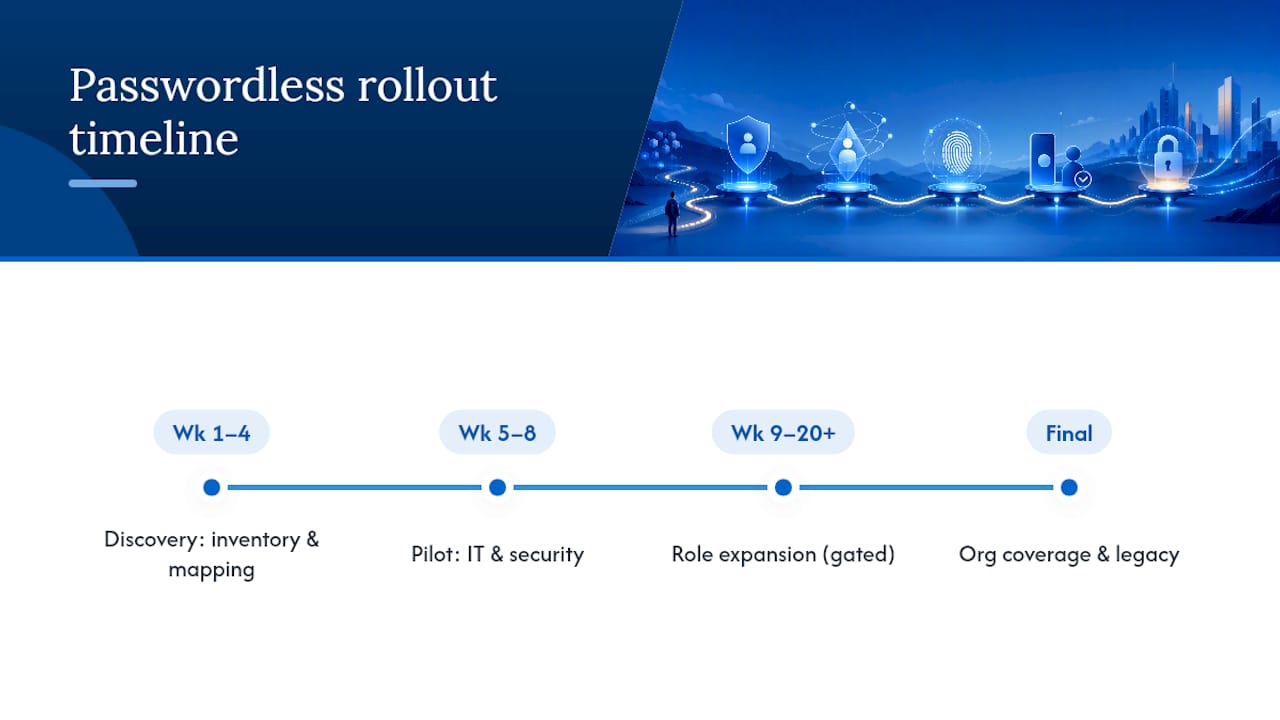
Full organizational coverage, including legacy application remediation or compensating controls for systems that can't yet support FIDO2, generally requires a multi-month phased rollout for a mid-size organization. Rushing this compresses the recovery-design and helpdesk-readiness work that determines whether the rollout sticks. Organizations that skip the discovery phase tend to discover legacy compatibility problems mid-rollout instead of before it, which is a far more expensive place to find them.
How Does Passwordless Affect User Experience and Accessibility?
Passwordless authentication generally improves everyday user experience once past the initial enrollment friction. There's no password to remember, no complexity requirement to satisfy, and no reset request to file after a long weekend away from a workstation. A fingerprint tap or a device prompt replaces all of that.
Accessibility requires deliberate planning, though. Biometric methods depend on hardware that not every device or every user can use reliably; a user with a hand tremor or a worn fingerprint sensor may struggle with a fingerprint reader specifically. Building in a PIN or hardware key fallback alongside biometric options, rather than treating biometrics as the sole path, keeps the system usable for the full workforce rather than a subset of it.

Enrollment design matters just as much as the daily login experience. Staff who split time across a phone and a shared workstation need a method that works cleanly on both, which usually points toward a portable hardware key rather than a phone-bound passkey for that specific group. Clear, plain-language enrollment instructions, delivered before the rollout wave hits rather than as a surprise email, reduce the support tickets that erode confidence in the new system during its first weeks.
What's Next for Passwordless Authentication Technology?
Passkey syncing across ecosystems is the most consequential near-term shift. Major platform vendors now sync passkeys across a user's devices through cloud-based credential managers, which resolves one of the earliest complaints about device-bound keys: losing a phone used to mean losing every credential registered to it.
Cross-device authentication flows are also maturing, letting a user scan a QR code with a phone to authenticate a session on an unrelated desktop or kiosk, without installing anything on that second device. Expect broader enterprise adoption of this pattern for shared workstations and field environments where a personal device may not be the primary login tool.
On the standards side, FIDO2/WebAuthn continues gaining broader industry support as the common language between browsers, operating systems, and identity providers, which reduces the fragmented vendor-specific implementations that slowed early passwordless adoption. Expect closer integration between passwordless credentials and continuous, risk-based authorization signals, meaning the login event becomes one data point in an ongoing trust evaluation rather than a one-time gate. That shift aligns directly with where Zero Trust architecture is already heading.
Lessons From the Field: What Deployments Actually Teach You
Across client deployments, three lessons repeat consistently: recovery design breaks rollouts more often than the authentication method itself; staff resistance drops fast once helpdesk tickets visibly decline; and legacy application gaps are always bigger than the initial inventory suggests. If you're weighing a rollout, an assessment with Securetechie is the fastest way to see where your environment actually stands.
— Alex
How Securetechie Manages Your Passwordless Rollout
Planning a passwordless rollout in-house means absorbing the enrollment troubleshooting, recovery design, and legacy compatibility mapping this guide just walked through, on top of your regular workload. Securetechie runs that entire process for Southern California businesses as a managed engagement, not a one-time consulting drop-off.

Our team handles the pieces that typically stall internal rollouts: a readiness assessment of your current identity stack, staged pilot management starting with privileged accounts, compliance audit support for HIPAA, SOC 2, and CMMC requirements, and 24/7 monitoring once the new authentication model is live. Because Securetechie already manages infrastructure and cybersecurity for clients across the region, passwordless deployment plugs into an existing security posture instead of becoming a separate project with its own blind spots.
If a phased rollout is on your roadmap for this year, schedule an assessment with Securetechie to map your current environment against a realistic pilot timeline.
Sources
- Why passkeys are the future of passwordless authentication
- Passwordless authentication | Microsoft Security
- What is biometric authentication (HYPR blog)
- Questions and buzz surrounding draft NIST special publication 800-63-3
- Biometric authentication methods (Descope blog)