
A successful office IT relocation comes down to one thing: completing the right tasks in the right order, weeks before the moving truck arrives. The office IT relocation checklist below gives you a prioritized, time-lined sequence you can hand directly to vendors, facilities teams, and internal stakeholders. Follow it and your staff walk into a working office on Day One. Skip steps or start late, and you are troubleshooting at midnight on a Sunday.
Your top-priority actions, counted back from move day:
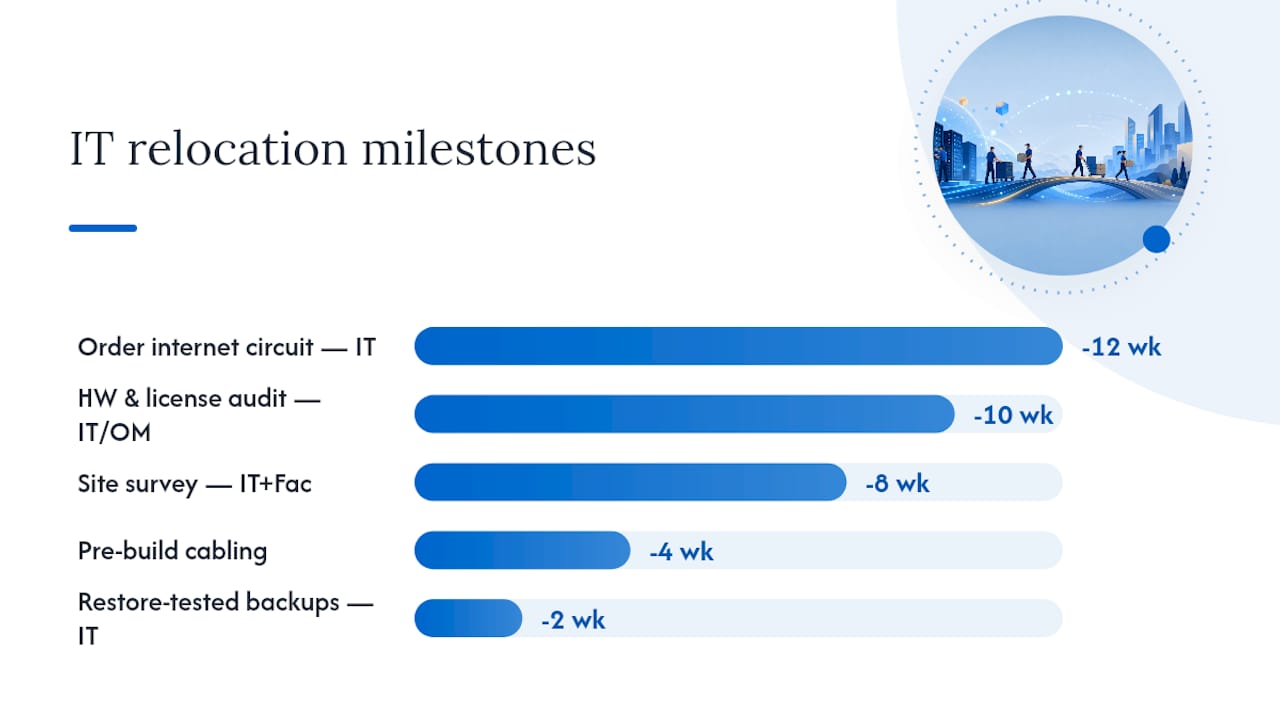
- Week −12 or earlier: Order the new internet circuit. New fiber or leased-line installs commonly take 45–90 working days from order to delivery, making connectivity the single longest lead-time item on the critical path.
- Week −10: Complete a full hardware, software, and license audit. Retire aging equipment now rather than paying to move it.
- Week −8: Conduct a site survey. Photograph the MPOE/demarc, comms room, power circuits, and rack space. Verify cooling before signing off on the space.
- Week −6: Submit number-porting paperwork to your VoIP or telephony provider. Porting typically takes 2–4 weeks and requires error-free paperwork.
- Week −4: Pre-build the new site's network. Run Cat6A cabling to a minimum of two drops per desk, terminate and certify all runs, and bring the new circuit live while the old office stays operational.
- Week −2: Complete restore-tested backups of all servers, VMs, and cloud configurations. "Restore-tested" means you have actually recovered data to a clean target and confirmed it, not just verified that a backup job completed.
- Week −1: Freeze all non-essential changes. Finalize the move-weekend runbook with named owners, minute-by-minute tasks, and a fixed rollback time.
- Move weekend: Execute the runbook. Sequence: circuit and firewall first, then core switching, wireless, servers, printers, pilot users, then full staff.
- Week +1: Run the full post-move test matrix. Staff a hypercare triage desk on-site through the first week.
Critical-path milestone table:
| Milestone | Countdown | Owner |
|---|---|---|
| Internet circuit ordered | −12 weeks | IT Lead |
| Hardware and license audit complete | −10 weeks | IT Lead / Office Manager |
| Site survey signed off | −8 weeks | IT Lead + Facilities |
| Number-porting paperwork submitted | −6 weeks | IT Lead / VoIP Provider |
| New site pre-built and cabled (Cat6A certified) | −4 weeks | Cabling Contractor |
| Restore-tested backups verified | −2 weeks | IT Lead |
| Runbook finalized, change freeze in effect | −1 week | Project Owner |
| Cutover executed per runbook | Move weekend | All owners |
| Post-move test matrix complete, hypercare active | Week +1 | IT Lead + MSP |
Proper IT planning for a small-to-mid-market office move typically spans 4–6 months from kickoff to move-in. If your timeline is compressed, prioritize the circuit order and the site survey above everything else.
Key takeaways
A successful office IT move requires ordering the circuit at week −12, pre-building the new site while the old one stays live, and executing a scripted runbook with a fixed rollback time and named owners for every step.
| Point | Details |
|---|---|
| Order the circuit first | New fiber installs take 45–90 working days; this is always the critical path item. |
| Pre-build before cutover | Bring the new site live while the old office operates to make move weekend a switch-on. |
| Write a real runbook | Minute-by-minute tasks with named owners and a fixed rollback time prevent Monday outages. |
| Verify backups before moving | Restore-test every server and VM within 7 days of move day, not just check backup job status. |
| Securetechie for managed moves | Securetechie covers the full move scope from circuit order through hypercare for Southern California businesses. |
Table of Contents
- What does a complete IT relocation plan look like?
- How to audit hardware, software, and services before the move
- What connectivity and communications steps are critical before moving?
- What should you check during a site visit for IT infrastructure?
- How do you protect data during an office IT move?
- Move-weekend cutover: how to run the runbook
- What does the new office test plan look like?
- How to coordinate movers, telcos, and third-party vendors
- Security and compliance checks before, during, and after the move
- When should you use a managed IT partner for your office move?
- What the IT teams who get this right actually do differently
- Securetechie handles the IT move so your team doesn't have to
- Frequently asked questions
- Sources
What does a complete IT relocation plan look like?
Planning is where most moves succeed or fail, and the margin is almost always determined by how early the project owner starts and how clearly responsibilities are assigned.
Gated timeline with key decision points:
| Gate | Countdown | Key Deliverable |
|---|---|---|
| Kickoff | −12 weeks | Project owner named, circuit ordered, budget approved |
| Audit complete | −10 weeks | Asset register finalized, retirement list approved |
| Site survey | −8 weeks | Survey report signed, cabling scope confirmed |
| Vendor contracts | −6 weeks | Cabling, movers, and ISP contracts executed |
| Pre-build complete | −4 weeks | New site live, pilot users tested |
| Backups verified | −2 weeks | Restore tests passed, runbook drafted |
| Change freeze | −1 week | Runbook finalized, staff comms sent |
| Cutover | Move weekend | Runbook executed, rollback criteria defined |
| Hypercare close | Week +1 | Snag list resolved, tickets triaged |
Roles and responsibilities:
- Project owner (typically the office manager or IT manager): holds the schedule, approves budget changes, and is the single point of escalation for all vendors.
- IT lead: owns the technical runbook, circuit ordering, cabling scope, and post-move test matrix.
- Facilities: coordinates building access, loading dock scheduling, and landlord approvals at both sites.
- Vendor SPOC: one named contact per vendor who can authorize decisions and escalate within their organization.
Budget categories to confirm early:
- New circuit installation and cross-connect fees
- Structured cabling labor and materials (Cat6A, fiber backbone, patch panels)
- Rack, UPS, and power works at the new site
- Temporary cellular failover or secondary carrier during cutover
- Electronics-handling movers and insurance riders
- Hypercare staffing (on-site IT support for Week +1)
Communications rules: Send a status update to all stakeholders every Friday from kickoff through Week +1. Publish escalation contacts in writing before move weekend. Send a Day-One employee communication the Thursday before the move that covers new Wi-Fi credentials, printer locations, VoIP extension changes, and the helpdesk number.
How to audit hardware, software, and services before the move
An accurate audit prevents two expensive problems: transporting equipment that should be retired, and discovering mid-move that a license or service is tied to an address or account you no longer control. A thorough device and services audit before the move directly reduces Day-One support ticket volume.

Asset inventory template fields:
| Field | Notes |
|---|---|
| Asset tag | Scan or photograph the physical tag |
| Serial number | Required for warranty transfer and insurance |
| Owner / assigned user | Needed for delivery routing on move day |
| Destination (desk/room) | Map to new floor plan before move day |
| Status | Move / Replace / Retire |
| Special handling | Anti-static, fragile, chain-of-custody required |
Walk every desk, server room, and storage closet. Do not rely on an existing CMDB unless it was audited within the last 90 days.
Software and cloud tenancy checks:
- Confirm admin account ownership for every SaaS platform. Many are registered to a former employee's email.
- Verify SSO configurations and whether any service is tied to an on-prem Active Directory that will move or change IP.
- Check license portability: some seat licenses are address-locked or require vendor notification for site changes.
- Review backup agents and monitoring tools for hardcoded IP addresses or hostnames that will break after the move.
- Note vendor notice periods for contract changes, especially for colocation, managed hosting, and copier leases.
Contract items to review early:
- ISP SLA terms and early-termination clauses at the old site
- Phone number porting authorization letters (LOAs) and account PINs
- Copier and printer lease transfer requirements (many require landlord or lessor approval)
- Server colocation or managed hosting transfer terms and any minimum notice periods
Asset disposition checklist: For every item marked "Retire," document the serial number, confirm data has been wiped to NIST SP 800-88 standards, and obtain a certificate of destruction from your disposal vendor before the move date. Never transport a retired drive to the new site.
What connectivity and communications steps are critical before moving?
The internet circuit is the program's critical path. New leased-line or fiber installs commonly take 45–90 working days from order to delivery, and wayleaves or road crossings can add weeks beyond that. Order at week −12 at the absolute minimum.
ISP ordering checklist:
- Confirm which carriers have fiber in the building or can reach the MPOE without a road crossing.
- Identify the MPOE and MDF demarc location during your site survey. Photograph it.
- Confirm cross-connect options and costs between the carrier demarc and your comms room.
- Request wayleave or permit status in writing from the carrier before signing the contract.
- Get a confirmed install date in the contract, not an estimated range.
DNS and TTL best practices:
Lower your DNS TTL to 300 seconds (5 minutes) at least 48 hours before cutover. This limits propagation delay when you flip records. After cutover is confirmed stable, restore TTL to your normal value. For mail flow, verify SPF, DKIM, and DMARC records are correct at the new site before decommissioning the old circuit.
VoIP and number porting:
- Submit the Letter of Authorization (LOA) and a copy of your current phone bill to the new VoIP provider at week −6.
- Porting typically takes 2–4 weeks. Common errors: mismatched account name, wrong billing address, or missing PIN.
- Test all extensions and hunt groups at the new site before porting. Port numbers only after the new system is verified.
- Keep the old phone system active in parallel until porting is confirmed complete.
Temporary failover options:
| Option | Best Use |
|---|---|
| 4G/5G cellular router | Short cutover window, low-traffic fallback |
| Secondary broadband circuit | Parallel run during pre-build phase |
| SD-WAN with dual uplinks | Larger offices needing automatic failover |
Validate failover routing by physically disconnecting the primary circuit during a test window before move day.
What should you check during a site visit for IT infrastructure?
Site surveys that verify demarcation, power, and cooling before moving equipment save significant time and money. Complete at least two visits: one during building selection and one after key handover.
Site survey checklist:
- Photograph the riser, MPOE, and all incoming carrier entries.
- Count available rack units and measure rack dimensions (height, depth, width).
- Identify all power circuits in the comms room: breaker IDs, amperage, and whether they are dedicated or shared.
- Confirm cooling capacity: BTU rating of any existing CRAC/CRAH unit, or confirm the room qualifies for a portable unit.
- Check door lock type and confirm the comms room has a separate key or access card from the general office.
- Note cable tray routes from the comms room to each floor zone.
Cabling standards and drops planning:
Cat6A is the current baseline for new office builds. It supports 10GbE to the desktop and provides headroom for future wireless access points. Plan a minimum of two drops per desk (one for the workstation, one spare or for a VoIP handset). Conference rooms need a minimum of four drops plus a dedicated fiber or Cat6A run for AV systems.

Document every run with a label at both ends and produce an as-built diagram before move day. Photographed configurations at the patch panel level, as noted in relocation best practices, dramatically reduce troubleshooting time on cutover weekend.
Rack and power specifications:
- Size your UPS for 125% of the calculated load to allow for growth.
- Dedicated 20A circuits for server racks; never share with general office power.
- Confirm the UPS runtime meets your RTO: most small-office UPS units provide 10–20 minutes at full load.
Floor plan annotations: Mark AP placement on the floor plan before cabling begins. Place APs to cover dead zones, not just to hit a unit count. Separate secure areas (server room, finance) from public or visitor zones on the network diagram and the physical floor plan.
How do you protect data during an office IT move?
Data protection during a move is not just about backups. It covers the full chain: backup verification, migration staging, physical chain-of-custody for storage hardware, and acceptance testing before staff return to their desks.
Pre-move data protection checklist:
| Item | Requirement |
|---|---|
| Server and VM backups | Restore-tested to a clean target within 7 days of move |
| Firewall configuration export | Saved and version-controlled off-device |
| Switch and AP configuration export | Saved with device hostname and firmware version noted |
| Cloud tenant snapshot | Admin-level export of settings, policies, and user lists |
| Mailbox migration staging | Staged migration completed, delta sync active before cutover |
"Restore-tested" means a team member has actually recovered data to a separate target environment and confirmed application functionality, not just checked that the backup job shows a green status. Securetechie's backup and disaster recovery practice uses this standard for every pre-move engagement.
Mailbox and file migration template:
- Take a full snapshot of all mailboxes and file shares.
- Run a staged migration to the new environment with delta sync active.
- Verify a sample of mailboxes (at least 10% of users) for completeness and folder structure.
- Define rollback criteria: if more than 5% of sampled mailboxes show errors, halt and investigate before proceeding.
- Cut over DNS MX records only after verification passes.
A zero-downtime email migration follows this exact staged approach.
Physical chain-of-custody for storage hardware:
- Use tamper-evident packaging on all drives and storage arrays.
- Require a custodial sign-off sheet at the origin (who packed it, when) and at the destination (who received it, condition on arrival).
- Never transport unencrypted drives in an unlocked vehicle or without a named custodian present.
Move-weekend cutover: how to run the runbook
Runbook-driven, minute-by-minute cutover sequencing with rollback triggers and named owners is the single most effective control against Monday-morning outages. A general to-do list is not a runbook. Every step needs a named owner, a start time, an expected completion time, and a pass/fail check.
Recommended bring-up sequence:
- Confirm circuit is live and firewall is online. Ping external DNS. Do not proceed until this passes.
- Bring up core switching and confirm inter-VLAN routing.
- Bring up wireless. Verify SSID broadcast and client authentication on each AP.
- Bring up servers and verify all services (AD, DNS, DHCP, file shares).
- Bring up printers and peripherals. Confirm print queues.
- Pilot users (5–10 staff) test real workloads: email, file access, VoIP calls, VPN.
- Full staff cutover only after pilot passes.
Rollback triggers: Define a fixed rollback time before the runbook starts. If the circuit is not live by Hour 4, or if pilot users cannot authenticate by Hour 6, the rollback owner calls the trigger and the team reverts to the old site. The rollback time must be agreed in writing before move weekend begins.
Packaging and transport rules:
- Label every cable, device, and rack unit before disassembly. Use a consistent label format: location code + asset tag.
- Use anti-static bags for all drives, NICs, and expansion cards.
- Transport servers upright in padded cases or original packaging. Never lay a tower server on its side during transport.
- Require a chain-of-custody sign-off at the origin rack and again at the destination rack.
Pro Tip: Run the pilot with real user workloads, not synthetic ping tests. A user who cannot open their CRM or print a document is a failure the runbook must catch before full staff arrive Monday morning.
Fallback plans:
- Keep the old circuit active for at least 30 days after cutover. It costs less than an emergency re-provision.
- Pre-communicate a work-from-home trigger to all staff: if the new site is not operational by a defined time, staff work remotely and the IT team continues the build without business pressure.
What does the new office test plan look like?
A device audit and pilot testing are the two controls that most directly determine whether employees can work on Day One. The test matrix below gives you named verifiers and pass/fail criteria for each system.
New office test matrix:
| System | Test | Pass Criteria |
|---|---|---|
| Internet | Speed test and latency check | Meets contracted bandwidth, latency under 20ms to primary cloud |
| DNS / mail flow | Send and receive test email | Mail delivered in under 2 minutes, no NDRs |
| Active Directory / auth | Log in with standard user account | Authentication succeeds within 5 seconds |
| VPN | Remote access from external network | Full tunnel established, internal resources reachable |
| VoIP | Inbound and outbound call test | Clear audio, no jitter, correct caller ID |
| Printers | Print from each department workstation | Job completes, correct queue assigned |
| Conference AV | Screen share and video call test | Display and audio work without manual driver install |
| Access control | Badge in/out at all secured doors | All badges active, logs recorded |
Staged verification approach: Core systems first (internet, AD, DNS), then pilot users, then whole-office rollout. Assign a named verifier to each test row. No system advances to the next stage until its pass criteria are met.
Hypercare model: Station at least one IT technician on-site for the full first week. Run a daily snag review at 4:00 PM to triage open tickets and assign owners. Fast-track any ticket that blocks a user from working. Close the hypercare desk only after the snag list reaches zero open items.
Common Day-One fixes:
- Wireless dead spot: check AP placement against the floor plan, verify the AP has an IP and is joined to the controller.
- Printer queue not found: re-push the printer via Group Policy or manually add the queue using the new IP.
- Missing peripheral: cross-reference the asset register against the chain-of-custody sign-off sheet to locate the item.
How to coordinate movers, telcos, and third-party vendors
Responsibility gaps between vendors are the most common source of move-day outages that no single party owns. A centralized contact sheet and sign-off checklist close those gaps before they open.
Vendor contact and escalation sheet template:
| Vendor | Role | Primary Contact | Phone | SLA Window | Escalation Path |
|---|---|---|---|---|---|
| ISP | Circuit delivery | Account manager name | Direct line | 4-hour response | NOC number |
| Cabling contractor | Structured cabling | Site supervisor | Mobile | Same-day | Company owner |
| VoIP provider | Number porting | Porting team | Support line | 2-hour response | Account director |
| Electronics mover | Hardware transport | Move coordinator | Mobile | Day-of | Operations manager |
| MSP | Technical oversight | IT lead | Mobile | 1-hour response | Senior engineer |
Coordination checkpoints by vendor type:
- Movers: Confirm electronics-handling certification, insurance coverage, and building access windows at both sites. Require a pre-move walkthrough. For move-in logistics and tenant coordination, move-in operations planning resources can help align property manager and mover schedules.
- Cabling contractor: Require a certification report (TIA-568 test results) for every Cat6A run before accepting the work. Do not pay the final invoice without it.
- ISP: Get the confirmed install date and the name of the field technician in writing. Confirm cross-connect completion separately from circuit delivery.
- VoIP provider: Confirm porting completion date in writing. Test all extensions before the porting window closes.
- MSP: Assign one internal technical SPOC who can authorize decisions on-site without escalating to management for every minor issue.
Vendor sign-off checklist for site readiness:
- Cabling certification report received and filed
- Cross-connect from carrier demarc to comms room confirmed complete
- UPS and power works signed off by electrician
- Comms room door lock and access control confirmed operational
- All vendor invoices matched to deliverables before final payment
A single internal or MSP technical point of contact who attends every vendor call and site visit eliminates the "that's not our scope" conversation on move day. Move-management tools like CrownRMS can help track items in transit and centralize shipment records when asset volumes are high.
Security and compliance checks before, during, and after the move
Security controls during a move are non-negotiable. Physical disruption creates exactly the conditions that expose data: unlocked comms rooms, untracked hardware, and access accounts that were not updated.
Asset wipe and disposition checklist:
- Wipe all retired media to NIST SP 800-88 standards before transport or disposal.
- Obtain a certificate of destruction from your disposal vendor for every retired drive.
- Document serial numbers of all wiped devices in the asset register.
- Never transport retired media to the new site, even temporarily.
Access control changes required:
- Deactivate all building access badges for the old site on move day.
- Issue new badges for the new site only after identity verification.
- Change comms room door codes or key assignments at the new site before any equipment arrives.
- Review and update all admin account credentials for network equipment, servers, and cloud platforms.
- Confirm who has approved access to the new comms room and document it.
Audit steps post-move:
- Confirm all old circuits are decommissioned and billing is cancelled. Carriers do not always stop billing automatically.
- Update billing portal ownership and contact details for all services.
- Verify that monitoring and alerting tools are pointing to new IP ranges and hostnames.
Compliance sign-off: For organizations subject to HIPAA, SOC 2, or GDPR, a move that involves relocating servers, changing network topology, or transferring data between environments may require a formal risk assessment and documented sign-off. Securetechie's compliance and security audit practice covers these touchpoints. The guidance here is a summary, not legal or regulatory advice. Confirm specific requirements with your compliance officer or legal counsel.
Pro Tip: Schedule a post-move vulnerability scan within 30 days of cutover. New network configurations frequently introduce firewall rule gaps or misconfigured VLANs that were not present at the old site.
When should you use a managed IT partner for your office move?
Securetechie has executed structured IT relocations for small to mid-size businesses across Southern California, using a gated timeline, a scripted runbook, and a hypercare model that keeps staff productive from Day One.
Managed IT move template (Securetechie's approach):
| Phase | Deliverable | Typical Timeline |
|---|---|---|
| Discovery and audit | Asset register, circuit order, site survey report | Weeks −12 to −10 |
| Pre-build | Cabling certified, new site live, backups verified | Weeks −8 to −2 |
| Cutover | Runbook executed, pilot passed, staff cutover complete | Move weekend |
| Hypercare | On-site triage, snag list closed | Week +1 |
Signs you should hire an MSP for your move:
- Your internal IT team has fewer than two people available full-time for the project.
- The timeline is compressed to under 10 weeks.
- The move involves complex telephony, colocation transfers, or multi-site cutover.
- Your organization is subject to HIPAA, SOC 2, or CMMC compliance requirements.
- You have had a previous move that resulted in extended downtime or data loss.
Securetechie's managed infrastructure services cover the full move scope: circuit coordination, cabling oversight, runbook authorship, cutover execution, and hypercare staffing. For organizations switching MSPs during a move, the MSP transition process is designed for zero-downtime handover. Review IT case studies to see structured move outcomes for businesses similar to yours.
What the IT teams who get this right actually do differently
Most move failures are not technical. They are sequencing failures: the circuit was ordered three weeks late, the runbook was a shared Google Doc with no owners, or the pilot was a ping test rather than a real workload. The teams that execute clean moves share a few habits that are worth naming directly.
Fix the rollback time before the runbook starts. Every team intends to roll back if things go wrong. Almost none of them define the exact time and the exact person who calls it. Without a fixed rollback time, the team keeps troubleshooting past the point of no return and staff arrive Monday to a broken office. Write the rollback time into the runbook header. Make it non-negotiable.
Photograph everything before you touch it. Rack configurations, patch panel labeling, cable runs, and AP placements should all be photographed before disassembly. This is not about documentation for its own sake. It is about the 2:00 AM moment when a switch is not coming up and nobody remembers which port the uplink was on.
Overlap the old circuit by at least 30 days. The cost of keeping the old line active for a month is trivial compared to the cost of an emergency re-provision if the new circuit has a fault. This is the single most underused insurance policy in office IT moves.
Pre-build the new site while the old one is still live. Pre-building and testing the new site before cutover converts a high-risk build into a low-risk switch-on. If the new site is already running and verified, move weekend is a migration, not a construction project.
Treat number porting as a separate project. VoIP number porting has its own paperwork, its own lead times, and its own failure modes. Teams that fold it into the general IT checklist almost always submit the LOA late or with errors. Assign a dedicated owner to porting at week −6 and treat it as a parallel workstream.
Pro Tip: The most non-obvious move-day risk is a license that is tied to a static IP or a physical address. Check every software license agreement for address-lock clauses before the move, not after.
Securetechie handles the IT move so your team doesn't have to
An office IT relocation has a clear critical path: order the circuit early, pre-build the new site, write a runbook with a fixed rollback time, and staff a hypercare desk through Week +1. Executing all of that in parallel while running a business is where most internal IT teams run out of bandwidth.

Securetechie provides end-to-end managed infrastructure support for office relocations across Southern California, covering circuit coordination, structured cabling oversight, runbook authorship, cutover execution, and on-site hypercare. The engagement starts with a move assessment that maps your current environment, identifies the critical path, and produces a gated project plan you can use immediately. For organizations with compliance requirements, Securetechie's team handles HIPAA, SOC 2, and CMMC touchpoints as part of the move scope. Contact Securetechie to request a move assessment or download the starter checklist and get a project plan in place before your circuit order window closes.
Frequently asked questions
How far in advance should I start planning an office IT move? Start at least 12 weeks before move day for a small-to-mid-size office. For a full-scope move with complex telephony, colocation, or compliance requirements, 4–6 months is the realistic planning window.
What is the longest lead-time item in an office IT relocation? The internet circuit. New fiber or leased-line installs typically take 45–90 working days from order to delivery. Order it before anything else.
What does "restore-tested backup" mean? It means a team member has actually recovered data from the backup to a separate, clean target environment and confirmed that applications and files work correctly. A backup job that shows a green status has not been restore-tested.
When should I submit number-porting paperwork? At week −6 at the latest. Porting typically takes 2–4 weeks, and errors in the Letter of Authorization (LOA) restart the clock. Common errors include a mismatched account name, wrong billing address, or missing account PIN.
What is a runbook and why does it matter? A runbook is a scripted, minute-by-minute sequence of tasks with a named owner for every step, verification checks, and a fixed rollback time. It is the difference between a controlled cutover and a team improvising at 3:00 AM. General to-do lists are not runbooks.
What cabling standard should I specify for a new office? Cat6A is the current baseline. It supports 10GbE to the desktop and provides headroom for Wi-Fi 6/6E access points. Require TIA-568 certification test results for every run before accepting the contractor's work.
How long should I keep the old internet circuit active after the move? At least 30 days. Keeping the old line active costs far less than an emergency re-provision if the new circuit has a fault during the first weeks of operation.
What compliance steps are required during an office move? For organizations subject to HIPAA, SOC 2, or CMMC, a move that involves relocating servers or changing network topology may require a formal risk assessment and documented sign-off. Confirm specific requirements with your compliance officer or legal counsel. Securetechie's compliance audit services cover these touchpoints as part of a managed move engagement.
Sources
- Office Move IT Checklist: Proven Guide to Avoid Downtime
- IT Office Move Project Management: The...
- Office Move IT Relocation Checklist | Computer Experts Corp.
- Office Move IT Checklist: How to Keep Employees Productive on Day One — Jones IT