
Data loss prevention (DLP) is a set of technologies and policies that stops sensitive information from being exposed, misused, or transferred without authorization. It protects data across three states: data in use (on endpoints), data in motion (across networks), and data at rest (in storage). If your organization handles patient records, payment card data, contracts, or any regulated personal information, DLP is the control layer that keeps that data from leaving through the wrong channel.
Start here:
- Discover and classify your sensitive data before configuring any policy.
- Pilot on your highest-risk channels first, typically email and cloud file sharing.
- Run in monitor-only mode, review alerts, tune policies, then move to enforcement.
- Pair DLP with identity controls, endpoint detection, and user training for full coverage.
A recent insider dataset found that personal cloud storage, removable drives, and AI tools were among the top exfiltration destinations by volume. Those three vectors alone represent the majority of where sensitive data walks out the door, and none of them require a sophisticated attacker.
Table of Contents
- Why data loss prevention matters — and where it falls short
- Where data actually leaves your organization
- How DLP solutions are categorized and where they operate
- How DLP detects sensitive data and manages the policy lifecycle
- A phased implementation checklist for DLP deployment
- How to choose the right DLP approach for your organization
- A practical DLP checklist built for SMBs
- Key Takeaways
- The real gap most DLP programs leave open
- Securetechie's managed DLP services for Southern California businesses
- Useful sources for further reading
Why data loss prevention matters — and where it falls short
DLP delivers real, measurable value when it is scoped correctly. The core benefits are concrete: fewer accidental leaks through email and cloud sharing, a documented audit trail for compliance reviews, faster incident investigations because you know exactly what moved and where, and policy enforcement that maps directly to HIPAA, PCI DSS, and CCPA/state privacy law requirements.
HIPAA requires covered entities to implement technical safeguards that control access to electronic protected health information. PCI DSS mandates controls over cardholder data in transit and at rest. CCPA and its successor CPRA require organizations to protect California residents' personal information from unauthorized disclosure. DLP supports all three by applying consistent controls at the point where data moves, not just where it is stored.
That said, DLP is not a complete solution on its own. False positives are the most common operational pain point: an overly broad regex pattern flags every spreadsheet containing a number sequence, and suddenly your security team is drowning in low-value alerts. Encrypted channels, unsanctioned applications, and personal devices create blind spots that standard DLP agents do not cover. A determined insider who photographs a screen or dictates data verbally will not trigger any policy.
DLP works best as one layer in a defense-in-depth program. Effective exfiltration prevention combines DLP with endpoint monitoring, network egress controls, behavioral analytics, and identity governance. Zero-trust principles, where access is verified continuously based on identity and context rather than network location, close many of the gaps that perimeter-only DLP leaves open.
Pro Tip: For SMBs just starting out, focus your first DLP policies on email and collaboration tools. These channels carry the highest volume of sensitive data movement and produce the most actionable alerts without requiring complex infrastructure changes.
Where data actually leaves your organization
Understanding the real vectors of data loss helps you prioritize controls against the threats that matter most, not the ones that make the best conference slides.
Accidental leakage is the most common category and often the easiest to address:
- A misaddressed email sends a patient roster to the wrong clinic.
- A Google Drive folder is shared with "anyone with the link" instead of specific recipients.
- A Slack or Teams message drops a contract PDF into a public channel.
- An employee uploads a spreadsheet to a personal Dropbox account to work from home.
- A presentation containing salary data is attached to a vendor email instead of a marketing deck.
Insider exfiltration is deliberate and harder to catch without behavioral context. A departing employee copies client lists to a personal USB drive before their last day. A contractor with overly broad access downloads an entire database of customer records. A disgruntled employee forwards internal pricing data to a competitor. These actions often look identical to legitimate work until you examine the volume, timing, and destination together.
External attacker exfiltration typically follows a credential compromise or malware infection. Once an attacker has valid credentials, they can move data through the same channels your employees use, making detection harder without behavioral baselines.

A short incident example illustrates how a policy trigger works in practice. An employee attempts to email a file containing 200 Social Security numbers to a personal Gmail account. The DLP engine scans the attachment, matches the content against a Social Security number pattern, and blocks the send. The system logs the attempt, generates an alert, and routes it to the security team. The investigator reviews the user's recent activity, confirms no other anomalous transfers, and closes the ticket after a coaching conversation with the employee's manager.
How DLP solutions are categorized and where they operate
DLP solutions are not a single product type. They operate at different points in your environment, and most mature programs combine more than one category.
| DLP Category | Data States Covered | Deployment Location | Detection Methods | Enforcement Modes | Best Fit | Integration Requirements |
|---|---|---|---|---|---|---|
| Network DLP | In motion | Inline/egress gateway, proxy | Regex, fingerprint, keyword | Monitor, block, quarantine | Enterprise, regulated industries | Firewall, proxy, SIEM |
| Endpoint DLP | In use, at rest | Agent on laptops/desktops | Fingerprint, regex, contextual, ML | Monitor, block, encrypt, coach | Enterprise, remote workforces | EDR, identity (AD/Entra), MDM |
| Cloud/CASB DLP | In motion, at rest | API integration, reverse proxy | API scanning, regex, ML | Monitor, block, quarantine, encrypt | SMB to enterprise, SaaS-heavy orgs | CASB, SSO/IdP, SIEM |
| Email/Gateway DLP | In motion | MTA gateway, native platform | Regex, fingerprint, keyword, ML | Monitor, block, quarantine, coach | SMB to enterprise, all industries | Email platform, identity |
| Storage/File-Store DLP | At rest | NAS, SharePoint, cloud storage | Fingerprint, regex, classification labels | Monitor, quarantine, encrypt, restrict | Enterprise, compliance-driven | DLP platform, classification engine |
Network DLP sits at egress points and inspects traffic leaving the organization. It provides broad visibility but requires inline deployment and can struggle with encrypted TLS traffic without SSL inspection configured.
Endpoint DLP runs as an agent on user devices, covering data in use and at rest even when the device is off the corporate network. Microsoft Purview's endpoint DLP, for example, enforces policies on Windows and macOS devices across browsers, USB ports, and local applications. Fortinet's endpoint security stack integrates DLP capabilities alongside its FortiEDR agent, giving teams a combined detection and prevention layer. The tradeoff is agent management overhead and potential performance impact on older hardware.
Cloud/CASB DLP connects to SaaS applications through APIs or acts as a reverse proxy, scanning data shared through platforms like Microsoft 365, Google Workspace, Salesforce, and Box. Imperva's cloud data security capabilities extend DLP-style controls to cloud databases and data warehouses, adding coverage for structured data at rest in cloud environments that traditional endpoint or network tools miss entirely.

Email/Gateway DLP is often the fastest win. It sits at the mail transfer layer and inspects outbound messages and attachments before delivery. For organizations already on Microsoft 365, Microsoft Purview DLP is built into the platform and can be activated without additional infrastructure.
Storage/File-Store DLP scans repositories like SharePoint, network file shares, and cloud storage buckets for sensitive data that has already landed in the wrong place. It is the remediation layer, not the prevention layer, but it is essential for finding historical exposure.
How DLP detects sensitive data and manages the policy lifecycle
Detection accuracy is what separates a DLP program that produces useful alerts from one that generates noise. Four primary methods are in common use, and most enterprise platforms combine them.
Fingerprinting (exact match) creates a hash of a specific document or dataset and triggers when that exact content appears in a transfer. It is highly accurate for known sensitive files like contracts, source code, or specific database exports, but it only catches exact or near-exact copies.
Regex and pattern matching identifies structured data formats: Social Security numbers, credit card numbers, ICD-10 codes, routing numbers. It is fast and broadly applicable, but pattern-only rules generate false positives when the same format appears in non-sensitive contexts (test data, training materials, random number sequences).
Contextual analysis adds metadata, user identity, application context, and behavioral signals to the detection decision. A file labeled "Confidential" moving to a personal email address at 11 PM from a user who submitted a resignation last week carries a very different risk score than the same file moving to a known business partner during business hours.
ML-based classification trains on labeled examples of sensitive content and generalizes to new documents that match the pattern without requiring an exact template. Microsoft Purview uses trainable classifiers for categories like resumes, financial statements, and source code. This method handles unstructured content well but requires tuning and labeled training data to perform accurately.
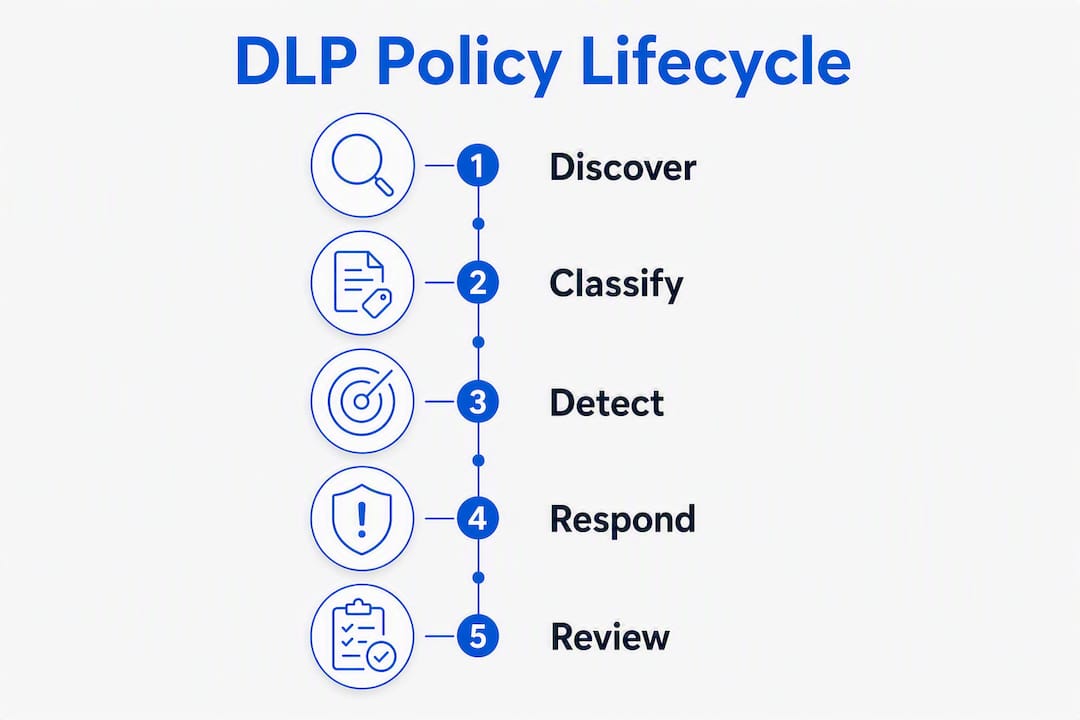
The policy lifecycle is where most DLP programs succeed or fail. Discovery and classification come first: you cannot protect what you have not found. Classification assigns sensitivity labels that drive policy decisions downstream. Enforcement applies the right control (monitor, coach, block) based on the label and context. Response handles triggered alerts through a defined workflow. Tuning reviews false positives and adjusts rules to reduce noise without creating blind spots. Each stage has a clear owner: data owners classify, security engineers author policies, the SOC or IT team reviews incidents, and a designated approver signs off on enforcement mode changes.
Pro Tip: Track three metrics from day one: false-positive rate per policy, mean time to close an alert, and percentage of sensitive data covered by at least one active policy. These three numbers tell you whether your DLP program is improving or stagnating.
A phased implementation checklist for DLP deployment
A phased rollout avoids the two most common failure modes: deploying too broadly too fast (false-positive overload) and deploying too narrowly forever (with no real coverage). Data discovery and classification are mandatory before any technical control goes live.
- Map your sensitive data. Inventory endpoints, SaaS platforms, cloud storage, and on-premises file shares. Document data types, owners, and where each type flows. Data lineage information materially improves detection accuracy later.
- Define classification tiers. Establish at minimum three levels: public, internal, and confidential/restricted. Align labels to your compliance obligations (PHI for HIPAA, CHD for PCI, personal information for CCPA).
- Scope your pilot. Choose one high-risk data type (Social Security numbers, PHI, or payment card data) and one or two channels (outbound email and cloud file sharing). A narrowly scoped pilot on high-value assets lets you tune policies and prove value before expanding.
- Deploy in monitor-only mode. Run for two to four weeks. Collect alert data, identify false-positive patterns, and build a baseline of normal data movement.
- Tune policies against real data. Use the alert history to refine regex patterns, add exceptions for known-good workflows, and adjust sensitivity thresholds. Historical incident data makes the best test cases.
- Expand coverage incrementally. Add additional data types, channels, and enforcement modes one at a time. Move from monitor to coach (inform the user) before moving to block.
- Integrate with identity and EDR. Connect DLP to your identity provider (Active Directory, Microsoft Entra ID) so policies can factor in user role, group membership, and risk score. Integrate with your endpoint detection and response tool to correlate DLP alerts with endpoint activity.
- Set enforcement mode by risk tier. Low-risk policies stay in monitor mode. Medium-risk policies move to coach mode (user notification with justification prompt). High-risk policies block the action and require manager approval to override.
- Establish an incident response workflow. Define who receives alerts, what triage steps look like, escalation criteria, and how coaching conversations are documented.
- Schedule quarterly tuning reviews. Review false-positive rates, coverage gaps, and any new data types or channels that have emerged. Update policies before the next compliance audit cycle.
A minimum viable DLP rollout covering email and cloud sharing for one sensitive data type typically takes several weeks from discovery through initial enforcement, assuming classification work is done in parallel. Full enterprise coverage across all channels and data types can extend over several months.
Mitigations should be balanced with business requirements: encryption and client-side protections help, but teams must assess operational impacts like key management and access for legitimate workflows before moving to block mode.
How to choose the right DLP approach for your organization
The right DLP approach depends on where your sensitive data lives, how it moves, and what your team can realistically manage. No single product covers every vector, and the best choice is the one your team will actually operate consistently.
| Evaluation Dimension | What to Assess |
|---|---|
| Coverage | Does it protect data in use, in motion, and at rest across your environment? |
| Detection methods | Does it support fingerprinting, regex, contextual analysis, and ML classification? |
| Enforcement modes | Can it graduate from monitor to coach to block without a full reconfiguration? |
| Best fit | Is it sized for your team's management capacity (SMB vs. enterprise)? |
| Integration requirements | Does it connect to your identity provider, CASB, SIEM, and EDR without custom development? |
| SaaS/cloud API support | Does it cover the specific SaaS platforms your organization uses? |
| Reporting and audit | Can it produce audit-ready reports for HIPAA, PCI, or CCPA reviews? |
Questions to ask during procurement and pilot:
- How does the solution handle encrypted traffic and HTTPS inspection?
- What is the agent's performance impact on endpoints, particularly older hardware?
- How are false positives reported, tracked, and resolved within the platform?
- What SLAs apply to policy updates when a new sensitive data type is identified?
- How does the solution integrate with Microsoft Entra ID or Active Directory for user context?
- What does the managed or co-managed option look like, and what does the vendor handle versus what your team handles?
For organizations already invested in Microsoft 365, Microsoft Purview DLP is a natural starting point. It covers email, Teams, SharePoint, OneDrive, and Windows endpoints through a single policy console, and it integrates directly with sensitivity labels and insider risk management. Fortinet's integrated approach suits organizations that want DLP capabilities bundled with their network security stack, particularly those running FortiGate firewalls and FortiEDR at the endpoint. Imperva addresses a gap the others leave open: structured data in cloud databases and data warehouses, which is critical for organizations with significant cloud-native data infrastructure.
For SMBs with limited IT staff, the management overhead question often matters more than feature depth. A platform with 200 policy templates and a complex console may produce worse outcomes than a simpler tool your team actually uses. Small-business IT monitoring paired with a focused DLP policy set often outperforms an enterprise platform deployed without dedicated resources to manage it.
A practical DLP checklist built for SMBs
SMBs face a specific challenge: the risk profile is real, the compliance obligations are often the same as larger organizations (HIPAA does not have a small-business exemption), and the internal resources to manage a complex DLP program are limited. The answer is not to skip DLP. It is to scope it correctly from the start.
Email and collaboration tools carry the highest risk for SMBs because they are the primary paths where sensitive data moves and accidental exposures most frequently occur. Built-in controls in platforms like Microsoft 365 or Google Workspace cover email and file sharing but often leave cross-channel gaps, particularly for endpoint USB transfers, personal cloud uploads, and AI tool usage.
Minimum viable DLP for an SMB:
- Activate email DLP on your existing platform (Microsoft Purview or Google Workspace DLP) with policies covering SSNs, PHI, and payment card data.
- Restrict external sharing defaults in SharePoint and Google Drive so "anyone with the link" sharing requires explicit approval.
- Enable endpoint DLP on company-issued laptops to block or alert on USB transfers of sensitive files.
- Configure cloud app controls to block uploads of sensitive data to personal cloud storage accounts.
- Run employee security awareness training that explains what DLP policies do and why they exist, so users understand the controls are protective rather than punitive.
- Set a monitoring baseline for alert volume and false-positive rate before expanding policies.
A managed DLP offering from a provider like Securetechie typically covers policy setup and initial classification, ongoing monitoring and alert triage, tuning cycles to reduce false positives, incident support and escalation, and compliance reporting for HIPAA, PCI, or SOC 2 reviews. The key advantage of a managed approach is that the tuning and monitoring work, which is where most in-house programs stall, is handled by a team that does it every day.
Pro Tip: When rolling out DLP to employees, frame it as protection for them, not surveillance of them. Explain that the policies prevent accidental mistakes that could expose customer data and create personal liability. Users who understand the "why" are far less likely to find workarounds.
DLP without user education causes workarounds that defeat the controls entirely. A user who cannot email a file to their personal account will find another path if they do not understand why the restriction exists.
Key Takeaways
Effective data loss prevention requires discovery and classification before any technical control goes live, a phased enforcement model that moves from monitor to coach to block, and complementary controls including identity, EDR, and user training to close the gaps DLP alone cannot cover.
| Point | Details |
|---|---|
| Discover before you protect | Map sensitive data across endpoints, SaaS, and storage before configuring any DLP policy. |
| Pilot on high-risk channels first | Start with email and cloud sharing for one sensitive data type to tune policies without alert overload. |
| Graduate enforcement modes | Move from monitor to coach to block incrementally; blocking too early generates friction and workarounds. |
| Track three core metrics | Monitor false-positive rate, mean time to close, and percentage of sensitive data under active policy coverage. |
| Securetechie manages the hard part | Securetechie handles DLP policy setup, monitoring, tuning, and compliance reporting for SMBs in Southern California. |
The real gap most DLP programs leave open
Most organizations that invest in DLP focus on the technology and underinvest in the operational layer. They configure policies, deploy agents, and then assume the program runs itself. It does not. The false-positive backlog grows, tuning cycles get skipped, and within six months the security team is ignoring alerts because the signal-to-noise ratio is too poor to act on.
The deeper issue is role clarity. Operationalizing DLP requires knowing who authors policies, who reviews incidents, and who approves enforcement mode changes. Without that structure, tuning stalls and the program degrades. This is not a technology problem. It is a process and ownership problem that no product solves on its own.
There is also a tendency to treat DLP as a compliance checkbox rather than a risk management tool. Organizations deploy it to satisfy an auditor's question and then configure the minimum required to pass. That approach produces a program that looks good on paper and performs poorly in practice. The organizations that get real value from DLP are the ones that align policy scope to their actual risk, not to the broadest possible coverage that a vendor demo suggests.
For SMBs specifically, the communication-driven approach, embedding controls directly into email and collaboration workflows rather than layering a disconnected tool on top, tends to produce better outcomes with less management overhead. Zero-trust principles applied at the identity and data level extend that coverage to cloud and remote scenarios without requiring a full network overhaul.
Securetechie's managed DLP services for Southern California businesses
Protecting sensitive data without a dedicated security team is a real operational challenge. Securetechie delivers managed cybersecurity services that include DLP policy setup, classification configuration, ongoing monitoring, alert triage, and tuning for SMBs and midmarket organizations across Southern California.

Relevant services include endpoint DLP integration with EDR, email and cloud sharing policy configuration, identity integration with Microsoft Entra ID and Active Directory, compliance audit support for HIPAA, PCI, SOC 2, and CMMC, and 24/7 monitoring with defined incident escalation paths. For organizations that need infrastructure changes to support DLP deployment, such as network segmentation or egress filtering, Securetechie's team handles those alongside the DLP configuration.
Contact Securetechie for a data security assessment to identify your highest-risk data types and channels and get a scoped DLP deployment plan built for your environment.
Useful sources for further reading
-
NIST Glossary: Data Loss Prevention — The authoritative U.S. government definition of DLP from the National Institute of Standards and Technology. Use this as the definitional anchor for compliance documentation and policy language.
-
Microsoft Security: What Is Data Loss Prevention? — Microsoft's practitioner-level explainer covering DLP types, detection methods, and policy design. Particularly useful for organizations evaluating Microsoft Purview or already running Microsoft 365.
-
Microsoft Purview DLP Documentation (Microsoft Learn) — The technical reference for configuring Microsoft Purview DLP policies, sensitive information types, and enforcement modes. The starting point for any Microsoft 365 DLP deployment.
-
Microsoft Purview Suite for Microsoft 365 Business Premium — Product page covering the bundled DLP, information protection, insider risk management, and compliance capabilities available to SMBs through Microsoft 365 Business Premium.
-
Cyberhaven: Data Exfiltration Prevention — Covers exfiltration vectors, detection approaches, and the layered prevention model. The 2024 insider dataset on exfiltration destinations cited in this article comes from this source.
-
NCSC: Reducing Data Exfiltration by Malicious Insiders — UK government guidance on technical mitigations including egress filtering, device management, content inspection, and logging. The control categories apply directly to U.S. deployments and map well to NIST SP 800-53 control families.
-
Canadian Centre for Cyber Security: Defending Against Data Exfiltration Threats — Layered mitigation guidance with practical advice on balancing encryption and operational requirements. Relevant for U.S. organizations evaluating encryption as part of their DLP program.
-
Securetechie: Zero Trust Security Explained for Small Business — Explains zero-trust architecture and identity integration as complements to DLP, with context for SMBs in Southern California.
-
Securetechie: Backup and Disaster Recovery Solutions — Covers the recovery side of data protection. DLP prevents unauthorized disclosure; backup and disaster recovery addresses accidental deletion, ransomware, and hardware failure.