
A business continuity plan (BCP) is a documented set of procedures that keeps your critical operations running during and after a disruption, whether that disruption is a ransomware attack, a natural disaster, a key employee leaving, or a supply-chain failure. The fastest first step: write down your top three revenue-generating functions and block one hour this week to assess what would happen if each one went offline for 24 hours.
Start here, before you read further:
- Identify your one to three most critical business functions (billing, order fulfillment, patient scheduling, client communications).
- Assign one person to own the business impact analysis (BIA) and schedule it within the next 48 hours.
Key Takeaways
A tested, process-specific business continuity plan is the single most effective way to reduce downtime, preserve revenue, and meet regulatory requirements when a disruption hits your business.
| Point | Details |
|---|---|
| Start with a BIA | Identify your top three critical functions and estimate their impact at 1, 24, and 72 hours of downtime before writing any procedures. |
| Set RTO and RPO per process | A single enterprise-wide recovery target creates plans that are either too costly or too slow; assign tolerances to each critical function individually. |
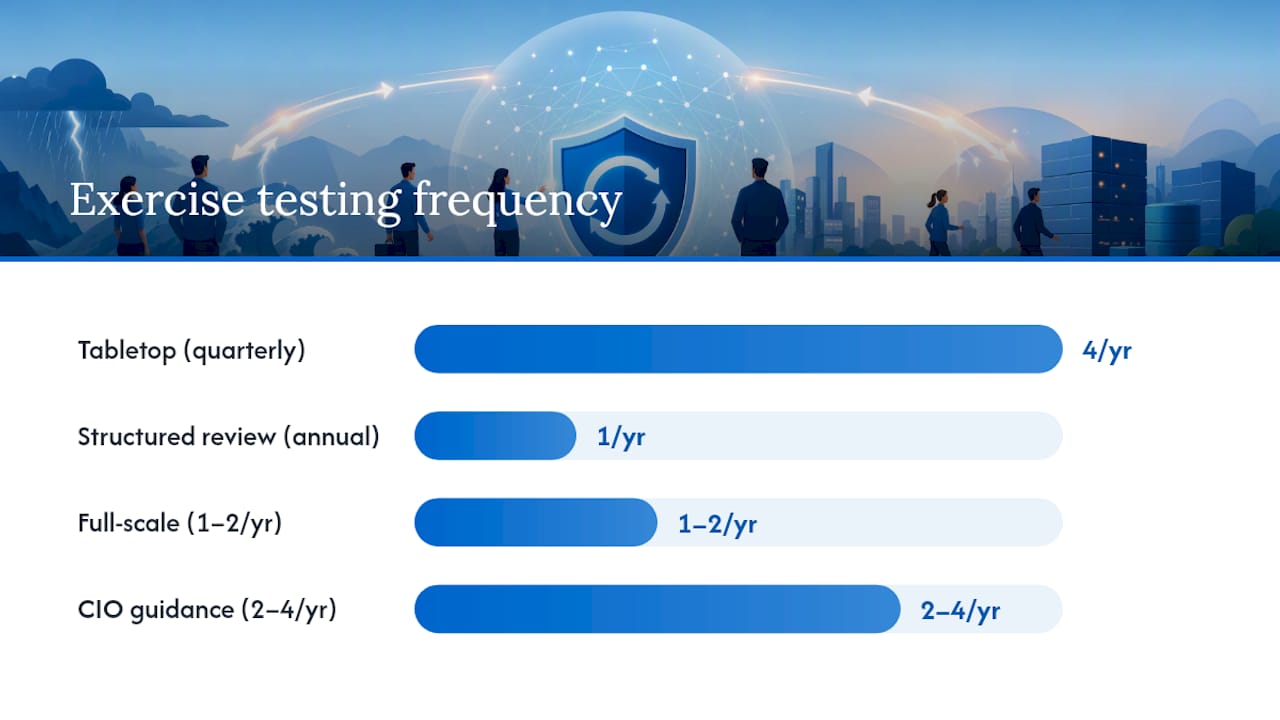
| Test at least twice a year | CIO guidance recommends 2–4 exercises per year; a quarterly tabletop is the lowest-cost way to keep the plan current and the team prepared. |
| Align BCP, DR, and IR | Business continuity, disaster recovery, and incident response must share objectives and communication trees to avoid gaps during a real incident. |
| Securetechie for managed continuity | Securetechie delivers 24/7 monitoring, tested backups, failover orchestration, and compliance support for Southern California businesses under one managed services agreement. |
Table of Contents
- What does a business continuity plan actually cover?
- Why does your business need a continuity plan?
- What are the core components every BCP must include?
- How do you build a business continuity plan step by step?
- How do you run a business impact analysis?
- What are RTO, RPO, and the strategies that meet them?
- How do BCP, disaster recovery, and incident response differ?
- How should you test and maintain your BCP?
- What templates and checklists can you use right now?
- How long does building a BCP take, and what does it cost?
- Which U.S. standards and regulations apply to your BCP?
- How does a managed IT provider support your BCP?
- Why prevention beats reaction in continuity planning
- Securetechie helps Southern California businesses build continuity programs that actually work
- Authoritative resources and templates to download
- Sources
What does a business continuity plan actually cover?
A BCP is not simply an IT backup policy. It addresses people, processes, and technology together, covering every layer of the organization that must keep functioning when something goes wrong.
Scope typically includes:
- Critical business functions and the staff, applications, and vendors that support them
- Physical locations, including alternate work sites or remote-work protocols
- Third-party vendors and suppliers whose failure would cascade into your operations
- Communication procedures for employees, customers, regulators, and the media
- Data backup locations, recovery procedures, and access credentials
A BCP is broader than a disaster recovery plan (DRP), which focuses specifically on restoring IT systems. Think of the BCP as the umbrella: it defines what the business needs to survive, and the DRP sits underneath it, detailing how the technology gets restored to meet those needs.
Why does your business need a continuity plan?
Disruptions are not rare events reserved for large enterprises. Cyberattacks, severe weather, utility outages, and vendor failures affect businesses of every size. FEMA's BIA guidance and Ready both emphasize that small and mid-size businesses are often the least prepared and the hardest hit when operations stop unexpectedly.
Direct benefits of having a BCP:
- Reduced downtime. A documented plan cuts the time your team spends figuring out what to do next, because the decisions are already made.
- Preserved revenue. Continuity strategies keep billing, fulfillment, or service delivery running even when primary systems are unavailable.
- Reputational protection. Customers and partners notice when a business handles a crisis with transparency and speed.
- Regulatory readiness. Healthcare organizations under HIPAA, financial institutions under FFIEC, and defense contractors under CMMC all face formal continuity requirements. A tested BCP satisfies auditors and reduces liability.
- Lower insurance and financing risk. Insurers and lenders increasingly ask whether a business has a documented continuity program.
Common risk categories to plan for: ransomware and data breaches, hurricanes and wildfires (particularly relevant for Southern California businesses), extended power outages, key-person dependencies, and critical vendor failures. ISO 22301, the international standard for business continuity management, frames these as "disruptive incidents" and requires organizations to assess their likelihood and potential impact before building strategies.
What are the core components every BCP must include?
A practical BCP does not need to be a 200-page binder. It needs to be findable, readable, and actionable under pressure. The sections below represent the minimum viable structure.
Essential sections:
- Purpose and scope. What the plan covers, which locations and functions are included, and what triggers activation.
- Activation criteria. The specific conditions (system outage exceeding X hours, declared emergency, loss of a facility) that put the plan into effect.
- Roles and responsibilities. Named individuals and their backups for every continuity function, including a continuity coordinator, IT lead, HR lead, and communications lead.
- Communication tree. A step-by-step notification sequence: who calls whom, in what order, using which channels, and what message to deliver.
- Continuity strategies. Specific workarounds for each critical function (manual processes, alternate vendors, cloud failover, remote work protocols).
- Alternate site information. Physical or virtual locations where work can continue if the primary site is unavailable.
- Vendor and supplier contacts. Emergency contacts, contract numbers, and SLA terms for every critical third party.
- Data backup locations and access procedures. Where backups are stored, how to access them, and who holds the credentials.
- Recovery procedures. Step-by-step instructions for restoring each critical function to normal operations.
- Testing schedule. Dates, exercise types, and owners for at least two exercises per year.
Quick audit checklist (yes/no):
- Does the plan have a named owner and a named backup?
- Are activation criteria written down and unambiguous?
- Does every critical function have a documented workaround?
- Are vendor emergency contacts current (verified within the last 90 days)?
- Has the plan been tested recently?
- Are backup access credentials stored separately from the primary systems they protect?
Keep the core plan to 10–20 pages. Supporting runbooks and technical procedures can live in appendices, but the main document should be readable in under 30 minutes.
How do you build a business continuity plan step by step?
IBM recommends treating BCP and disaster recovery as separate but coordinated programs, each with its own documented steps. The sequence below applies specifically to building the BCP.
-
Establish oversight and scope. The CEO or business owner formally sponsors the program. Assign a continuity coordinator (internal or external) and define which functions, locations, and vendors are in scope.
-
Conduct a business impact analysis (BIA). Identify critical processes, map their dependencies, and estimate the financial and operational impact of losing each one over time. This step produces your recovery priorities. See the BIA section below for a full walkthrough.
-
Perform a risk assessment. For each critical function, identify the threats most likely to disrupt it and rate their probability and severity. Cyber incidents, facility loss, and key-person absence are the three most common starting points for U.S. businesses.
-
Define Recovery Time Objectives (RTO) and Recovery Point Objectives (RPO). Set these per process, not as a single enterprise-wide number. A billing system may tolerate four hours of downtime; a patient scheduling system may tolerate 30 minutes.
-
Develop continuity strategies. For each critical function, document the specific workaround that will be used if the primary method fails. Assign an owner to each strategy.
-
Assign roles and build the communication tree. Name every person responsible for a continuity action, including backups. Build the notification sequence and test the contact information.
-
Document procedures. Write step-by-step recovery instructions for each critical function. Keep language simple enough that a capable employee unfamiliar with the process could follow them under stress.
-
Test the plan. Run at least a tabletop exercise before the plan is considered operational. Schedule simulation and full-scale exercises for subsequent quarters.
-
Maintain and update. Review the plan after every test, after every significant organizational change, and at least annually.
Who owns each step:
| Step | Primary Owner | Support |
|---|---|---|
| Oversight and scope | CEO / Business Owner | Continuity Coordinator |
| BIA | Continuity Coordinator | Department Heads |
| Risk assessment | IT Lead + Continuity Coordinator | Operations |
| RTO / RPO definition | IT Lead + Business Owner | Finance |
| Strategy development | Department Heads | IT Lead |
| Roles and communication tree | HR Lead | All Managers |
| Documentation | Continuity Coordinator | IT Lead |
| Testing | Continuity Coordinator | All Teams |
| Maintenance | Continuity Coordinator | IT Lead |
Pro Tip: Protect revenue-generating functions first. If you have limited time and budget, start with the two or three processes that directly produce or collect revenue. Getting those covered gives you the highest return on your planning investment before you expand to supporting functions.
How do you run a business impact analysis?
The BIA is the analytical foundation of any effective BCP. FEMA's BPA-BIA Users Guide provides practical templates and step-by-step guidance for this process, and it is worth downloading before you start.
BIA workflow:
-
Identify all business processes. List every function across departments: sales, billing, operations, IT, HR, customer service, compliance.
-
Map dependencies. For each process, document the people, applications, data, vendors, and physical resources it depends on.
-
Estimate impact over time. For each process, ask: what is the impact if this is unavailable for one hour? 24 hours? 72 hours? One week? Quantify in terms of revenue loss, regulatory exposure, safety risk, and reputational damage.
-
Determine tolerances. The maximum tolerable downtime (MTD) for each process becomes the ceiling for your RTO. The acceptable data loss window becomes your RPO.
-
Prioritize. Rank processes by their MTD and impact score. The shortest MTD and highest impact score get the most resources and the most detailed recovery procedures.
Sample BIA table:
Capture impact across five categories: revenue, safety, legal and compliance, reputation, and operational continuity. A process that scores low on revenue but high on safety or compliance may still rank as a top priority.
What are RTO, RPO, and the strategies that meet them?
Recovery Time Objective (RTO) is the maximum time a process can be offline before the impact becomes unacceptable. Recovery Point Objective (RPO) is the maximum amount of data loss the business can tolerate, measured in time (e.g., losing up to four hours of transaction data). Both figures should be set per process, not as a single number applied across the entire organization. A single enterprise-wide RTO creates plans that are either too expensive for low-priority functions or too slow for critical ones.
According to LogMeIn's analysis, business continuity focuses on keeping people and processes running while disaster recovery focuses on technical restoration. That distinction matters when setting RTO and RPO: the BCP owner sets the business tolerance, and the IT or DR team is then tasked with meeting it technically.
Strategy options by RTO/RPO band:
-
RTO under 1 hour / RPO under 15 minutes. Requires active-active cloud failover, real-time data replication, and automated failover orchestration. High cost, justified for patient safety systems, financial transaction platforms, or 24/7 customer-facing services.
-
RTO 1–4 hours / RPO 1–4 hours. Cloud backup with rapid restore, warm standby servers, or a managed backup and disaster recovery solution. Appropriate for most billing, CRM, and communications systems at small to mid-size businesses.
-
RTO 4–24 hours / RPO 4–24 hours. Daily backups, manual workarounds (paper-based processes, phone trees), and alternate vendor arrangements. Suitable for lower-priority administrative functions.
-
RTO over 24 hours. Manual record-keeping and deferred processing. Reserved for functions with low revenue or safety impact and long natural lead times.
Cost vs. speed tradeoff: Cutting RTO from 24 hours to one hour typically requires a significant jump in infrastructure investment (cloud replication, redundant internet circuits, managed failover). Prioritize the investment where the business impact of downtime is highest, and accept longer RTOs for functions where the cost of speed outweighs the cost of waiting.
How do BCP, disaster recovery, and incident response differ?
These three programs address different problems and operate at different speeds. TechTarget's analysis describes them as distinct but integrated pillars, and recommends aligning objectives across all three teams from the start rather than building them in isolation.
| Dimension | Business Continuity (BCP) | Disaster Recovery (DRP) | Incident Response (IR) |
|---|---|---|---|
| Primary focus | People, processes, operations | IT systems and data restoration | Detect, contain, and eradicate security threats |
| Trigger | Any disruptive event | System or data loss | Security incident (breach, ransomware, intrusion) |
| Timeframe | Ongoing during disruption | Hours to days post-event | Minutes to hours during active incident |
| Owner | Business / Continuity Coordinator | IT Lead / MSP | Security team / CISO / MSP |
| Key output | Operational workarounds | Restored systems meeting RTO/RPO | Contained threat, preserved evidence |
| Standards | ISO 22301, NFPA 1600 | NIST SP 800-34 | NIST Special Publication 800-61 |
Integration guidance: The BCP defines the RTOs and RPOs that the DR team is responsible for meeting technically. The IR plan feeds into the BCP by triggering activation when a security incident causes operational disruption. All three programs should share a common communication tree, use consistent terminology for escalation levels, and conduct joint exercises at least once per year.
A practical note on ransomware: restoring from backup without completing forensic investigation can reintroduce the infection. Your BCP should include alternative manual workflows that keep operations running while the IR team completes cleanup, rather than rushing a restore that may fail. For a detailed ransomware-specific playbook, see Securetechie's ransomware protection guide.
How should you test and maintain your BCP?
A plan that has never been tested is a hypothesis, not a continuity program. CIO's guidance recommends that many organizations test 2–4 times per year, with frequency calibrated to business risk. Executive sponsorship is a prerequisite: exercises that lack leadership participation produce incomplete results and rarely drive plan updates.
Test types and when to use them:
-
Tabletop exercise. A facilitated discussion where leadership and key staff walk through a scenario on paper. Low cost, no operational disruption, ideal for a first test or for onboarding new team members. Run this quarterly.
-
Structured walk-through. Each team reviews their section of the plan and confirms that contacts, procedures, and resources are current. Good for annual plan reviews and after significant organizational changes.
-
Simulation exercise. A realistic scenario is presented without advance notice (or with limited notice), and teams execute their procedures in real time without actually switching over systems. Tests decision-making speed and communication.
-
Full-scale exercise. Systems actually fail over, alternate sites are activated, and recovery procedures are executed end-to-end. Reserve this for annual or semi-annual testing once the plan is mature.
Ready.gov provides exercise facilitation materials including a situation manual, test planner, and facilitator handbook, all downloadable at no cost.
Compact tabletop exercise template:
- Scenario brief (10 minutes). Facilitator presents the incident: "It is 9 AM Monday. Your primary data center is offline due to a ransomware attack. Email and your ERP system are unavailable."
- Initial response round (15 minutes). Each team lead states their first three actions. Facilitator notes gaps and conflicts.
- Hour 4 inject (15 minutes). Facilitator adds a complication: "Your backup vendor confirms the restore will take 12 hours, not 4." Teams adjust.
- Stakeholder communications round (10 minutes). Who notifies customers? What is the message? Who approves it?
- Debrief (20 minutes). What worked? What was unclear? What needs to be updated in the plan?
Maintenance cadence: Update the plan after every test, after any significant change (new vendor, new system, staff turnover in a key role), and at minimum once per year. Assign a named owner to each update action and set a deadline. A plan that is not maintained is worse than no plan, because it creates false confidence.
What templates and checklists can you use right now?
Ready.gov publishes a downloadable one-page BCP template that covers the essential fields: critical functions, key contacts, alternate locations, and recovery procedures. It is a practical starting point for any small or mid-size business.
One-page BCP checklist fields:
- Business name, primary location, and plan effective date
- Continuity coordinator name and backup contact
- Activation trigger criteria (specific, not vague)
- Top three critical functions with named owners
- Alternate work location or remote-work protocol
- Primary and backup communication channels
- IT backup location and restore contact
- Top five vendor emergency contacts
- Employee notification sequence (first five names and numbers)
- Customer communication template (approved message)
- Plan review date and next test date
Full plan section outline:
- Section 1: Purpose, scope, and activation criteria
- Section 2: Roles, responsibilities, and succession
- Section 3: Communication tree (internal, external, media)
- Section 4: Critical function continuity strategies (one page per function)
- Section 5: IT recovery procedures and backup access
- Section 6: Vendor and supplier emergency contacts
- Section 7: Alternate site procedures
- Section 8: Testing schedule and lessons-learned log
- Section 9: Plan revision history
For a cybersecurity-specific incident response template that integrates with your BCP, Securetechie's incident response plan guide covers the IR side of the equation in detail.
How long does building a BCP take, and what does it cost?
Timeline and cost vary significantly by organization size and scope, but the ranges below reflect realistic expectations for U.S. small and mid-size businesses.
Timeline:
- One-page plan for a small business (under 25 employees): 2–6 weeks, assuming one person dedicates 4–6 hours per week to the process.
- Departmental plan covering 3–5 critical functions: 6–10 weeks, including one tabletop exercise.
- Full enterprise BCP with testing cycles: 3–6 months, including BIA, risk assessment, strategy development, documentation, and at least one simulation exercise.
Primary cost drivers:
- Personnel hours. The BIA and strategy development phases are the most time-intensive. A mid-size business should budget 40–80 hours of internal staff time for a first-generation plan.
- Alternate site or cloud failover infrastructure. This is typically the largest capital expense. Cloud-based failover is significantly more cost-effective than maintaining a physical hot site.
- Backup and BDR tools. Managed backup solutions with tested restore capabilities are a non-negotiable investment. Untested backups are not a continuity strategy.
- Vendor SLA upgrades. Some critical vendors may require contract amendments to guarantee recovery support within your RTO window.
- Training and exercise costs. Tabletop exercises can be run internally at minimal cost. Simulation and full-scale exercises may require external facilitation.
Phased budgeting approach: Start with the one-page plan and a tabletop exercise. That covers the highest-risk exposure at the lowest cost. In the second phase, invest in cloud backup and failover for your top two critical functions. In the third phase, formalize vendor SLAs and add simulation exercises. This sequence delivers meaningful protection quickly without requiring a large upfront commitment.
Which U.S. standards and regulations apply to your BCP?
Several authoritative frameworks govern continuity planning for U.S. businesses, and the applicable ones depend on your industry and size.
-
ISO 22301. The international standard for business continuity management systems. Provides a structured framework for establishing, implementing, maintaining, and improving a BCMS. Relevant for any organization seeking a recognized, auditable continuity program.
-
NIST SP 800-34. The National Institute of Standards and Technology's Contingency Planning Guide for Federal Information Systems. Widely adopted by private-sector organizations as a best-practice framework for IT contingency planning, even when federal compliance is not required.
-
FEMA guidance. FEMA's planning resources, including the BPA-BIA Users Guide, provide practical templates and methodology for conducting impact analyses and building continuity programs. Particularly useful for businesses in disaster-prone regions.
-
Ready. The federal government's primary resource for business preparedness. Offers free templates, exercise materials, and a six-step BCP framework applicable to businesses of any size.
-
HIPAA (Health Insurance Portability and Accountability Act). Covered entities and business associates must maintain a contingency plan under the HIPAA Security Rule (45 CFR § 164.308(a)(7)). This includes a data backup plan, a disaster recovery plan, an emergency mode operation plan, and testing procedures.
-
FFIEC (Federal Financial Institutions Examination Council). Financial institutions are required to maintain business continuity programs that address resilience across people, processes, and technology. FFIEC guidance is detailed and prescriptive, covering third-party risk, testing, and board-level oversight.
-
NFPA 1600. The National Fire Protection Association's standard on continuity, emergency, and crisis management. Often referenced in insurance requirements and government contracts.
How to use these standards in practice: Treat each standard as an audit checklist. Map your existing plan sections against the standard's requirements, identify gaps, and prioritize closing them. For vendor contracts, reference the applicable standard in your SLA language (e.g., "vendor must support RTO of four hours consistent with our HIPAA contingency plan requirements"). For compliance audits, having a documented BCP that references the relevant standard significantly reduces audit preparation time.
How does a managed IT provider support your BCP?
A managed IT provider does not replace your BCP process, but it accelerates and operationalizes the technical components that most small and mid-size businesses lack the internal capacity to build and maintain.
What a qualified managed IT partner delivers for continuity:
- 24/7 monitoring. Continuous infrastructure monitoring detects failures before they become full outages, often resolving issues before the BCP activation threshold is reached.
- Managed backups with tested restores. Automated, encrypted backups with regular restore testing confirm that recovery is actually possible, not just assumed.
- Failover orchestration. Managed infrastructure services can automate failover to cloud environments, reducing RTO from hours to minutes for critical systems.
- Runbook development. Documented, step-by-step technical recovery procedures that align with your BCP's continuity strategies.
- Tabletop facilitation. An experienced provider can facilitate exercises, inject realistic scenarios, and document lessons learned.
- Incident response integration. A managed cybersecurity team that handles detection, containment, and eradication integrates directly with your BCP activation process, so the IR and continuity teams are not working at cross-purposes.
Questions to ask any prospective managed IT vendor:
- What is your guaranteed RTO for restoring our critical systems, and is it written into the SLA?
- How frequently do you test restores, and can you provide documentation of the last test?
- Do you have experience supporting HIPAA, FFIEC, or CMMC continuity requirements?
- Can you facilitate or co-facilitate our annual tabletop exercise?
- How does your incident response process integrate with our BCP activation criteria?
- What is your escalation path if a recovery exceeds the contracted RTO?
For businesses that already have an internal IT team, co-managed IT services provide a way to augment existing capabilities with specialized continuity and security expertise without replacing the team already in place.
Why prevention beats reaction in continuity planning
Most businesses treat continuity planning as a reactive exercise: something to do after a close call or a compliance audit. That approach consistently produces plans that are incomplete, untested, and outdated by the time they are needed.
The more effective posture is preventive. When monitoring, backup testing, and runbook maintenance are ongoing activities rather than annual events, the gap between "plan on paper" and "plan that works" closes significantly. Organizations that test their recovery procedures regularly discover failures in their backup systems, gaps in their communication trees, and vendor SLAs that do not actually support their RTO targets, all before an incident forces the discovery.
The goal is not a perfect plan. It is a tested plan with known gaps that are being actively closed. That distinction separates businesses that recover quickly from those that spend weeks in crisis mode.
Securetechie helps Southern California businesses build continuity programs that actually work
Building a BCP from scratch takes time your team may not have, and the technical components, tested backups, failover orchestration, and incident response integration, require expertise that goes beyond most internal IT resources.

Securetechie provides managed IT and cybersecurity services specifically designed for small to mid-size businesses in Southern California. The team delivers 24/7 infrastructure monitoring, managed backup with verified restores, failover orchestration, compliance support for HIPAA, SOC 2, and CMMC, and incident response capabilities that integrate directly with your continuity program. Rather than leaving you to coordinate multiple vendors across these functions, Securetechie consolidates them under a single managed services agreement with a 99.9% uptime guarantee and documented response times.
To find out how Securetechie can accelerate your BCP and close the gaps in your current continuity posture, contact the team at Securetechie to schedule a consultation.
Authoritative resources and templates to download
These sources provide free, government-backed templates and frameworks you can use immediately.
-
Ready. The federal government's primary business preparedness resource. Download the six-step BCP framework, exercise planner, situation manual, and facilitator handbook at no cost.
-
Ready. A fillable one-page starter plan covering critical functions, key contacts, alternate locations, and recovery procedures. Use it as your first draft.
-
FEMA BPA-BIA Users Guide (PDF). Step-by-step BIA methodology with templates for capturing process dependencies, impact estimates, and recovery tolerances.
-
NIST SP 800-34. The federal contingency planning guide widely adopted as a private-sector best practice for IT recovery planning. Use it to structure your DR procedures and align them with your BCP.
-
IBM: Business continuity vs. disaster recovery. A clear explanation of how BCP and DRP relate, with core steps for each program. Useful for communicating the distinction to leadership.
-
CIO: How to create an effective business continuity plan. Practical guidance on executive sponsorship, testing cadence, and exercise types from a practitioner perspective.
Sources
- Business continuity vs disaster recovery vs incident response | TechTarget
- Ready
- Ready
- Fema
- Business continuity vs. disaster recovery | IBM
- How to create an effective business continuity plan | CIO
- Business continuity vs disaster recovery: Key Differences Explained | LogMeIn